ZBrushCentral

Questions and Troubleshooting for ZBrush 3.12B

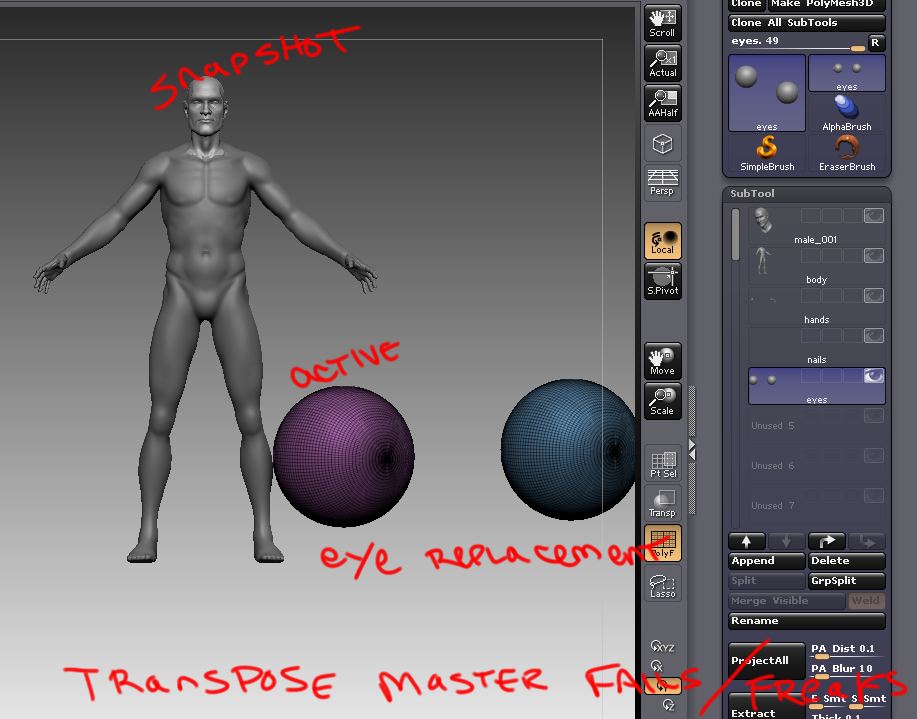
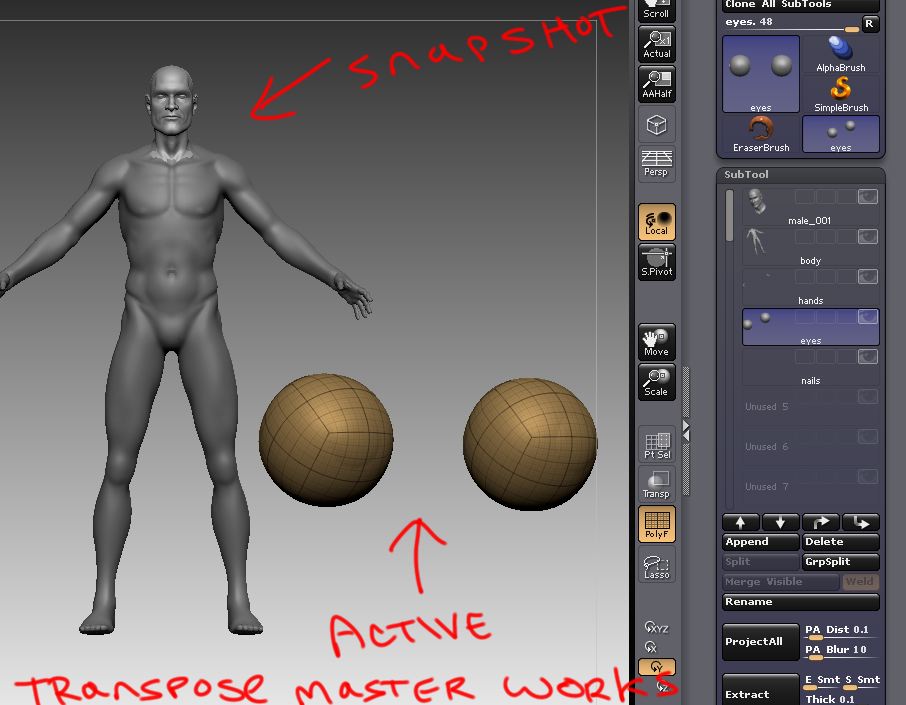
See image below and the subtool list.
The only way transpose master works with this ztool is when I have one of the last two subtools active, THEN begin the transpose master process (oh - and all subtools visible).

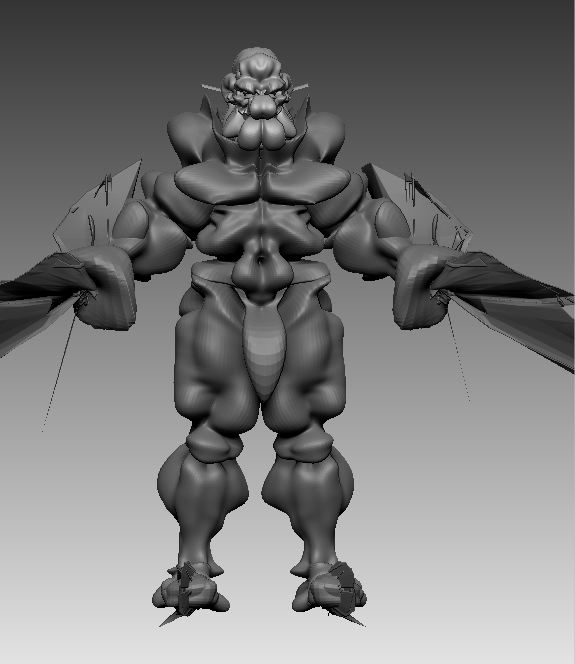
If I have any other subtool active when I begin the transpose master process, all the subtools will eventually scale very tiny and deform as if inflated.

Also: I use subtool master and export all these subtools at their lowest subd level. I open the OBJs in maya, and they build up into a female character five and a half feet tall, with her standing on the grid. Which I like. (I went into preferences/settings and set feet instead of centimeters) To me, it seems when the bug happens all the subtools are re-centering down at the ‘pivot’ point that is in maya - down on the grid between her feet.

genericFem.jpg

I have a generic male ztool. I am able to use transpose master with it.
I deleted the ‘eyes’ subtool, and appended a new set of eyes (created from a PM3D_Sphere3D, clone/mirror/insert mesh).

After doing this ‘eye’ replacement, the ztool is saved, then zbrush restarted. The ztool is opened, and now transpose master fails/freaks out.
Nearing the end of transpose master process (second button within transpose master) I get this message regarding the ‘eyes’ subtool:
“Optimal UV mapping can not be achieved with the current”
“UV map size and UV map border Values”
“Increase UV map size or decrease UV map border and try again”

male1.jpg

Attachments

male2.jpg

male3.jpg

I have two subtools. A generic male a generic female.

When I export the lower subd. levels (all subtools, both ztools) into maya everything is scaled appropriately.

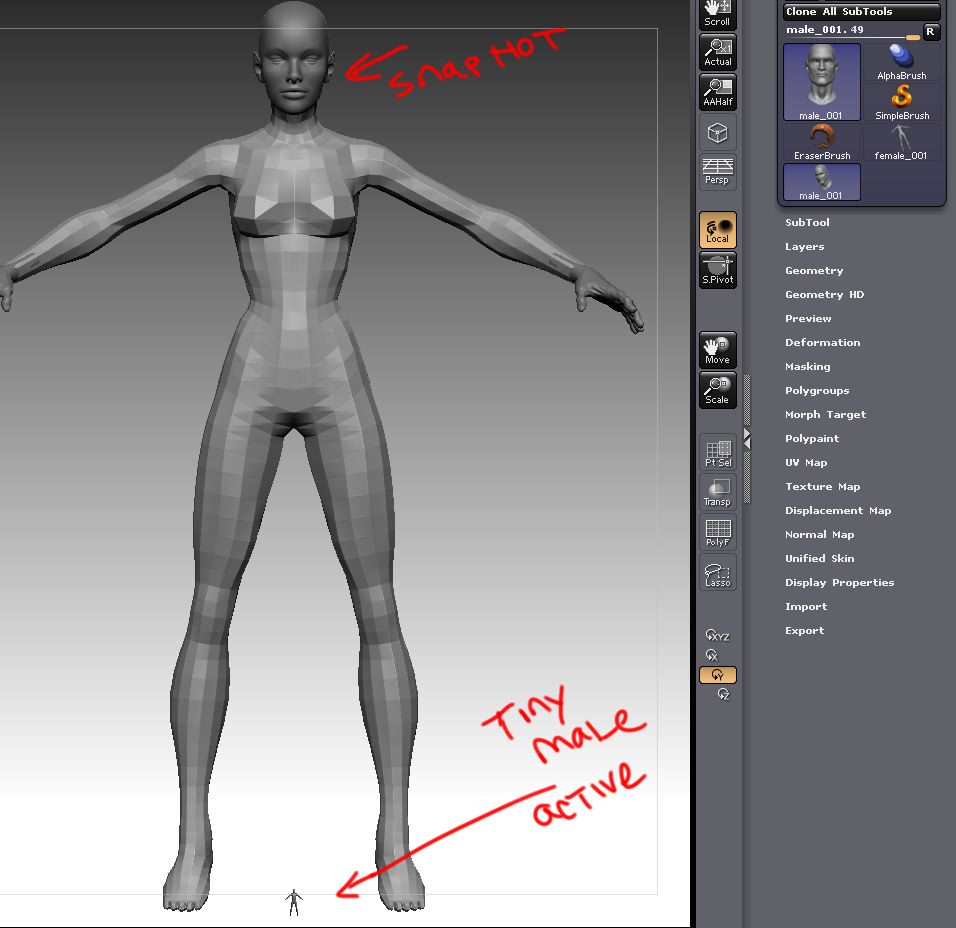
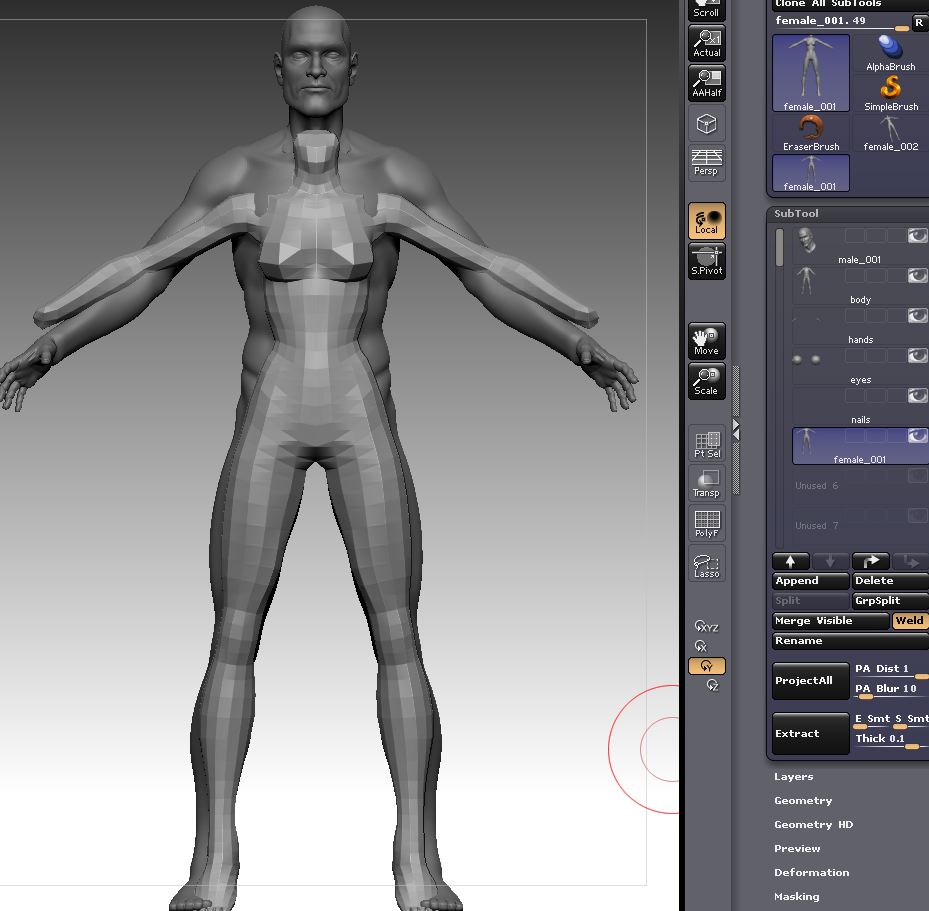
Now the interesting thing - I open the female ztool in zbrush. I then take a snapshot. Then I load the male ztool and he appears very tiny (see image below). The next interesting thing - I clear the canvas and frame the male ztool. Then I append the female body into the sutbool list. The appended mesh is correctly sized (as it is in Maya). Now the trick, save out the ztool and shut down zbrush. Open zbrush and open the ztool, and working can continue normally.

But if don’t do this trick (save, close, restart, reopen), but instead I try to do anything with the appended female mesh, it will ‘pop’ into the HUGE size and essentially ruin things.

comp1.jpg

Attachments

comp2.jpg

Hi bLawless,
The reason that the object ‘pop’ is that it has zero undo levels.
To remedy that situation, you need to apply any operation that will initialize its undo buffer. A quick way to do this will be by pressing CTRL-I twice. The CTRL-I=Inverse masking, pressing it twice leaves you with unchanged mesh but with 2 undos and a mesh that can be edited without the ‘pop’.
This step will not be needed in the next update:)

I think both 3.12 and 3.12B had this issue, but I’ve noticed some ZTL’s (various versions of the same object) made in zbrush 2 are coming in as exploded cubes in 3.12B. I did a test the other day at work and 3.1 (win) opens it fine. So I was able to save the file as a 3.1 file and then open it fine again in 3.12B. I can provide the ZTL if needed.

Hey I have a displacement question in 3.12B. I’ve been fishing around for suggestion on displacement settings and what I’ve found are using have 3 channels, 32 bit, Smooth UV,and Adaptive. I’ve noticed when I click “CreateDispMap” I get somewhat what Im looking for (however this issue is just me) and it generally works when I bring it over into maya. When I click Create and export Map The tif file is almost completely black with the exception of a very faint very dark grey version of the displacement map. When I apply this in Maya It doesn’t add any detail to the model but just sort of puff it out. So my questions are, am I doing something wrong with “Create Export Map”, and does clicking "Create DispMap carry the same results but without the convenience of automatically being exported?

Hi there everyone, first post here.

I purchased Zbrush last week and I’ve been trying to learn. I bought the book Introducing Zbrush by Eric Keller, and I’ve been trying to follow the exercises (I am completely new to zbrush). I’ve had 2 issues that are not allowing me to continue, and is causing me much frustration:

I was trying to make a 2.5 painting. It all went fine as far as the software goes but eventually I decided to start over because I didn’t like how it was coming along. I tried to do a new one, and when I did my canvas bigger, added a background color (in the Document palette) and tried to draw a 3d plane. Well… the color change didn’t seem reflected on screen, the plane was not visible but for a dark marquee that left and “echo” or trash in the screen and I couldn’t see what I was working with.

Frustrated, I jumped to the chapter on sculpting to see if I could get anything done there. I loaded the imagePlanex.ZTL tool, added a material, but when I went to add a texture (imagePlaneX.psd), the texture did not show on the planes, and every time I move the tool around the canvas, it leaves some more “trash” (the edges of the planes leave a little triangle, that erases when I move my brush round it).

Maybe I am being paranoiac, but I feel that that besides the process I might be following (just doing what the book said) I shouldn’t be looking marquees and bits of “trash” in my canvas. I should be able to see my texture in the planes, and my canvas color change should be reflected.

What should I do? Thanks in advance for your patience!

It sounds like you’re using 3.12 rather than 3.12B. Please get the update here: http://www.pixologic.com/zbrush/downloadcenter/

Also, keep in mind that there are changes between the PC version (which is what your book was written for) and the Mac version (which has extra stuff). The same page of the Download Center also has a PDF that explains the differences, like how to apply a texture to a model in 3.12.

I’ve been using 3.12b for a bit now and so far so good.

how did you solve this issue?
i’m crashing to, and i have a urgent project to finish.
thanks!!

I’ve been using 3.12B and so far very happy with it! The question I have , after coming over from the PC version of 3.1, : has anybody figured out how to make cavity map without Zmapper? And for that matter can it be done in 3.12B?

Thanks!

Is ZB3.12b crashing on launch for anyone else?

I haven’t been able to use it since it was released, I’ve done everything I can think of to try and get it to run with no success (reinstalls of OS, ZB3.12 and 3.12b, repair permissions, it’s been off to Apple to have hardware checked, OS is updated to latest version etc…) Pixologic don’t know what the problem is and say they have no record of anyone else with the problem.

I’m getting desperate, can anyone give any info or suggestions that might help figure out what’s wrong?

BazC my friend, I’m afraid you are the only one to get this issue and this is very weird and incredible.

Did you try to reload a new 3.12 and a new 3.12B. Its maybe cause of the first 3.12 … Just my 2 cents.

If you don’t find the 3.12 anymore I can maybe help you because I think YOUR 3.12 is bugged

Michel from Luxo forum

Hi Michel, Yup I’ve tried a fresh download of 3.12 installed on a new partition with no ZB on it then a fresh download of 3.12b. I’m going to try it one more time just in case I missed something then I’m out of ideas. There’s a new Mac version due, all I can hope is that that fixes my problems.

Cheers mate!

I needed to create another bar for a football helmet facemask.
I appended the subtool list with a zsphere. As you can see the zspheres (first and second image) create a twist that I don’t want.

With both subtools visible I can not rotate the outer zspheres. But after hiding the ‘helmet subtool’ I was able to rotate the zspheres in question.

But - when I tested this with another ztool I could not duplicate.

helm.jpg

BazC if this new install doesn’t work, I’ll have only one more solution : call a priest, an exorcist because your computer is cursed
:evil:

Of course religion! Why didn’t I think of that? I’ll sacrifice a bagel while dancing naked round my fish pond at midnight tonight! :smiley:

I use transpose move to mask out some of the mesh.
I hit “q” to enter edit mode - but I am asked if I want to
save the document before I close zbrush.

This happens when I am moving very quickly.
I use transpose to mask, and my finger hits ‘q’
before the algorithm is finished calculating
the masked mesh. I can duplicate this little bug.

@BazC

have you yet tried to remove 3.12 (trash it) and just leave 3.12B in your applications folder? i remember mentioning it to you before, because it solved some crashes and oddities i was experiencing, but i haven’t seen you mention that step yet.

Good idea, sorry I missed it. I just did that.
That being done, little bug (important? Maybe not) still exists.
Restarted zbrush, opened a polysphere, divided 3 times bringing it to 1.5 million roughly. Transpose move, control held down, drag over the sphere, then quickly, let go of control and lift pen - then hit q, I am asked if I wish to close doc before quitting zbrush. More than once (when repeating these steps) Zbrush simply closed out instantly. It was a Zbrush action not a crash because OSX did not indicate it was a crash.

No biggie