ZBrushCentral

Greeble Pack for Zbrush 4R7

Yep, same as yours. I presume you’re not on a Mac?

No, I’m on a PC. Dont think software companies test well enough on MAC’s as they do on PC, maybe not enough MAC users to test them, not sure. If your gonna support both OS there needs to be vigorous testing on both sides of the equation. But when they find bugs and fix them it tends to break something else. I’d hate to be a programer Lol

Maybe try DirectX? Might be a long shot, but couldn’t hurt.

I’ve tried both, they both generate just fine, seemed like E3D like the OpenGL version little better, so thats why I went with that one.

@megacal

Have you ever considered (dare I say it? cough, cough) a PC?

I used MACs in my classes on Flash, and they are very nice.
But PC’s aren’t exactly chopped liver…and very easy to work on and/or build.
Just sayin’.

BLASPHEMER!! :rage:

LOL! Kidding of course. I was never one for the ol’ Mac v PC Wars.

When I was working, I used both Mac and PC. Although all of our graphics work was done on Macs, I still had to use PC’s for 3DS Max.

I have thought about going with a PC just to run Modo and Zbrush, but they both work fine on Mac, and I’m an Apple person ever since Apple II. It IS a strong consideration at this point though. Even used MacPro towers are still more expensive than a new PC (depending on config, of course).

But I’m just a hobbyist, too. And that’s a consideration. I really like to eat. :lol: So does the dog.

Pays to keep messing with things!

When I baked the textures, I changed the output to to 2048 instead of 4096, and it’s working perfectly again! I drag and drop the ‘Metal Damaged’ Smart material into the layer, and BOOM! There it is! :slight_smile:

DamagedMetal.jpg

Onward and upward! Still a lot to do yet, but at least I got this far!

Way to go Morbius! :D:+1:

Morbius Pays to keep messing with things!

When I baked the textures, I changed the output to to 2048 instead of 4096, and it’s working perfectly again! I drag and drop the ‘Metal Damaged’ Smart material into the layer, and BOOM! There it is! :slight_smile:

Awesome!!! :smiley: Glad you get to Play with your Toy now. I know your gonna have a Blast Texturing your Model.

Got an email back from Allegorithmic re: SP this morning.

Said that working in 4096 is extremely resource intensive, and “they often recommend working in 2K and working/exporting in 4K only when needed”.

Seems that’s been my problem. Everything’s been working smoothly since I went down to 2k!

Just fyi.

Morbius Got an email back from Allegorithmic re: SP this morning.

Said that working in 4096 is extremely resource intensive, and “they often recommend working in 2K and working/exporting in 4K only when needed”.

Seems that’s been my problem. Everything’s been working smoothly since I went down to 2k!

Just fyi.

Cool! Glad they got back with you. I usually do all the Texture work in 2K and dont do the 4K untill the end to see the Results in 4K and do the final Export.

Working in 2K, baking-exporting in 4k.
Because of the Anti Aliasing (AA) issue.
As I recall, Pixologic suggests: A 2-4 M poly mesh should be baked on a 2k map. However, an 8-16M mesh should better be baked on a 4k map.
Mostly because, in zbrush, we basically use Vertex-paint (polypaint) for texturing, similarly in sculpting (displacing). Consider the resolution of the mesh as pixels. Somehow.
It also depends on how the UV map is constructed. Loss of space around UV islands will reduce information, as expected.

Morbius,

Everything’s been working smoothly since I went down to 2k!

That’s great you figured it out…"It’s always somethin’ "…sometimes it’s somethin’
simple.

And you’re back from the brink, i.e. thinking about getting a PC. :lol:

If you ever do, you’ll be in good company. :wink:

I’ll spend some time trying SP again…and export the textured object to VUE to
see if it works.

If the object is far away, and obscured by VUE haze & atmosphere, it may not be
necessary to use SP, as the texture details may not be visible (?)…but won’t know
till I try it.

Maybe someone else has a sample of a VUE scene with a ship textured in SP?

Though up close the textures are awesome, e.g. Glenn’s Alien Artifact.

I’ll see if I can add some grunge to this one.HiCliffs1e.jpg

Attachments

HiCliffs1e.jpg

And now Ladies and Gentlemen and children of all ages!

I bring you the latest crash report!

Yes, friends, I get as far as adding the ‘metal gold’ material to the Layer 2 fill, and the progress line gets about 2/3rds of the way along, and, yes, you guessed it!

CRASHES!! But this time it’s different! It just freezes, instead of closing down the app altogether! So I can basically sit here forever and watch it doing absolutely nothing!

Okay, I’m done with this! It’s been fun, but I’m not going to spend all my days trying to fix one crash after the other - for all eternity. And I don’t think it’s SP. I just think my poor old MacPro1,1 just plain can’t handle it.

I was getting close, but I’m just burned out! Think I’ll take a step back and see if I can figure out how to handle this thing in Modo!

And many, many thanks, Glenn, for the great tutorials and all the question answering and troubleshooting! If nothing else, at least I’ve learned some ZModeling and UVing and outputing in ZBrush - none of which I’ve done before! Great fun stuff!

I’m not giving up by a long shot. Just with SP - at least for now. They say they’re hoping to have a Mac bug-fix out by the end of the month, so hopefully things will go smoother. Maybe.

I’ll be back! :wink:

“I’ll be back! ;)”

Soon, I hope! We’re having too much fun here even without SP. :wink:

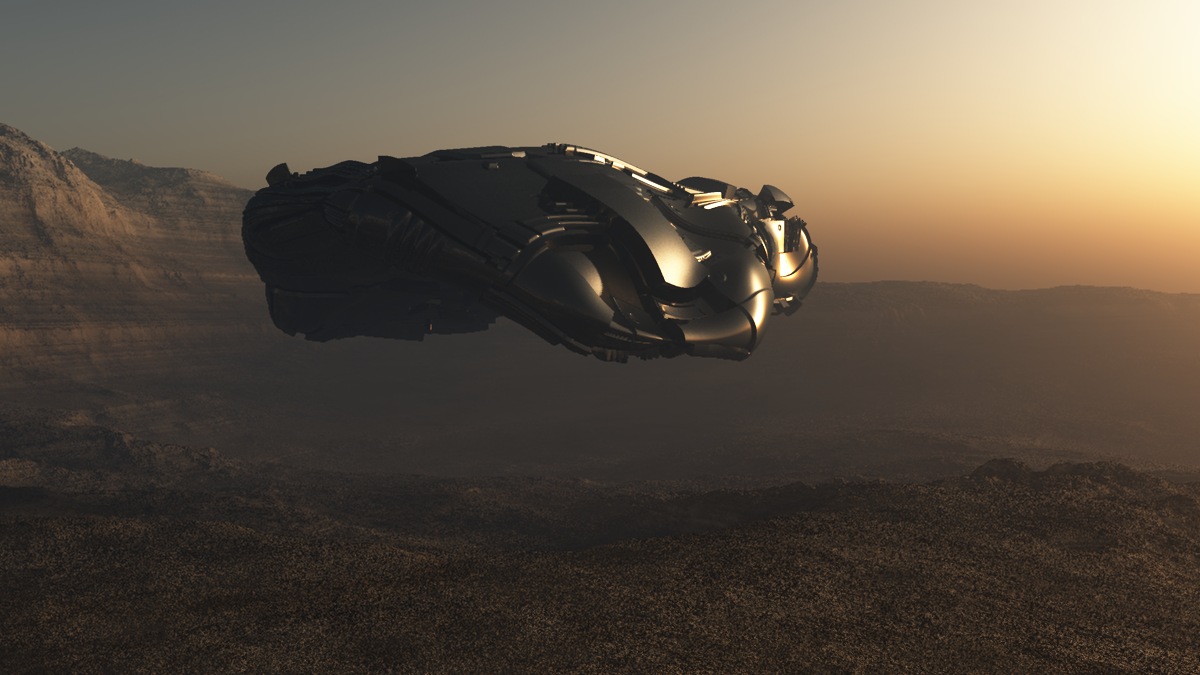
Animated in BlenderOctane
<iframe width=“1000” height=“800” src=“https://www.youtube.com/embed/eYhZNGngmpA” frameborder=“0” allowfullscreen="">

Very nice, megacal!!

I think that’s your coolest ship yet - that I’ve seen anyway!

IT MUST FLY!! :wink:

Great Ship Megacal! Keep it Going!

Sorry Morbius SP is giving you so many issues, maybe when they get the Mac side fixed they’ll give you another 30 Day Trial for helping them by pointing out some Bugs, seems Fair.

Guys dont let me steer you away from Zbrush by showing off SP, Zbrush at its core is still a Great 3D painting program, so dont feel you cant paint on your model in Z. Youve already got the UV’s and everything set-up for export, why not skip SP and paint in Z. Go to this link for an in-depth course on sculpting and painting with Joesph Drust, its a excellent series. http://pixologic.com/zclassroom/homeroom/lesson/helmet-design-with-joseph-drust/.

I’ll try to do something up in the Future in Z so you can see what it can do

Morbius

Very nice, megacal!!
I think that’s your coolest ship yet - that I’ve seen anyway!
IT MUST FLY!! :wink:

Thanks! It WILL fly! I think I need to decimate it first…render times in VUE are
too long for animating as is. May try it in Carrara, too…not as realistic, but faster renders
and a great animation system. :wink:

gmp1993

Great Ship Megacal! Keep it Going!

Thanks! Just dinking around trying different things…couldn’t tell you how
I did it. :laughing: But I was happy to see it looked cleaner than earlier attempts.

Thanks for the link to sculpting and painting with Joesph Drust…I’ll check it out, asap. :sunglasses:small_orange_diamond:+1:

Sorry Morbius SP is giving you so many issues, maybe when they get the Mac side fixed they’ll give you another 30 Day Trial for helping them by pointing out some Bugs, seems Fair.

Guys dont let me steer you away from Zbrush by showing off SP, Zbrush at its core is still a Great 3D painting program, so dont feel you cant paint on your model in Z. Youve already got the UV’s and everything set-up for export, why not skip SP and paint in Z. Go to this link for an in-depth course on sculpting and painting with Joesph Drust, its a excellent series. http://pixologic.com/zclassroom/home…-joseph-drust/.

Don’t be sorry! I’m just happy to have got (gotten? git 'er dun?) as far as I have, thanks to you!

I actually started SP again from scratch, and stepped down to 1024, and it’s working again! I did all my mapping in Modo @1024 with excellent results anyway, so what the heck. It worked! I got the rust, etc., done, but I’m afraid you lost me at the point where you used your self-constructed ‘Smart’ dirt material. Couldn’t follow how you built that, so I skipped it. :wink:

Anyway, STILL moving forward. I don’t give up easily.

Yeah, that Helmet Design with Joseph Drust. I got about 14 videos in, and he started jumping ahead with the actual helmet sculpting (i.e., instead of showing ‘how’, would say things like 'I sharped up these edges, and I did this and that…" without showing HOW to do it) and totally lost me. My helmet wasn’t anywhere near what his looked like, and I just gave up on that. It’s a common mistake people make when doing tutorials. Presuming too much. Needless to say, I had a lot of time invested, and was pretty disappointed when he started making big jumps ahead. Can’t complain too much with free tutorials though, you know? It seemed awfully good, and looked like fun, but…….

Anyway, I’m still at it, Glenn!! :+1:

Couldn’t follow how you built that, so I skipped it. :wink:

Sorry about that, heck I forgot so I cheated. Shouldnt of done that

Anyway, I’m still at it, Glenn!! :+1:

Keep it up! Youve come a long way in a short time. Its a lot to absorb.

Keep it up! Youve come a long way in a short time. Its a lot to absorb.

Thanks! I’m trying!

Yep, it’s a lot to absorb. But my brain is like a sponge! A dried out, crusty, cracked ol’ sponge.:lol:

I’m driving myself absolutely crazy with the grease and particle brushes, but time to call it a day and relax a bit.
I haven’t managed to crash it again since I dropped down to 1024, so THAT is a big plus! And now I can blow through the whole tutorial almost completely by memory. :smiley: I’ve re-done it enough times!

And there’s always tomorrow!

Quickly we will go back into Zbrush to Separate our Dish from the main Hull, so we can animate it inside Element 3D. In Element 3D I’ll show you how to set up a fly around pass of your model and get your lights on your model to emit Lens Flares using Optical Flares. Also get a basic Lighting Set-up as well as your Shadows and A/O to get you ready for your Final Render.

Go to the Link Below for the 3D Pre-Compose Script by Video CoPilot:

<iframe width="960" height="720" src="https://www.youtube.com/embed/gWPLbP6xxVQ" frameborder="0" allowfullscreen

Attachments

Sweet. Thanks, Glenn!

Look forward to watching it, AND doing it - one way or the other!