ZBrushCentral

Zbrush 4 Retopo Problems (answered)

Hello,

I have been trying to retopo a character using the retopology tool in Zbrush 4, but I can see my retopo mesh underneath my character. As a result, when I add new points, they sometimes connect to the mesh on the other side.

I have tried to hide the retopology on the other side of the mesh (ctrl-shift and drag over selection), but it crashes Zbrush 4.

I am pleased that Pixologic improved the retopo tool (inconsistent snapping to points and missing faces), but it seems to now have a few new problems.

Are there any work a rounds or fixes for these retopo problems?

Thanks,

Yes, I am doing that too and I was thinking that if I could adjust the opacity of the subtool being retopologized, the new points might not go to other points on the other side so easily.
I looked in preferences to see if I could adjust the opacity but I couldn’t find anything. Now I see lines mostly and it gets difficult to stay organized.

Can we adjust the opacity of the subtool being retopologized?

Hi,

got the same problem. Still no fix in sight…

http://www.zbrushcentral.com/showthread.php?t=92166

bye e

yikes! This takes forever to work like this. A really large portion of my job involves retopologizing, this may be a deal breaker for Z4 for me until this is fixed unfortunately. I can retopologize with a quickness in the past versions. :slight_smile:

Hello,

The crashing only seems to occur on dense meshes (3 or 4 divisions). If you retopo a simple sphere and try to hide a portion of the retopologized mesh, it hides the retopo work and does not crash.

Hi,

for those who havn´t seen, the problem has been solved:

http://www.zbrushcentral.com/showthread.php?t=92166

bye e

Thanks elektro,
It will be helpfull and give us another way to draw a new topology.

But there is always a bug (in my opinion) when you want to use the traditional method
>> rigging -> Select mesh … Topology/Edit Topology

Maybe a new patch soon ?

Cool! Thanks for the link.

Thank you very much elektro for the link! It looks like this method offers other benefits to retopologizing in addition to the fix. Thanks.

Your welcome :smiley:

The credit goes to grfx.

bye e

I fixed this!

Go into Preferences/Draw and change the Front Opacity Slider value to 1. Makes it work like it used to.

Extra Dimensional- YES! That is a quicker way for me, thanks for figuring it out.

Yes, it’s good
Thanks Extra Dimensional

Thanks Extra Dimensional! I did not know you could adjust the opacity. Cool!

Extra Dimensional-thanks god ! you saved me ! I think your approach should be the best solution,thank you very much!!

but I can still select the point on the other side. thats annoying.

Originally posted by Volbeat:

but I can still select the point on the other side. thats annoying.

Try these settings in Preferences > Draw submenu.

Front Opacity 0.95
Back Opacity 0.01

Use 3d-coat

it still snaps but it doesnt draw the line through the mesh! ok. thx

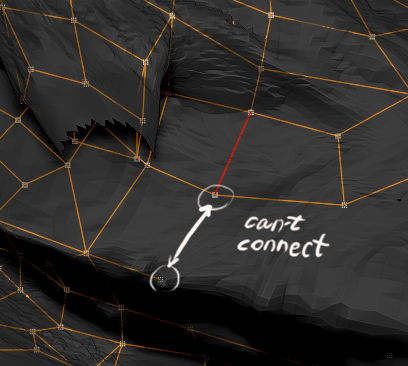
hello everyone, i have a problem when retoping my model. on the picture you can see i can’t connect those two vertices (zspheres), but when i move them much closer to each other, the edge is creating… and it is over all the mesh, like i have a limit in distance between 2 vertices… like 10 px or so, i changed the settings for radius in preferences->zsphere, but nothing actually helped. any ideas? thanks…
so idea is that i can retop like very tiny wireframe, but when i want less quads in my low poly (bigger wireframe), i can’t do that.

Attachments

connect.jpg