They just need to have an option to remove the velocity factor of the spacing, and add a simple slider as well. Some will experience lag I’m sure, but the option would be sweet.
or they could just re-enable the stroke spacing value :rolleyes:, which has not worked since z2. (cept in a monstermaker beta video)
I simply based my response on Aurick’s many responses to the phenomenon over the years:
    [http://www.pixolator.com/zbc/showthread.php?t=40899&highlight=stroke+dots](http://www.pixolator.com/zbc/showthread.php?t=40899&highlight=stroke+dots)


    Furthermore, I upgraded my cpu during the Zb3.1 lifetime, and I can attest to a difference.

    This does seem somewhat at odds though with the fact that you can set the spacing quality for the lazy mouse.  Perhaps the calculated stoke in LB mode allows for this better than freehand stokes. I don't know.

    You *can* adjust spacing for the 2.5 brushes, so the omissions seems deliberate.


    As for 3.5 vs 3.1, I don't see this.  The performance is significantly improved, and I see much better sculpting performance on denser meshes.

    The strokes have a different *quality*  however, as 3.5 has a different (inferior) default alpha, and doesnt paint across the center as well, and makes for some slightly different looking strokes all around.  Perhaps these differences call attention to the spacing issue more in some way.  But I've done side by side text and I dont notice any real decrease in the speed at which my stroke starts to break up in 3.5 across the same 8 million poly sphere.  If anything, I can move over the densest of meshes in double digit millions of polygons with  more unbroken strokes at a reasonable speed than before.
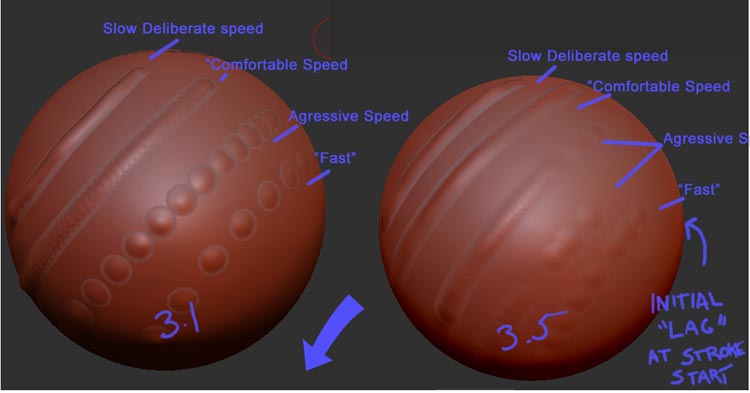
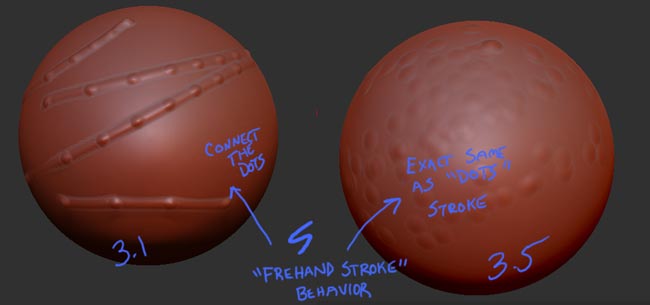
I realize this isn’t at all scientific, and of limited worth. I dont know if there might be a way to make a script to more scientifically test this or not. But I did do a side by side of approximate stroke tests in either application. Both with the polymetric sphere made into a poly mesh and divided into the 8 Mil range. The “comfortable” speed, the speed I wish I could work at with my anemic CPU is roughly the same, perhaps a shade better in 3.5, but still slightly dotted in both programs.
[attach=159089]spacingcomparison.jpg[/attach]
Nothing else is different enough to remark on, with the exception that on my system in 3.5, there is a tiny initial bit of “lag” with all the strokes that deforms the very start of the slowest strokes, and makes the fastest ones “stutter” a bit at first, before evening out. This is not present in 3.1 for me, and the strokes there are generally more consistent. If this is what you are referring to, then yes, I can agree, there is an issue there, at least on my system configuration.
Perhaps different Systems benefit differently from 3.5. For instance in 3.1 I only benefited 30% from multithreading, while the performance increase in 3.5 jumped way up to 150%
As usual, I’m probably being really dense, and completely not understanding what youre talking about.
Attachments
Hey Bingo_Jackson,no problem!
Maybe the freehand mode is becomed obsolete as lazymouse is improved and it’s the preferred way to do clean strokes,who knows!
Going faster with strokes it’s also a personal style(as jamespthornton said),with fast strokes I simply do better lines(but I don’t find impossible to work in 3.5,it’s only a bit different,to be clear)
I agree with others,some internal value probably has wrong default settings.
Bye
EDIT:
I have seen your picture only now,maybe the strokes are optimized for huge polycount,thanks for the comparison.
@Bingo_Jackson: You simply have chosen wrong mesh for the test. 8 milion is hitting performance bottleneck in 3.1. I can see that just by using slow strokes, that 3.1 is struggling on mesh that dense. Just use one in the range of 100k - 500k (thats the comfortable range for 3.1k) or so and check then when 3.1 is not having performance problems.
Performance wise 3.5 is faster than 3.1, I can see that by using lazy mouse so comparison on very heavy meshes is pointless when we are testing spacing settings, not performance. In 3.1 you would mask out parts of it anyway.
Well, I don’t know. I do generally tend to test performance on the densest meshes to see where the real differences are. This test is useless, as theres no way to be scientific about it unless some sort of recorded script could make the stroke speed a constant. I could be subconsciously altering my stroke to support my argument.
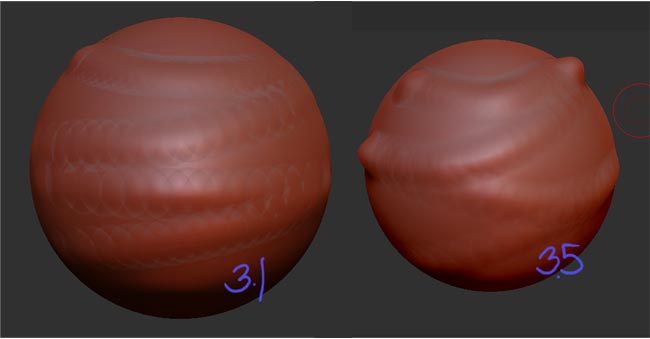
But using the same sphere at 500k(ish), and the same kind of lazy back and forth motion at closest to the same speed as I can , I can’t tell a significant enough difference in the spacing to really definitively call a difference. If I do it enough, sometimes I think I can see your point, other times I think 3.5 is superior, and eventually I just go crazy.
[attach=159105]spacingex2.jpg[/attach]
There is definitely a different quality to the strokes, but I think that is coming from other reasons. It may just be that my CPU is so OLd, I’ve just come to expect my stroke to break apart fairly readily anyways, and I dont have the power to be able to sense where this difference is.
I’m willing to concede that there may be a hardware dependent aspect when working with high polycounts, as well as some sort of internal setting that controls spacing when not under load at play with the stroke performance, as the stroke breaks apart in both versions at high speed, even when working with fairly lo poly meshes. The fact that lazy mouse seems to be a different animal is compelling.
Attachments
Performance wise and memory wise 3.5 is way better for sure. But its annoying that someone decided to change one value that virtually stops me from being able to use application at all. Setting that should be fully customizable.
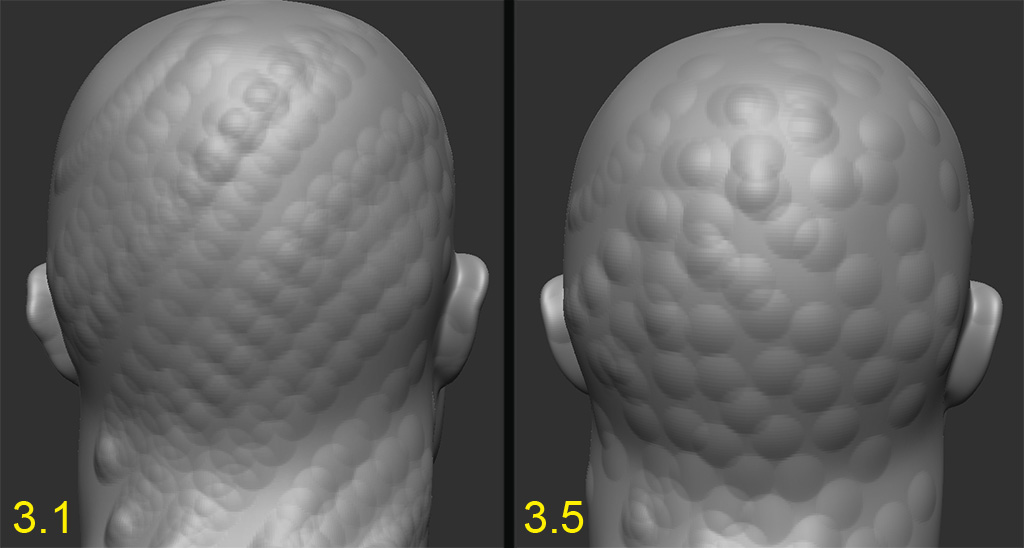
I hardly think that “going as fast as possible” is a scientific way of controlling stroke speed. In fact, this seems the least helpful to me, because I rpoduce virtually identical results in both programs doing this with the same object at 500k poly. At that speed you’re essentially just “spraying dots”.
Attachments
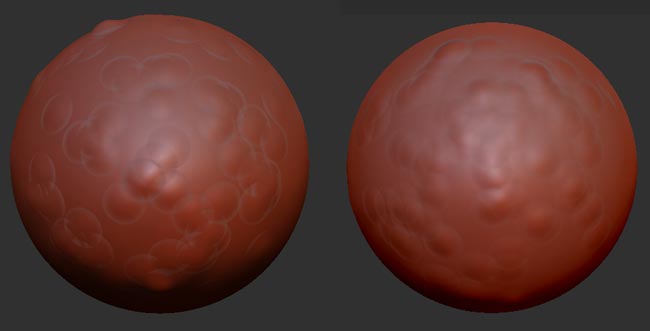
Right. Apparently no matter what I will say or what I will post it will never be “scientific”. So apparently I made it all up or I am subconciously lowering my drawing speed to 1/3rd of that in Z 3.5.
Also I may be wrong on this one because of the material used and low resolution, but turn off the shadows and cavity, there can be difference in those between the versions, set focal length to the same settings in both cases as one of those looks too soft. Set tablet settings in brush menu to the same as you have tablet settings in preferences 3.1 (they are not the same in 3.5 as default) and please use mat cap gray as red wax is awful. Posting machine spec might help also, you mentioned its old.
So yes it was as fast as I can, at this resolution (300k) in 3.1 I simply do not get dots with normal work. Maybe you are faster, maybe your computer is much slower or maybe you used small strokes on zoomed out sphere which can get higher speeds over the surface. I had my basemesh on the whole screeen. That screenshot was center view minus the menus. I used the same speed with the same zoom. Identical results every single time.
Also yes, there is some initial lag in 3.5 but only after alt tabbing here.
Well no, none of our tests will be scientific (as I stated mine were not) unless we were able to run some sort of script that delivered stroke input in exactly the same way. And I said I could be subconsciously altering my speed to support my argument. (not with your all out speed test though, thats a pretty simple way for me to get exactly the same results in each program: Garbage.)
But I don’t doubt you for a second. It simply goes back to my orginal point on this being, at least in part, hardware dependent. You have a much more powerful CPU than I do. I simply may not be able to see the difference you’re experiencing because my stroke quality across the board is going to be poorer than yours, and the threshhold for seeing this difference may be much lower. As I said, I cannot recreate the results you created in 3.1 going at “top speed”.
Im not saying they are scientific. I am saying the don’t have to be. The difference is big and clear enough between versions. At least on my computer. Its not like its 10% or something. You can see how big the difference is on my screenshot.
Yeah, what he said!
First thing I noticed was the reset click to bring the model back to original view. You could not do that in 3.1 right off the bat. All you do now is double click in open space and your model will be back in view instantly.
You could also now conveniently do incredible morph targets to use in other applications.
No actually, I retract my statement…I have been able to duplicate this behavior. The issue was, when I was doing my “dot spacing” tests, I was using my mouse. Using the mouse, I’m still not sure I detect any overwhelmingly significant difference between the two programs.
Attachments
another point of frustration. i was actually looking quite forward to this ( simple! ) feature becoming part of the core. just lumping in geo as a poor mans voxels is something i do fairly often to play with concepts. problem is subtool master’s flaky at best as to whether it will work successfully or not. but at least when it did i could carry on working with that geo there in a semi fluid workflow. the way this is working now by throwing the merged objects up into an increasingly clumsy. cluttered and unwieldy tool palette is such a bloated approach
please. add the option ( if it’s there i haven’t yet found it ) to at least have the merged geo stay right there in the canvas
Just tried my hand on ZSketch, AKA ZSphere2
Not really impressed, I can use it on creatures stuff, but found it hard to do human figures. And definitely not on something mechanical.
The generated skins are just too irregular to make a decent sculpt,
unless theres a way to adjust the topology of the base mesh, Ill go back to box modeling for awhile.
If you exit Zsketch mode, and have an underlying Zsphere armature, you can instead make skins using adaptive skinning (the traditional Zsphere skin), which produces geometry that is much more manageable, at least at lower subD levels. Still nothing that will replace the need for a human mind to redraw more deliberate topology at some point, for most purposes.
Exit “Edit Zsketch” mode, and either bind your sketch to your armature, or press “show zsketch”. Then when you press A, the zsketh information will be incorporated into the adaptive skin. Note: You must have an underlying Zsphere armature for this to work. A single Zsphere wont cut it. If the Zsketching extends too far away from the "“skeleton”, the detail will be clipped off. You will have to reposition/resize/add to the underlying Zspheres to capture the detail.
The Zclassroom videos shows this process in detail.
i really hate having the color box in the popup menu, it totally screws up my quick workflow. guess i’ll have to remake my own and hotkey it.
turn on lazy mouse and compare efects
Can you explain why?