Hey guys.
I don`t have it yet, so can anyone share his first impressions, please?! 
Hey guys.
I don`t have it yet, so can anyone share his first impressions, please?!
In a word: awesome. Then, it stopped working. Then it worked. Now it refuses to load.
sighs
no problem here, using it for 10/15 hrs now and never have a crash.
The program is verry responsive, but the new zsphere take some time to get used to.
Also the unified skin generated from them is’nt better than the old one(generates a lot of 5poligons points)
Aniway at hig resolution you don’t notice it too much.
The new brushes are AWESOME!!!
I don’t try the orthes new features for now.
No stability problem on xp 32-bit, i think they improved the memory usage too.
IMHO is a very good upgrade.
Just a speed test, actualy the first decent thing ive got so far.
[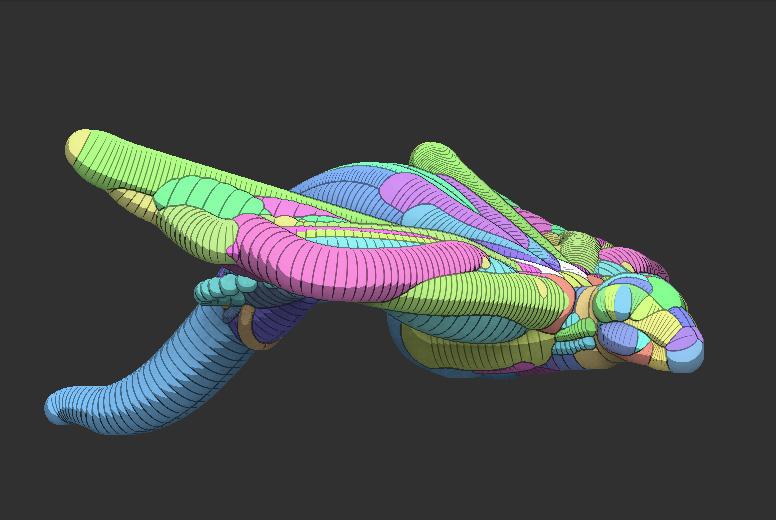 ](javascript:zb_insimg(‘157527’,‘Untitled-2.jpg’,1,0))
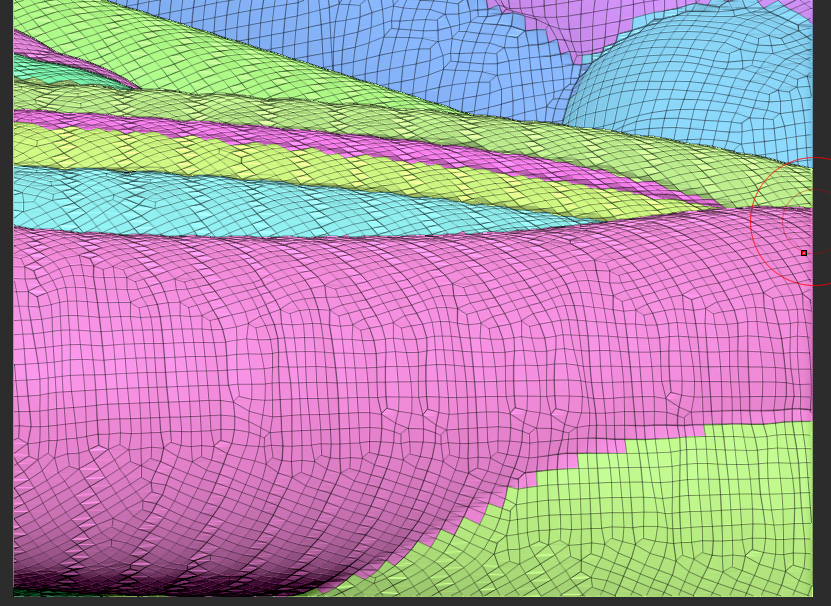
When the app works, it’s great. But, I seem to have some kind of startup issue which prevents the program from starting properly, from time to time.
This topo looks scary.
How`s “right mouse button navigation”?
I think the new Zsphere sketch method with unified skinning will be mostly useful creating the lowest resolution you can achieve without losing the major forms you tried to create.
It’s a bit of a shame though, they didn’t include more userfriendly retopology tools, since we’ll mostly be generating unified skins from this new zsphere2 method.
they improved the number of things you can get from a right click:[ ](javascript:zb_insimg(‘157528’,‘Untitled-3.jpg’,1,0))
The Namek, i agree with you, i sincerely hope the improve them in the 4 release.
For now z2 are only for a rapid sketch of magior forms.
(or maybe i nedd some more advanced tutorial…)
On a side note i’ve tried to use the old topology tools on a Z2sketch.
It dont works really good (some unpredictable results now and then),
but sometime it do it’s job.
let’s see the z4 release…
I think it’s been said before but it’s worth repeating.
An artist is (should be) concerned with gesture, anatomy, emotion.
He shouldn’t be thinking about what part of the world the clay came from, or the northern lights, or what the mesh looks like.
People become worried about what the mesh looks like because that is what they HAD to be concerned with in the past. But the clay was a ‘means to an end’. The same with the northern lights, or what a mesh looks like. In the future we will have brushes that make that obsolete. We will have 10 billion poly meshes that will make that obsolete.
Then, for gaming/film, one can retopologize. But for now, moving quickly to get an idea out is paramount. To take a hold of the fleeting imagination and ‘get it out’ as it was dreamed, is (I think) most important.
I read an article somewhere about Steven Spielberg. Where he said he would make a movie as quickly as possible so he wouldn’t lose his first vision of it. It’s something like that.
EDIT, I meant to say the morning lights (that painters use to improve themselves)
mmm. maybe is some sort of language barrier, i don’t want to sound ungratefully, i’m AMAZED by this release, but living today and not in 2020
i MUST look at the topology.
Fortunately at high resolution 5poligon point are not a great problem, but some more friendly topology tool are necesessary for a fluid work.
no problem here, using it for 10/15 hrs now and never have a crash.
You need to know how to push Z’s ‘buttons’… 3 minutes creating a texture from polypainting and I had a crash.
Just have a quick polipainting test. No broblem at all
Hmm, and what happens when you try to use the Smooth brush on this topology?
As you may know, 3 and 5 sided vertices create pinching artifacts when you try to smooth them. It’s annoying enough to justify a lot of optimization on your basemesh, especially when you want to create a concept from a very simple model…
ly, if you are working on major forms, 5 and 3 pinching effect aren’t a big problem.
If you want to work in detail you can do 2 things:
export the unified skin at 6/700 (somthing around 2 million poligon) or exporting it at a lower resolution and then retopo-it.
The first procedure present some problems aniway, so my complaining at the lack of more friendly retopo-tools
They improved the retopology tools to where it’s much faster to retop, so the unified skin topology is irrelevant. Just change it to topology you like.
My first impressions ?
AWESOME !  small_orange_diamondsmall_orange_diamond
Really, I love 3.5 so far !
Create a base sculpt blazingly fast with ZSPheres I and II , then fast retopo in Topogun, then happy sculpting in ZBrush 3.5 in no time , hahaaa !
EDIT : Haven’t tested out the other stuff yet like retopo in ZBrush …
Am curious, will try that now …
Just got it installed!!!
Haven`t tried Zsphere2 yet,
I really like the planar Brushes!!! Still dont know the logic behind it, But for me, itll definitely replace pinch on a lot of things from now!
I`m also glad they fix that navigation, can now do right click and rotate, even when the brush is over the model.