FLIK - Thank you very much…
Attachments
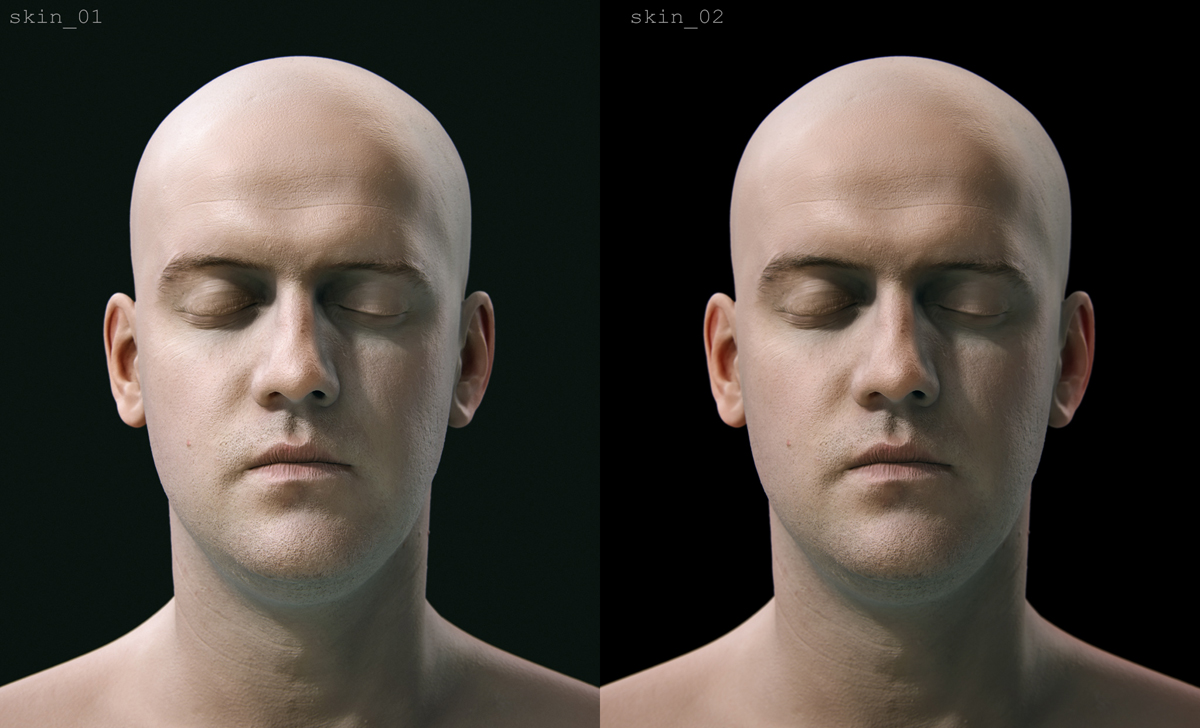
FLIK - Thank you very much…
very nice renders - looks very cool 
wooooooow!!! that looks perfect.
That’s pretty crazy for being BPR especially. Are you going to show the different passes you did?
wow cool render!. can we see the separate renders of this multi pass composite?
Awesome skin tests using ZBrush man.
Thanks Yiannis! For your Reply. This is a great and supportive Comm. And Yes The Skin tests are awsome! Right one is hyper-real U rocks man. 
Me too, would love to see a break down of this
FoOD - Thank you!
mjolnir - Thanks!
tobbeo - Thanks a lot. At some point I will. I’m still exploring…
moonlitmaverick - Thanks you. Yes I’ll post them at some point…
SuperHer0 - Thank you!
nirmohie - You 're welcome!
INFINITE - Hi Lee. Your head it’s great for tests!:). Well I’m thinking of what’s going to be the best format for explaining, at some point.
   Well these are some new tests I did today. The same render passes but different comps...still many things can be improved. SSS and specularity are the weakest links at the moment...


 more conventional Lighting Ratio

 <!--[attach=219639]CompsPresenation_01Low.jpg[/attach]-->


 High Key Lighting Ratio

<!--[attach=219640]CompsPresenation_02Low.jpg[/attach]-->
I posted the different variations (noColor/noSss), because it’s good to see, the degree that SSS affects a specific render or how much is in the color texture, etc
Some people may be wondering why someone would do that, instead of rendering in a major suite renderer (Mental Ray, VRay, or any newest one). especially in my case that I'm used to Mental Ray.
Some reasons :
     it's nice to know that with the best sculpting package you can also do high quality, print resolution renders.

      Some people don't have access to a full Renderer.

     You don't care about displacement/normal/bump maps.

    You have your full model there that you can edit your sculptural and texture details, add stuff, repose things...
wait for more and thanks for checking!
Looks excellent! Great realism to it!
they look amazing, some of the best Z4 renders i’ve seen, would we be able to see your matcap settings for those, they’re just so incredible
WOW! can you share matcaps and settings in lights and render? Holly !#$#!@ amazing renders! and might I add to your pluses that BPR is much much faster?
man I love those renders!
That’s why we love BPR !! :lol:, absolutely stunning!! really looks like a render out of vray or mental ray! amazing!
Wouah ,your renders are so fantastics!!!
But how did you process ?Did you use polypainting,or projection master for the skin?
So,really excellent work.
great job with the last renders , small_orange_diamondsmall_orange_diamond…
i just want to ask you how you get this to work ? -
http://www.zbrushcentral.com/showthread.php?t=92557
your rim and fill lights are passes too ? because when you have a rim and fill light this strange bugs are appear 
Εξερετικές προσπάθειες Γιάννη!
Excellent work.
Derek Frenzo - Thanks!
mazz423 - Thank you! I don’t use matcaps, I use the basic materials. If you look at my earlier posts, you 'll see that I only use the basic materials, (Basic, Fresnel Overlay,etc).
nassosa - Thanks Nasso. I don’t use matcaps and my workflow is very compositing based. I’ll explain later. About the speed, it’s…debatable and comes down to the case…Also it needs at least, basic compositing knowledge…but I love that i can quickly have a good rendering.
Yarim - Thanks a lot!
neoseb - Thank you! For the latest model the texture was provided of course, I generally use polypainting with Lightbox that can combined with photoshop…
PSTCHOART - Glad you like it. I know what you mean…I render all light passes separately. Even if you could render multiple lights with shadows you usually don’t want to have the same settings in terms of hardness /softness. So the best case for rendering would be to have different settings for Rays and angle, etc for every light (forBPR). like you can for Best Render, but I think this is an intermediate stage for the rendering properties…
michalis - Ευχαριστώ Μιχάλη.(Thanks Michali)
about my renders…I’d like to say one more time that I don’t use any special matcaps and my multipass rendering workflow is not Zbrush specific.
I do very similar with Mental Ray…in the end i have a node tree that is similar to a shading network in Maya with the addition of lights. So in post I don’t really “manipulate” the image, I adjust the “shader” and lights and I can change textures, specularity.etc and have different simulated materials, so it’s very flexible. Many people do very similar…
At some point I 'll do a tutorial…
Congrats, it’s wonderful.
I wish I was sitting down to watch him in a nice, animated comedy.
Thanks yiannis;)

