ZBrushCentral

When using an Insert Mesh brush how does one auto rotate the model?

Hi,

I don’t use the Insert Mesh brushes all that often but need to build a belt and found a brush that’s included in ZB 4.6 that pretty much fits my needs (if you know of more belt and buckles brushes let me know) but I can not for the life of me remember how to set up a way to auto rotate the figure to get a clean brush line…

Thanks so much

Richard
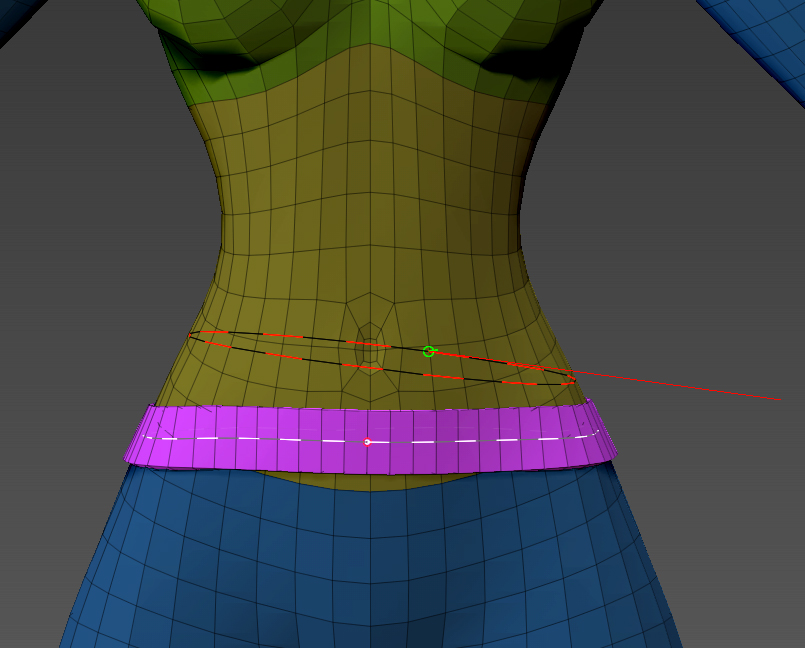
If you’re going all the way around the waist with a belt (if it’s a curve brush), you can start dragging, then drag off the model and hold shift.

That will create the curve all the way around the model.

snap-strap.jpg

Well that’s a handy tip. Thanks Thor! Keep a tight grip on Mjölnir! :smiley:

Worked great.

OK, one more. How do I make a hole as in an eyelet hole for the belt?

Fourth post… http://www.zbrushcentral.com/showthread.php?170167-Insert-Multi-Mesh-Repository

Thanks for the tip!

http://www.zbrushcentral.com/showthread.php?170167-Insert-Multi-Mesh-Repository&p=966517&viewfull=1#post966517