I understand that it is for roughing out your base mesh before sculpting, and that it gives you the freedom do supposedly not worry about topology, but didn’t Sculptris already do this and do it better? Honestly I’m really perplexed by this. Sculptris adapts on the fly and does allow you to reduce complexity of the mesh as you go. You also keep the details that you might have sculpted along the way. Both systems still give you a mesh that is unusable in any other program and you must retopologize anyway, so what is gained by using Dynamesh over Sculptris?
I have the same question. I mean its just doing remesh and when i do remesh the details are gone. Dunno if i am doing it correct. Voxels are better in that sense. No ?
Yeah, that’s what it seems to me. When watching the preview videos I actually had thought that that’s what they had done with Dynamesh - put the functionality of Sculptris/3DCoat into Zbrush. But after playing with it I feel like it was trying to play catch-up and missed the finish line altogether. I’m guessing ZB5 will have that functionality plus, I hope, auto-retopology, but until then I really am stymied.
Go make this using dynamic tesselation in Sculptris, and let me know how that goes:

Also, why put painting functionality in ZB? Other programs already do that? Retopology, UV, Texturing, Natural media paint simulation, ? Character posing tools? Rendering solution? All done by other programs as well. It’s possible there is some benefit to expanding the native abilities of your own program.
If you’re losing detail using dynamesh, it’s from improper use or a misunderstanding of the way it works. Remeshing at high dynamesh resolution with the projection button will allow you to retain a surprising amount of detail, but obviously you cant expect to keep super his res detail if you’re only generating medium res meshes. So you hit a performance wall, the same wall you hit in Sculptris at a certain point, and have to bring it into Zbrush for advanced sculpting. That’s why you then start sculpting at high res (at levels of detail Sculptris can’t achieve) once you have your form with Dynamesh, and if you want to make a significant change to your base form using dynamesh, you freeze your sub D levels, and re project when you’re done. There is no loss of detail.
Open minds, gentlemen.
- a lot on this thread.
I became a sculptris beta tester waiting for this:
http://www.zbrushcentral.com/showthread.php?96408-Playing-with-polygons-topology
where is it? What a disappointment!
Sculptris method is a lot superior to dynamesh. Dynamic tessellation makes possible that tools (like the excellent crease tool of sculptris) can act like this. Impossible to imitate them in zbrush because exactly of the lack of dynamic tessellation.
Sculptris is a straight ahead sculpting tool, for spontaneous sculpting lovers only. LOL
Edit:
@Spyndel
Please, try to follow this thread, you posted a hardsurf sample (impressive BTW), are you trying to say that this is done using dynamesh only? Or just started in dynamesh? Dynamesh is great, one of the great it does is to remesh sculptris meshes. Lot of approaches, the better I feel.
One of the things that dynamesh can not do is to capture the crispness of imported sculptris meshes (even a Sc mesh around 300k)
That is constructed entirely in Zbrush, making use of Dynamesh in every aspect. There is nothing visible there that is not dynamesh, or was not dynamesh at some point.
If that is true, sounds like a good reason for a native version of the same functionality, to make that third party program redundant, so that nothing is lost.
Sculptris is a great program, and DT can do a couple neat tricks that DM can’t. In the end, though, those tricks dont amount to much, and the net result is that I can do essentially the same thing with DM (pull a figure quickly and fluidly out of a single glob of polyclay, sculpting as I go). And DM can do a ton of stuff that Sculptris DT can’t.
But no one is forcing you to use it. Use whatever makes you comfortable. Let’s not waste peoples time with “What is the point of” threads, though, when ZB is clearly better with this tool, than it is without it. And it’s not like Dynamic Tesselation is out of the cards for Zbrush. You may see it at some point.
Spyndel there’s no reason to get so upset. Your post certainly sounds like you’re aggravated, and I am not trying to waste anyone’s time trying to understand what benefit I am getting from Dynamesh over Sculptris. I think we all love Zbrush and there’s no reason to come to its defense so vigorously because no one is putting it down. You’re right, I don’t see any way to make your mech in Sculptris but I don’t think that has anything to do with the dynamic updating but rather has more to do with the tools that Sculptris has available.
“Also, why put painting functionality in ZB? Other programs already do that? Retopology, UV, Texturing, Natural media paint simulation, ? Character posing tools? Rendering solution? All done by other programs as well. It’s possible there is some benefit to expanding the native abilities of your own program.”
I’m not sure what you’re saying here. I didn’t mention painting in ZB, because of course ZB already has painting, and does it quite well. It also does UV mapping and texturing quite well. Nor did anyone mention posing, natural media (which Zbrush already has), or rendering (again something Zbrush does quite well). Retopology, of course, is something that has been going on for some time with Zbrush and improving those abilities, especially with the advent of such things as Dynamesh, would help a lot of people out, and save a lot of time to move those models over into another program for animation/rendering/whatever. Unless I misunderstood what you were saying.
Again, this was not meant to be an argument thread, this was an actual question as to Dynamesh’s purpose/usability and how it differs from Sculptris - good or bad.
Lack of tools, more specifically you mean. Tools like…Dynamesh. So apparently, there’s some point to Dynamesh after all, eh? That mech is a product of Dynamesh, and its suite of associated tools, and it has everything to do with Dynamesh’s accurate, rapid reshaping and mixing abilities.
You couched your question in the form of “Why Have this , X Application already does this better.”
I demonstrated that fault in this line of thinking. This is true of many features in Zbrush. There is always some specialty application designed to perform a specific purpose better. Does Zbrush somehow not benefit from adding texture painting functionality, if Bodypaint has a more robust feature set in this regard? Is everyone expected to use a billion different programs, or is it possible people might find that the native functionality is convenient, suits their needs nicely, and simplifies their workflow by making one less program with its own special needs and concerns to juggle?
Your implication, and the tone of some that followed, was derisive of Dynamesh. Which is fine. I expect everyone will use the tools that they are comfortable with. But I also demonstrated that while the tools are not the same, and each has some unique strengths, much of the same functionality is gained from Dynamesh, while currently providing far and away more functionality than the tool you propose to be superior. So no, they’re not the same. In an overall sense, Dynamesh is patently better by any objective weighing, no offense to Sculptris intended, I think the world of the program and its creator.
If my tone sounds harsh to you, its because they’re one or two people on this board, who seem to have an agenda of “Boo, Dynamesh” at every opportunity. Which is fine, whatever. Everyone’s entitled. But I really wish they’d go and make use of the tool that best suits them, and give it a rest for the people who are stuck with poor old do nothing, pointless dynamesh, that only does the same thing as DT for the most part, and a hundred other things besides, and vastly increases Zbrush’s modelling, base mesh generations, and concepting ability.
The people that labored to give us this huge new toolset (dynamesh is more than just dynamesh), again for free, don’t really deserve to have the tools derided by people who have not taken the time to explore them and learn the possibilities. If someone had done so, they would not have to ask, “what is the point”.
Spyndel, if I thought that, I would have posted “there is no point” rather than “what is the point”. Part of learning is asking questions and that’s what I’ve done. We can’t all spend all of our time using the software and messing with the ins and outs so we might post on the forum. It is your prejudice, based on some other people, that my post and my question was flippant. It wasn’t. And I wouldn’t have brought up Sculptris except for the fact that Pixologic owns them, so it almost seems a redundant system. It would have been pretty silly to bring up something that, say, 3Dcoat has and ask what is the point of now having something similar in Zbrush.
The tools I was referring to in Sculptris had more to do with such things as hard edge brushed, clipping brushes, this kind of thing, which I see no reason Sculptris can’t have.
I have nothing derisive to say about Dynamesh, or Zbrush for that matter. Love the program. And I certainly wouldn’t deride the programmers for their awesome effort and free upgrades which I love and make it a point to tell everyone about whenever they ask about it. This was, strictly, a question about this tool and its relation to Sculptris so I could better understand the differences in the two and why I might use one over the other. You act a little as if Dynamesh has made Sculptris obsolete and if so why bother with Sculptris. This is exaclty what I’m trying to figure out.
Let’s take it a step further - if the ability of Sculptris was put into Zbrush with the same brushes and toolset Zbrush has would it still be necessary to use Dynamesh? Or is it pointless to bring in Sculptris functionality because Dynamesh is so superior? You mention tricks but nothing specific. That’s what I’m looking for - what is it that Dynamesh does over DT. What are the 100 things Dynamesh does better?
One of the upcoming movies in the ZClassroom thread will be about DynaMesh. I believe it will answer some of your questions:)
p.s. Cool mech Spyndel:)
Thanks support. Looking forward to those videos.
Spyndel, sure hope you don’t take anything I was saying the wrong way. I really am just trying to understand the differences. I gotta get some sleep. Have a good night.
Spec, another poster made sort of an asinine comment, and you caught some flak for that, I’m sorry. Your thread is rather unfortunately titled, and a lightning rod for argument.
No tool is obsolete if someone enjoys using it enough that it makes a big difference for them. I love Scupltris and respect Dr Petter. Im very happy hes working with Pixologic. However, I no longer feel compelled to use it for my own ends. I feel Dynamesh supplants it it the ways that matter, and gives me much more besides.
If you forced me to chose between Sculptris Dynamic Tesselation as is, and Dynamesh as is, I’ll take Dynamesh every time. Obviously, its value is magnified by its supporting toolset. But thats the point, Dynamesh is more than Just Dynamesh. Its all the tools that are designed to be used along with it. Obviously the tools impact the experience, or do you generally just stare at an unworked sphere in Sculptris while proclaiming dynamic tessellation “the shiz”.
The net gain of the Sculptris dynamic tessalation, is being able to quickly and fluidly pull complex form out of a single sphere, like a glob of clay. I get that from DM too. Perhaps not quite as elegantly, perhaps there are one or two things that cant be done quite the same way because of the differences in the process, but I dont feel the absence of those things. I do feel that net gain. If I look at it that way, its probably a wash, the tradeoff being on the plus side, I get to work natively in Zbrush, without the Goz juggle, with Zbrushs superior performance and available supporting features.
But factor in Dynamesh’s mesh mixing ability, and all the companion tools introduced along with it, and designed for use with it, and the scale completely tips all the way over. It baffles me that I put that picture up, and you’re still asking this question, as if its somehow Zbrushes existing brush tools that are primarily responsible for this. You ever try to carve a complex shape like the ones you see in that Mech WIP with a clipping brush alone? You ever try to perform a boolean subtraction with the old remesh and projection tools, with that clunky subtools visibility process? Ever had one survive the reprojection, if it worked at all? Dynamesh’s accuracy, speed, and relative (by the standards of virgin zbrush functionality which always has kinks) reliability is the glue that finally makes all this stuff really stick together and work, in a workflow you might choose to use for more than spot work. At least for me. Hardsurface stuff in Zb was always possible, but I wouldn’t choose to do it. Dynamesh amplifies the efficiency of a number of different processes, and I think we can safely look forward to it getting better and more efficient itself.
You can build shapes a hundred different ways. You can taffy pull like Sculptris. You can attach a square primitive to a curve insert brush, and draw out dozens of “lego blocks”, fusing them together as you go. You can form shapes free of the confines of traditional quadflows, which tend to force us into predictable geometry and shapes. And Dynamesh can let you radically alter alter form of even the highest resolution meshes with the use of projection, if fairly painless fashion. Far more painless than importing and converting Sculptris geomtry, at any rate.
Yes, I will trade dynameshsing mixing ability for the ability to indefinitely pull out a single strand snake it every which way, while it tesselates, which is a novel experience to be sure, and a great technical achievement, but on balance, doesn’t have as near as profound an impact on my work, as there are other ways to make those shapes. Im doing things in my mech project that were either impossible for me to do before in zbrush, or highly impractical to do as part of any extended project. And Im doing it in a time frame that is not as wildly disparate with my traditional polygon modelling workflow, as Ive always assumed anything of that sort in Zbrush would be.
If bonfide Dynamic tessellation makes its way into Zbrush at some point, all the better. And I hope to see Sculptris continue to distinguish itself. But the introduction of the Dynamesh toolset is the first time I’ve ever taken seriously the notion of Zbrush as a free form content creation hub that handles all my mesh creation. It’s not there yet, but I can see it. It’s made me a believer.
Sorry for the wall of text, but you did ask.
I’d like Scott to do a tut on his mech and the various dynamesh techniques he applied. I’ve stumbled on a few ideas myself, but he’s gone well beyond my few observations. 
-K
I would too. And he’s way past anything I have any idea how to do, but I have some ideas.
This got me thinking about hard surface stuff which I know almost nothing about, however that mech is possible if you rough it out in Sculptris and then do the hard surface stuff with Zbrush, you dont need dynamesh for this.
Here something about the slice tool.
It refuses to respond to having symmetry on, which made it fairly pointless to me at first but, I found something out:
This is cool:
- Open Sculptris
- Make… oh… Ahem, sorry.
- Goz the default Sphere into Zbrush.
- Use the slice tool to lop off a chunk of your sphere.
- In the Geometry menu hit the "Mirror And Weld button (make sure it happens on an axis you like).
- In the Subtool Menu hit the Group Split button.
- Again in the Subtool menu select the new um… object?
- In the deformation pallet use offset to move it away from the original position (you will notice its missing a side as is the other part(s)).
- Hit Close Holes in the Geometry pallet.
- Do the same for the other object in the Subbtool pallet.
- Rotate and repeat as desired.
- <—<<< That is an extra dot… Zoom in on it its wicked cool.
So…
Here is what a few minutes of making hard surface stuff with “nothing but a Sculptris mesh” got me and this is my first attempt figuring out how that mech was done, I would do a “remesh all” in the Subtool Menu but it would end up looking like dynamesh and that is sort of blurry for some odd reason…
This is one sphere from Sculptris, with two cuts and this could be done to all sorts of things:
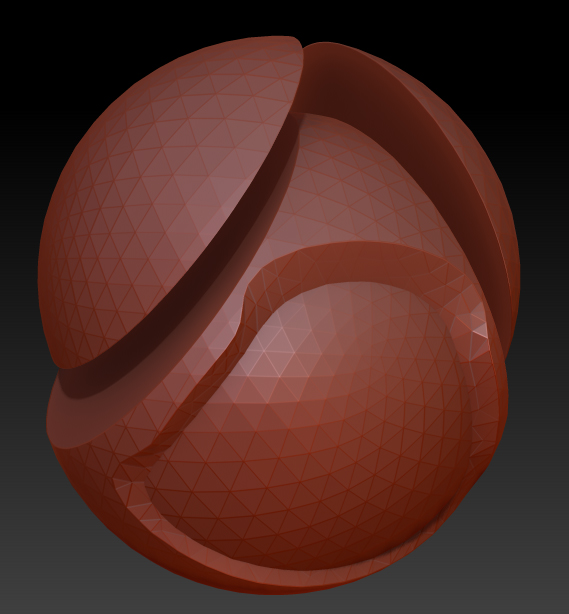
Good luck.
Lots of the things Im doing with that mech are possible different ways in Zbrush (virtually none of them are currently possible in Sculptris). Dynamesh makes them all easier. A few things are not possible any other way, save for drawing the out mesh out point by point with the topology tools and hoping zbrush understands the way you want that topology to draw out, then painstakingly creasing the complex object polygon by polygon, by performing acrobatic hiding operations… at which point you’re basically working with an inferior set of traditional polygon by polygon modelling tools. Then do that over and over. Why would you do this? You could cut a steak with a spoon if you really worked at it, but who would do this? Most of these things simply arent practical without dynamesh.
Dynamesh is the glue that makes a great many existing tools, and new tools designed for use with Dynamesh, work together in a ton of new and exciting ways.
The slice tool designed for use with dynamesh…
So basically, you’ve added unnecessary steps and complications to your workflow for the purpose of working with a geometry configuration that Zbrush generally doesnt like working with for sculpting and some operations, and greatly increased the time it takes to get something done because of your refusal to use dynamesh.
At some point you’re going to have to combine meshes (some of those shapes are highly impractical any other way.). Not to mention the close holes function makes geometry that you cant polypaint over(or wouldn’t), and the other ZB tools will likewise distort the polyflow making other things more difficult. You need to remesh. In Zbrush. If you use the subtool based remesh and projection methods, you’re basically using a much slower and clumsier [process of what dynamesh already does much more fluidly, and more accurately. I don’t know if they’ve updated the remesh and projection tools to work as well as Dynamesh now, but in Zb4, most subtractive operations were not very successful, and reprojection didn’t do a good job distributing geometry across deep recesses.
No one is saying you can’t continue to work with a tool you’re comfortable with. No one is saying it’s not possible to work very well between Zbrush and Sculptris, even though I personally don’t see any reason to. But the degree of obstinacy by a couple Sculptris fans on this board is hilarious. Why can’t you just admit that Zbrush is a much more powerful program with Dynamesh, and that it makes possible many things the present version of Sculptris Dynamic Tesselation does not? Zbrush may well see Dynamic tessellation added at some point, but I promise you it won’t be as big of a jump for Zbrush as Dynamesh is in itself.
Importing geometry and then using the set of tools designed for use with Dynamesh is probably not the best way to make your case that Dynamesh serves no purpose, and you dont need it.
A quick question here, at which point did I say that dynamesh servers no purpose?
I did say that you dont need dynamesh to do hard surface stuff, is that what you mean? Is that incorrect?
Looking back not only did I not say that no one else did either.
I have nothing against dynamesh, I haven’t even begun to scratch the surface of what it can do yet. For that mater I haven’t begun to scratch the surface of what Zbrush can do.
One other thing, I realize that using Sculptris to make a robot thingy like yours is not an ideal method. I was just curious if it could be done and I think it could.
You said you don’t need dynamesh to do that mech. I say you can do things without it, but if you attempt to do it without it, from scratch in zbrush, at some point you’ll be screaming to use dynamesh, using inferior dynamesh equivalents, or crawling along at a snail’s pace by using zbrush in a manner that it’s not designed to be used for, drawing meshes point by point, or using box modelling tools that truly are inferior to any freeware traditional subdivision poly modeler you care to pick up.
People have demonstrated for years Zbrush to be capable of hardsurface modelling, although as to whether it was capable of making exactly the hard surface you want to make, and not simply “what Zbrush can make”, is another question. Dynamesh is a huge step forward in that direction, allowing one to work more closely at the speed of thought, and more accurately carve out their mental image.
Having attempted this sort of work in every previous version of zbrush, do I say it is a strict necessity? No. Is a practical necessity for zbrush to be used as a serious option for complex hardsurface work in the coming years? I think so. This is the first time I’m really thinking seriously about utilizing it for such. This is a result of Dynamesh both directly, and indirectly in the way it makes so many other Zbrush tools suddenly much more practical.
All the hard surface and shape-making tools introduced in the last couple versions of Zbrush…shadowbox, the hard surface brushes, what have you, all depend on a remeshing process. Sooner or later, you must remesh objects worked by those tools, or they will prove useless to you for any of the other things you might want to do with them, or even simply to continue working on them after the geometry becomes hopelessly distorted. The old remeshing process was split into two separate processes each with their own quirks, required repeated scrolling up and down in the subtool menu and error prone visibility juggling.
By comparison, Dynamesh (despite some virgin functionality and usability kinks) works almost instantly, much more directly, much more reliably, and pulls off some things that the old process simply could not. It makes fast, accurate cuts the old projection process could not correctly interpret. So to the degree that that core remeshing process is drastically improved and drastically sped up by Dynamesh, so to does that effect cascade down to every other tool in the ZB toolbox that relies on it. You can move down bit by bit, working and remeshing as you go, just slapping on parts and reshaping them haphazardly, without as much referring back to subtool palette or worrying about subdivision levels. The net effect is profound.
This is of course one of the many benefits it offers above and beyond rapid concepting and quick creation of base mesh for more organic sculpting, which it does well enough to obviate the need for Sculptris for me personally.
The general implication of yours and another person’s attempts on these boards to repeatedly downplay the importance of Dynamesh and zbrush in general in favor your preferred tool is patently obvious. I’ve watched you do it in several threads now with your little passive aggressive jibes. That’s your perspective, and you have the right to your own opinion.
But don’t insult my intelligence with “What? When did I say…who me?” You came into this thread to post a long response for the purpose of “debunking” my claim that dynamesh was vital in the creation of the project I’m working on, to demonstrate, by implication, that Dynamesh is not all that significant. That’s as hilarious as it is transparent. Who would extend that kind of effort without an obvious agenda? Frankly, by your own admission you don’t have enough experience in Zbrush to make a convincing argument in that direction one way or another.
No doubt you will bristle at my calling it as I see it, but my tolerance for games is sadly finite. Just remember, I don’t care what tool you use, if it works for you and makes you happy. And Sculptris is a fine tool. I hope you go on to use it to great effect. But I have put my money where my mouth is when it comes to demonstrating the great many benefits Dynamesh has above and beyond pulling out sculptable form from a simple sphere like Sculptris.
I think we’re done here.
No tutorial then?
-K
I really want detail explanation for new features of R2. I will better wait for tutorials, till then, i will model in Zbrush what i have learned in Zbrush 4 so far.