ZBrushCentral

Subtool icons - what's their use? [Answered]

Hello zpeople,
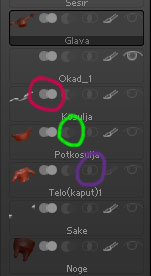
I was wondering about those icons in subtools pallet. Do they have any use?
I assume it has something to do with some kind of boolean type thingy, but I did not manage to get any visible self explanatory results.

Thanks in advance.

Dj.

Attachments
subtools-mistery.jpg

Yes, they are essentially boolean operations related to Remeshing as described here:
http://www.pixologic.com/docs/index.php/Remeshing

Hah. Quick one :slight_smile:
Thanks Marcus. I’ll read the remeshing docs. Though it looks like I wont use it that much now when dynamesh is in the house.

Yes, Dynamesh is more flexible really. :slight_smile:

Hey Marcus… I finally found the icon listing description… but what is the icon between the eye and the interection icon?

Polypaint on/off - the same as Tool>Polypaint>Colorize.

Ah, ok! I’m having an issue maybe you can advise on. I’m trying to use the subtool icons and want to merge two closed subtools, but have it remove polys that would be on the interior of the object.

Is there a setting for those to do that, or do I have to export and remove them in lightwave?

You can only do that by using DynaMesh. You might like to take a look at this plugin by piggyson which provides a good solution for what you want:
http://www.zbrushcentral.com/showthread.php?164728-Clean-Tool-Master-%28with-Dynamesh-Project%29-unofficial-Information-Installation

Will do, and many thanks!