Thanks Marcus, that’s great, tnx! I’ll wait. 
I have no idea how to make this work. What does it do exactly?
The Clone brush will copy parts of a painting: first hold CTRL and click on the part to copy. To copy from a different layer or a tracing image, set the Brush Adjust slider to above 50.
You can find out about the Paintstop features from the PDF that is included with the plugin or available from the Download Center.
Okay thanx.  I tried looking for paintstop info in the ZB3.5 PDF but there was nothing about paintstop in it. Didnt think these plugins would still be available separately with their own PDFs in the Download Center.
I’d also like to know, as great as this plugin is, are you guys continuing to improve paintstop with more features? Will it be any different when ZB4 rolls around?
marcus_civis
OK - I shoot with my movie camera live footage to be rotoscoped. I have read that quicktime pro and the freeware virtualdub will open film files and save each frame as an image file.
OK - I now have the film as a group of image files saved in a folder.
Here is what I would like for PaintStop to do (maybe it can already)
- load a file from the folder (can do) remembers the folder it’s in to be able to do the following
- first file opened as the canvas add layer to trace over the object to be rotoscoped (can do) when done saves the file with a add to the file name auto - example file name 0001 saves as 0001a and into a different folder
- Then have a next button that opens the next file in the first folder and repeat step 2
Not a guru so I hope what I wrote makes sense.

.
And this is why zbrush needs a hotkey editor so that people can efficiently organize and implement all of their key and button assignments to anything.
How do you select multiple polyggroups 3.2 RC3?
TJX,
I can’t say anything about the plans for PaintStop at the moment.
SpaceMan,
This would need to be added in to PaintStop in order to work. I’ll bear your suggestion in mind.
Liam04,
Your question has nothing to do with PaintStop; please start a new thread in the Other Questions & Troubleshooting forum .
hey i have the pluggin in the right place and i cant see it , i dont have any other plugging in that folder just paintstop , i know im 6 years away from this discussion but how can i solve it ?
Which version of ZBrush are you using, and can you show a screen shot of the folder where you have PaintStop installed?
Thanks,
i just changed to version 3.5 v3…and problem solved…thanks marcus !!
How about something like this for PaintStop:)
//youtu.be/<object width=“640” height=“385”><param name=“movie” value=“http://www.youtube.com/v/d13-Cq-lnFE&hl=en_US&fs=1&”></param><param name=“allowFullScreen” value=“true”></param><param name=“allowscriptaccess” value=“always”></param><embed src=“http://www.youtube.com/v/d13-Cq-lnFE&hl=en_US&fs=1&” type=“application/x-shockwave-flash” allowscriptaccess=“always” allowfullscreen=“true” width=“640” height=“385”></embed></object>
about half way through the video shows a cool picker
//youtu.be/<object width=“640” height=“385”><param name=“movie” value=“http://www.youtube.com/v/j8UsZC2E7Xw&hl=en_US&fs=1”></param><param name=“allowFullScreen” value=“true”></param><param name=“allowscriptaccess” value=“always”></param><embed src=“http://www.youtube.com/v/j8UsZC2E7Xw&hl=en_US&fs=1” type=“application/x-shockwave-flash” allowscriptaccess=“always” allowfullscreen=“true” width=“640” height=“385”></embed></object>
Here’s a pic of it
[ ](javascript:zb_insimg(‘205636’,‘5.JPG’,1,0))
I have installed Paintstop to Zbrush 4.0 but it wont start up, I get the error screen below. Windows 7, 64 bit, 4Gb ram.
Any ideas what the problem might be?
[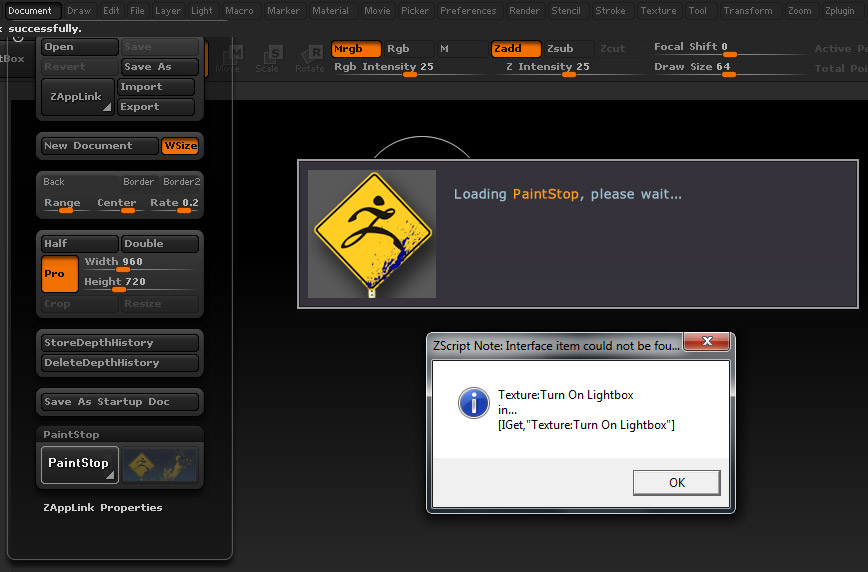 ]
]
Thanks, Sorted the loading issue!!
However, if I create a polymesh3d sphere for example, go into Paintstop and then exit with FADE ‘unticked’ I get the errors below…
Also if I go into Paintstop with the spotlight wheel active and a spotlight texture, when I come back out it sometimes grabs the texture fine (as long as FADE is on) but other times I get the same error as above then ZBrush crashes!!
Just thought I’d bring these things to your attention, Thanks!!

Psionic,
I’m really puzzled by this error. Normally it would indicate that the relevant folder doesn’t exist (and therefore the plugin isn’t installed correctly) but in that case pressing Fade shouldn’t make any difference.
My best advice is to completely remove and reinstall the plugin. If this doesn’t solve the issue I will try and investigate further but so far I’ve not been able to reproduce this error.
Thanks,
Hi sorry to keep bothering ya 
I have nailed it down to changing the brush size using the square brackets keys!! If I change the size using slider all is good, if I do it using the square brackets the error above shows up!! Hope that helps a bit?
And for my next trick…see pic below, each time I go into paintstop it creates a new sheet from what I can tell? Then after 12 sheets it starts to show this sequence of errors, not fatal as the paint is still picked up but annoying to have to keep clicking OK to get back to Zbrush. Initialize doesn’t reset it, only a complete restart of Zbrush does!
Thanks (and sorry)

One more thing, I’m still having a problem with lightbox/spotlight…simple solution is not to go into paintstop if you have a texture active but when have us humans ever been that logical? 
Anyway, if you double click on a texture in lightbox and leave the editting dial on, go into paintstop, draw stuff, exit and the texture will still be there. Press ‘Z’ and try to delete the texture, it wont…it’s like it doesn’t have focus? ALl other editting features work…only way to get rid is open another texture, X that one and then you can also X the other one!!
Also am getting some streaking on the edges of the model when exitting Paintstop with ‘fade OFF’ as it’s picked up and I haven’t drawn any where near the edge.
Sorry to keep bringing this stuff up, it’s an awesome plugin and please keep up the great work!!