Canvas resizing not working.
Pentuim 4
1 GBmem
2.8GHZ
Canvas resizing not working.
Pentuim 4
1 GBmem
2.8GHZ
What method are you using to resize the canvas? Are you trying to use the Document palette, or are you using PaintStop’s own canvas settings? If the latter, what steps are you following so that we can attempt to duplicate the issue.
Thanks for the tip Marcus
Is there any way to combine Paintstop with Projection Master? I have a boat model to texture and the Oil Paint brushes look like they would leave a nice brushstroke finish on it.
I’m using Zbrush 3.1
Attached my Zplugs contents pic and my Documents menu pic.
Thanks!
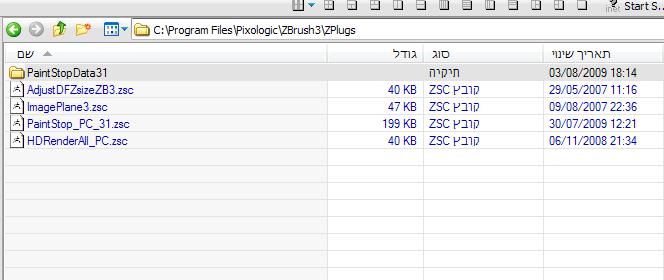
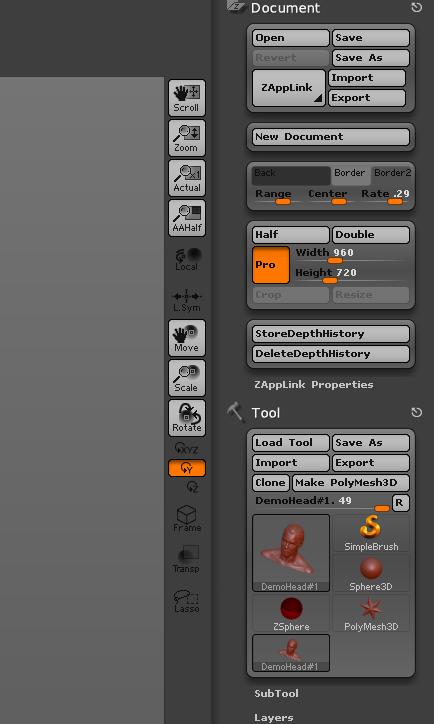
pc xp zbrush 3.1
How do I undock the color swatches window.
How do I ZBrush 3.1 color picker to get the color painted onto the canvas
Also where is the reset button for getting back to org interface when going through the user interfaces
Zikit,
Your installation of ZBrush appears to be incorrect - there should be a ZStartup folder which contains the ZPlugs folder.
SpaceMan,
How do I undock the color swatches window.
You can’t actually undock it but using the hotkey ‘K’ will bring it up at the cursor.
How do I ZBrush 3.1 color picker to get the color painted onto the canvas
Use the hotkey ‘B’ to pick colors.
Also where is the reset button for getting back to org interface when going through the user interfaces
You shouldn’t change interfaces within PaintStop - exit Paintstop first using the Exit button on the right or Exit from the File menu.
sorry for my lousy english,at first i wanna say thx for this great plugin.
i like the way of moving and zoom in/out the canvas in ZB.
is there a way to have the same in PaintStop (like pressing alt and LMB outside of the canvas)?
zbrush 3.1
i’m finding it very difficult to click the arrow exactly that opens other brushes/tools, it seems the active area is very small, any chance in an update that can be made slightly bigger?
Also:
if i hit the exit button then reenable Paintstop it now will use its own interface colors even though previously i had it set to use mine, which it does at startup. the box is even unchecked.
What are and how are custm papers made for best effecting the drawing tools in PaintStop
Aeon,
The shortcuts you describe are for sculpting operations and can’t be used in PaintStop. However, in PaintStop you can use the + and - keys to zoom in and out and the 0 [zero] key for actual size.
spaceboy412,
If you can increase the button size (in the Preferences>Interface submenu) you’ll get a larger area to click for the pop-up. However, we’ll bear your suggestion in mind for a next version.
On interface colors: are you saying that the first time you launch PaintStop it will keep your colors but not on subsequent launches during the same ZB session?
SpaceMan,
You can use any image but images that tile will be most effective.
thank you marcus about the button size, if i do that however all my other buttons will be messed up. i was only suggesting it because the area of the brush button for the other brushes is only about 1/5 of the button size (for me).
yes about the colors. i have PaintStop set up so when i start zbrush it will use my interface colors by having the option checkbox empty. If i exit Paintstop, then restart it Document>Paintstop, it will now use its original colors, if i look at its preferences box the UIcolors is still unchecked.
i was just letting you know, for me its not a big deal cause i don’t mind restarting zbrush.
Thanks Marcus
I just started playing with Paintstop. I did a search on this thread and found no info on saving brush settings. I don’t see anyway to do it. Rich.
50’s, i’m not 100% sure, but i believe all the 2.5d brushes show up in the tool menu if you enable menus, i think you can save out a brush that way, but unsure if it will save alpha etc. of course next time you use PS you would have to manually load that brush.
zb 3.1
photoshop cs
i just loaded in my custom color palette from PSCS which only really has about 20 custom colors plus stock PSCS colors, when loaded into Paintstop nearly all of the swatches are either white or grey, when i click on them the main color box will change color to what i think they should be, however the actual picker, colorpicker, is either in the white or grey of that color.
here is my color file from PSCS
Greetings,
Between ZBrush, Photoshop, and Corel Painter I can hardly catch my breath. Almost looks like Corel Painter. Thoroughly enjoyed the plug-in.
Rich,
There’s no way to save custom brushes at the moment though some settings are preserved during a session. You can follow spaceboy’s suggestion and load in custom brushes through the Tool palette but some PaintStop features won’t work with those brushes.
spaceboy,
Thanks, we’ll take a look.
ArfGraf,
Thanks for your comments, I’m glad you like the plugin.
Thank you, spaceboy and marcus, I’ll give it a try, if nothing else, I just jot down the settings.