Hi, I have just installed the plugin PaintStop_Mac_32.zsc and the folder PaintStopData32 into ZStartup/Zplugs. After opening Zbrush there is no paintstop submenu in the document palette! MAC OSX 10.5.7 - ZBrush 3.2 Please what goes wrong?
Hi tobemanu,
Can you post a screen shot of your ZPlugs folder? That will help us solve this problem.
Thanks,
tobemanu,
Many thanks, that’s a great help.
EDIT: apologies, I misread the zip file for a folder. I see you have the data folder where it should be.
Can you post a pic of ZBrush with the Document palette open? Thanks!
tobemanu,
Thanks. Well I don’t know what’s causing the problem. I see you have DispExporter.zsc in there - that shouldn’t be there and might be causing a conflict. I think you should take that out. You should only install plugins that have been released for your specific version of ZBrush.
EDIT: One other thing, are you sure you’ve installed this in your 3.2 ZPlugs and not 3.12B? (Your ZStartup folder looks different to mine…)
marcus_civis
Thanks for explaining how image resolution works in PaintStop. I just tried it again and I got it to work the way I wanted.
As for the thumbnails, I looked at the screenshot you posted and compared it to my own setup. Mine should be set up the same way, but I’ve posted a screenshot in case there’s something really obvious that I’m overlooking. Thanks again for your help.
Edit: am I supposed to be able to play with the PaintStop brush settings (Alpha, Stroke, Matcap, Texture) by hitting the space bar like in regular ZBrush? I didn’t see any mention of that in the manual but it makes the program way more versatile.
Attachments
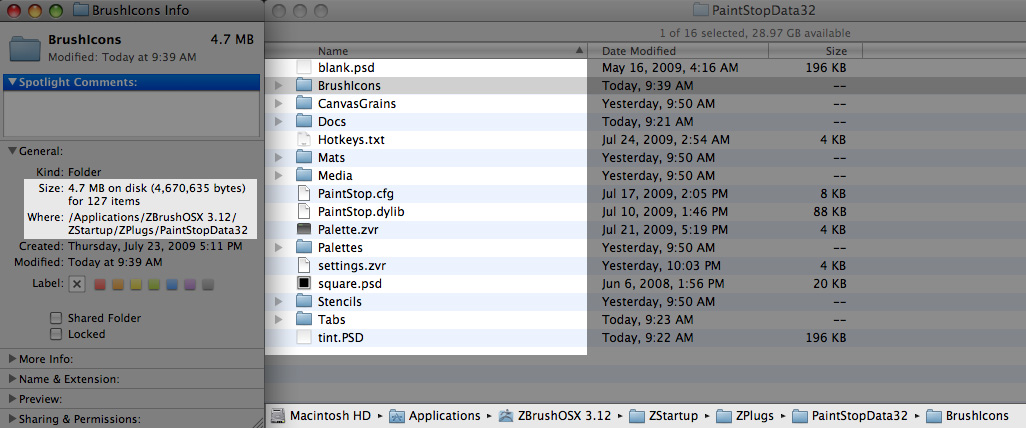
squidguy,
I’m glad the resolution info helped.
As for your set up, it appears that you have the plugin installed in MacOSX ZB 3.12. The plugin is designed for MacOSX ZB 3.2 and won’t work correctly for earlier versions.
so sorry! you were right - it was in the wrong folder 3.12B - Now it works just fine. Thank you so much for your help!
tom
tobemanu,
No problem. I hope you enjoy the plugin.
Hiya im just trying out paintstop, its really great but i have a question… i have tracing activated and i trace my outlines from the picture below but it there any way to pick colour from my trace image too?
Thanks
Bill
Yes, use hotkey ‘B’.
Exellent thanks marcus 
Is there a PaintStop Wiki?
The documentation is the PDF available with the download but I think it likely that there will be further stuff, tips and tricks and so on, in due course.
Thanks Marcus
OK I have been working with PaintStop for a while and I can not figure out how to change the tint in the canvas window help with this please - trying to get black paper to draw/paint etc white onto.
Hi,
it works for me when you un-tick “Keep previous Painting” - then you can click on the tint square & get a pop-up to select the colour from
Sammy!!
Thanks that works Sammy2
You can also tint the layer you are on by selecting a color and using the CTRL+F hotkey. Note that this method won’t clear depth so any oil paint depth will remain.