Thanks 
Wow! I always thought it was so much bigger … Is that the actual one they used on set? Now I’ve seen the photo I’m itching to create a more detailed version
Yes, it is. And I would love to see that creation of yours.
You bet
Ah terrific idea
Awesome stuff here. Love that game of thrones brush. Wish I would of seen the gem one too a week ago.
Anyways here is my small contribution before I go.
Seavannah_BeadS_wTearDrop.zip (67.8 KB)
A bead strand with a tear drop at the end of it. Sorry no pic of it and it was my first so not the best. no color either lol but maybe someone might find a use for it.

Seavannah_Tube.zip (27.5 KB)
A tube brush. My second brush I have made and it is the one I have used on my KissRobot.

FeatherBrush01a
p.s. the file is a bit big sorry bout that too. If Link for some reason doesn’t work you can also get it here on Seavannah@DeviantArt
A Pea**** feather made with fibers. lol still ZBCentral I am not saying a bad word… ok ok even though I didn’t name them that lol… it’s a bird feather lol.
Really high Res and Point count sorry was not able to fix this in enough time before I had to sell my ZB anyway will fix this if no one has once I get back on my feet again and am able to afford a new ZB program  anyway until then.
For those wanting to know how to make one. Here’s what I found.
1.Don’t use fibers like I did with the stem parts of the feather but just the eye/top part only, to save space/point count. Unless making a regular type feather try to make the fiber part without too many segments/profile keep it as low as you can. Make the count small too.
2.Try and keep all three pieces the same hight kinda hard to do but keep it as close as you can.
-
Wield points with a high res curve amount.
-
Also use the stretch feature found in the curve modifiers I think in the brush modifiers but it might be in the stroke can’t remember right off hand and I no longer have a ZB program to look at.
Anyway hope you all enjoy and can some how use these even if it is just to make your own feather. I will still be floating around should you use these pm me and I will take a look if you want.
One other thing you can turn off the curve mode and draw out the single feather I used to make the brush on a plane3D and delete the plane then fix the feather if you can by removing some of the stem feathers and just make them poly extrudes rather than the fibers and keep the eye and stem. Hope this helps.
Take care all and I say with the bottom of my heart Happy ZBrushing one and all! <object type=“cosymantecnisbfw” cotype=“cs” id=“SILOBFWOBJECTID” style=“width: 0px; height: 0px; display: block;”></object>Seavannah_BeadS_wTearDrop.zip (67.8 KB)Seavannah_Tube.zip (27.5 KB)
Thanks Seavannah for your contribution  small_orange_diamondsmall_orange_diamond
Those feathers are great, Thanks Seavannah…small_orange_diamondsmall_orange_diamondsmall_orange_diamondsmall_orange_diamond
A new one added here: http://www.zbrushcentral.com/showthread.php?1018504&p=1018504&viewfull=1#post1018504
Thanks LVXIFER nice tears!small_orange_diamondsmall_orange_diamond
Thnx LVXIFER…
I’m not sure it wasn’t done before, it becomes quite a pain to navigate through this whole post to verify… Anyway, this is a Snake Brush inspired by the method used by Thomas Méduri here : http://www.cgmeetup.net/home/making-of-equal-forces/
It may not be perfect by now so if anyone wants to make it better, feel free to do so and tell me (less work for me )
TOO_snake_brushes.zip (80.1 KB)
Here's another FREE IMM Brush Set - it includes 3 individual curve brushes.
Here is the link:
Hope you like it

thanks for your brushes Imm
I have used many times
are wonderful
a hug
http://www.zbrushcentral.com/showthread.php?174786&p=1011777&viewfull=1#post1011777
Hi guys!. This time i want to contribute with a new insert multimesh for making shirt collars very fast.

It works as any other IMM curve tool But i decided to create a mesh (FrameCollar) to easily create a closed curve with the Frame Mesh function. You can download and read the instructions here
Cheers!
F.
2 Likes
You’re absolutely welcome Some really cool stuff on your thread
101 greeble (Style A) . Check back for additional set soon.
Brush is set to draw a random mesh each time.
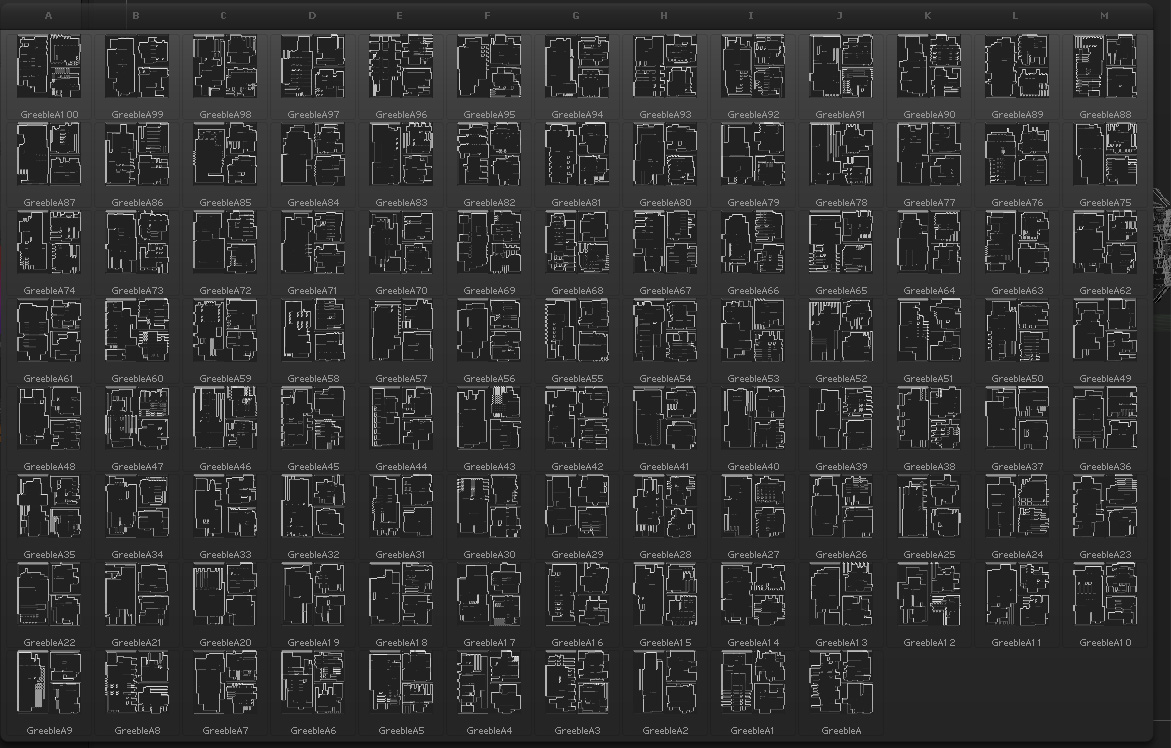
http://www.project1media.com/downloads/Greeble_A.zip
Attachments
These look fascinating, can’t wait to try them. Thanks so much!
Cheers, David
i was planning to made something similar, your are great…love that greeble panels…i’ve made this in seconds using the greebles on a plane, making a disp map after a grabdoc and applied it on a simple cylinder…thx again. Probably i’ll add my own.

Luxifer Hi, could you tell me the basic geometric process to create these fantastic structures?
