ZBrushCentral

GoB: an unofficial GoZ for Blender.

MrClay…what version of the gob are you using? could you post a link to the folder for me? I have tried three different versions…the folder names are:

GoB_2-72
GoB_265_WIN
GoB_2-69

I cannot get any of these to work. I am currently uninstalling Blender and will reinstall and try again. I used to have it working so I know I am not completely in the dark as far as following instructions. But for some reason I cannot get it going on this new Cintiq Companion.

If I remember I read a thread that was telling how the 69 version was incomplete and to use part of the 65 folder. I cannot find the thread anymore.

Need help…thanks

Just did a Blender Reinstall. This time back to 2.72. That was the version I had working before. Still ZBrush crashes…

I am posting the error message screen grab here. Maybe someone can help me with this.

zBrushCrashMsg.jpg

I used and use Version 2.65;

those links basically say what was written here a few pages back. :wink:
*for remembering, this is old stuff written there and Stunton uploaded in the meanwhile a newer version)

if it still fails,
your error might be either with Zbrushs GOZ cache folder,
or the script which is needed to tell Zbrush that there is another program(Blender) might be damaged/missing ?
the current goz enabled program might be set wrong
the wrong Blender exe file got selected within Zbrush.
the scripts for blender haven´t been put into the roaming folder directory (readme.pdf for further instructions)

haven´t tried yet the new gob2.72 version of since the old gob version still works even in Blender 2.73.
Stunton did a really great thing with the Gob tool.

Thanks for the reply. I will check the tings you mentioned. I normally tell zbrush to go to the blender.exe location but I noticed there is also a blender_app.exe file…so maybe I should try that one. Also are you using the install addon from within the Blender preferences, with the program running or are you manually copying/pasting the py file(s) through the appdata path into the Blender/addon folder/ And if you are are you putting in only the ext_Gob.py file or are you also putting in the init.py file?

Sorry to keep bugging you about this. I very much appreciate your taking the time to reply.

I followed your link and redownloaded the GoB 265a folder. When I am in preferences in Blender 2.73 and I am in the addons tab and click “install from file” and browse to the ext_Gob.py file nothing happens. There is nothing showing in the list. With the later versions, 2.69 and 2.72 at least when I install the Gob.py file it shows in the list of available addons…but not with the 2.65. So I tried installing the init.py file and still nothing shows up. This is frustrating.

I do not know how to clear my GOZ cache in ZBrush. I go to the user/pixologic path and simply delete the old Blender folder. Is there another cache somewhere that can be accessed within the program?

I cleared the cache within zbrush GOZ. I have tried every combination again…using all three versions of GOB. Still nothing works. As far as pressing the R button in Zbrush…it does not look like the references I see where one can change the GoZ program. I have included another screen grab of what happens when I hover over the R button. No matter what I get…Zbrush will crash. I am running windows 8.1…but this was not a problem at all for me on my earlier Cintiq Companion tablet also running 8.1

ZbrushRbutton.jpg

I guess I will have to be content with manually exporting the obj and importing. Takes longer and I am not sure if it does everything GoB will do in bringing over all the UV info and such. I have put about five or six hours into trying to get this to work. Not a hint of progress.

you have to select an 3D object to transfer it,in your image you would have to click on “Cylinder 3D” that is an 3d object or as ZBrush calls it, a tool.
the 2.5D things/tools can´t be transferred and the goz buttons are even disabled.
there are two R buttons.

these are the folders and directories.
gob files and directories.jpg

goz cache folder deletion goes thru this; preferences-> Goz-> Clear cache files

preferences and clear cache files.jpg

goz enabled program assigning/reassigning/resetting;

goz enabled application.jpg

I have win7 so I can´t replicate what you are doing but the pictures above should hopefully explain it a bit.

Thank you very much for taking all of those screenshots for me. I did not see the Goz config file in my folder. Maybe that one was created through the process you just showed me here. I will try this first thing tomorrow morning. Thank you again for all of your time and help on this.

Thanks…it works. Couldn’t have done it without your help…very much appreciated!

I am use Mac OS X 10.10.1
Blender 2.72b
ZBrush 4r6

I need you make new youtube record and explain me how to do ZBrush and Blender because
ZBrush GoZ to Blender not work, Blender GoZ to ZBrush it work. Please explain me clear

erro.png I don’t know how and why but I have this problem…

and with this problem?erro.png

@rco0001
your error messages are saying that the Cube.GoZ file is missing and the entire directory where it should be in.

my guesses are;
have you used the GoZ button in ZBrush yet?

you don´t have admin rights to write to the GoZProjects directory - doubtful but could be a possibility

you could also try to rename in ZBrush your object called cube to something else and press the goz button again

try to look in this directory, here should be normally some GoZ files in it;
C:/Users/Public/Pixologic/GoZProjects/Default/

the GOB 2.72 version which Stunton thankfully uploaded, has a greatly detailed “Readme for install.txt” file included
which should explain it for mac and windows users.
I updated on my pc and using it in 2.72 and as test with one buildbot version of 2.73,it works without flaws and expecially the autoupdate is a great addition, thanks Stunton!

mac4kent: You should update to ZB4R6 P2 (ZPlugin:AutoUpdate)

I have a fairly general question about Blender and whats about to happen with KeyShot, a few questions I suppose now that I think about it.
First of all I got it working, not only does it work it works very well, I am quite impressed, so thank you very much for making it.
My question is mostly about Cycles rendering, is it possible to use GoB like this upcoming KeyShot bridge? Right now I have to do things manually texture wise to make my Zbrush stuff render properly in Cycles, is it possible to simply set Blender to render in Cycles and have it seamlessly rendering in the background every time I update what I’m doing in Zbrush?
What I am doing now goes something like this:

-I make my sculpt.
-Hit the GoZ button to pipe it over to Blender.
-Set up the textures for Cycles and if needed do things to them in the node editor.
-Set my main view to render, or split the screen and set one of the sub panels to reader in case I need to do things like move the camera around or change lights or something.

This set up keeps Blender rendering in real time for the most part, however there are snags. What I would like is to only leave ZBrush when I want to see what things look like in Blender, but at the moment I need to reload the textures and this, while seemingly trivial, gets tiresome.
If it were to work the way I am suggesting it seems to me that it could in many ways replace the need for KeyShot which is considerably more expensive than Blender.

Is this possible?
Could another version of GoB support the use of Cycles?

Thank you again for making this, its a wonderful tool.

Hi Guys and Stunton,

Been using GoB for a while now and loving it. Stunton thanks ever so much for the scripting!

I have run into an issue… I have the add-on all working well, but sending a model to Zbrush 4R6P2 and back again the model is shrinking in size and creates two vertex groups (mask and a number). A small amount but noticeable!

I have checked naming, cleared the cache but it still does it! Has anyone else had this issue, been reading all the pages under this thread.

Thanks for your help.

Wyattfox

Sorted it out, thanks

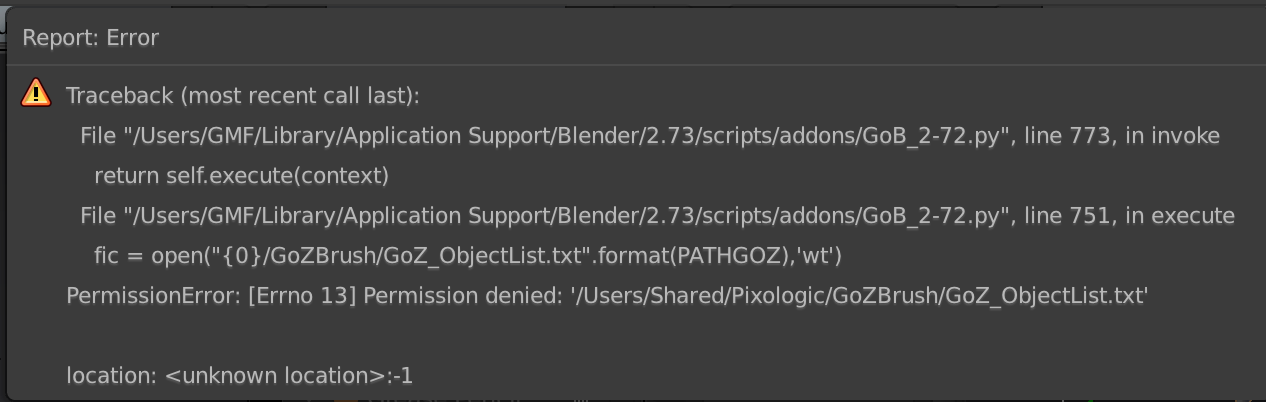
I have installed the plugin as specified in the included text file and am getting the following error message when trying to export a cube. Any ideas why this is happening?

Thanks in advance!

Screen Shot 2015-01-19 at 10.30.45 AM.png

Attachments

Screen Shot 2015-01-19 at 10.30.45 AM.png

Permission error. Make sure your privileges are set correctly.

I have repaired disk permissions on my mac as well as made sure that each of the folders involved are set to Read and Write. I am still getting the error.

What am I missing?

Thanks for the reply!

Make sure that the file(if it even exists), isn’t set to READ ONLY.