ZBrushCentral

Ztool ?material? problem (tool is very dark)

Hi Guys,

I just started with Zbrush two weeks ago so i hope someone can help me out here, i can’t find the solution anywhere.

I’m sculpting a human in, by accident i hit the wrong key and now my polymesh looks weird, very dark, check attachement, the right one is with polyframe-option on.

Here is the link to my Ztool

screenshot.jpg

I tried yo open your ZTL but it doesn’t seem to be compatible with my version.

Try this:

Select the red-wax material. Select the white color. Go to the Color Menu and select “Fill Object”

If that doesn’t work, check the “Render” menu and see that “Preview” is turned on.

If that doesn’t work, export the model at its highest resolution as a .obj; re-import that .obj. Use the “Reconstuct Subdiv” button on the Geometry tab of the Tool pallet to recreate your lower resolution levels.

HTH,
-K

Turn off “Colorize” in the Polypaint menu. At some point you simply painted/filled the tool with dark polypaint. With colorize off, it will display the selected color/material. With Colorize on, it displays any polypaint.

If you’d like to polypaint with a lighter color, do as Kerwin says with “Fill Object”.

It was the colorize option :slight_smile: Kerwin, i think you can’t open my .ztl because i work on an apple…?

Thanks for the help!

It’s probably that the ZTL isn’t compatible. :wink: Glad it was just a colorize problem.
-T

So I’m having a similar issue as posted above. I’ve tried all the solutions provided, but none of them resolve my problem. When I was working on this asset earlier, it was as bright and vibrant as the smaller window you can see in my attached image. Somehow it’s gone really dark and I cannot fix it. Every time I try and “eye drop” colors too, they’re way too dark vs what I’m eye dropping. Driving me nuts.

I’ve changed materials, adjusted the environment brightness (just washes everything out), and everything else I could think of. Any input would be immensely appreciated. I keep running into this issue every now and then and cannot figure out what the deal is. Thank you in advance.

Attachments
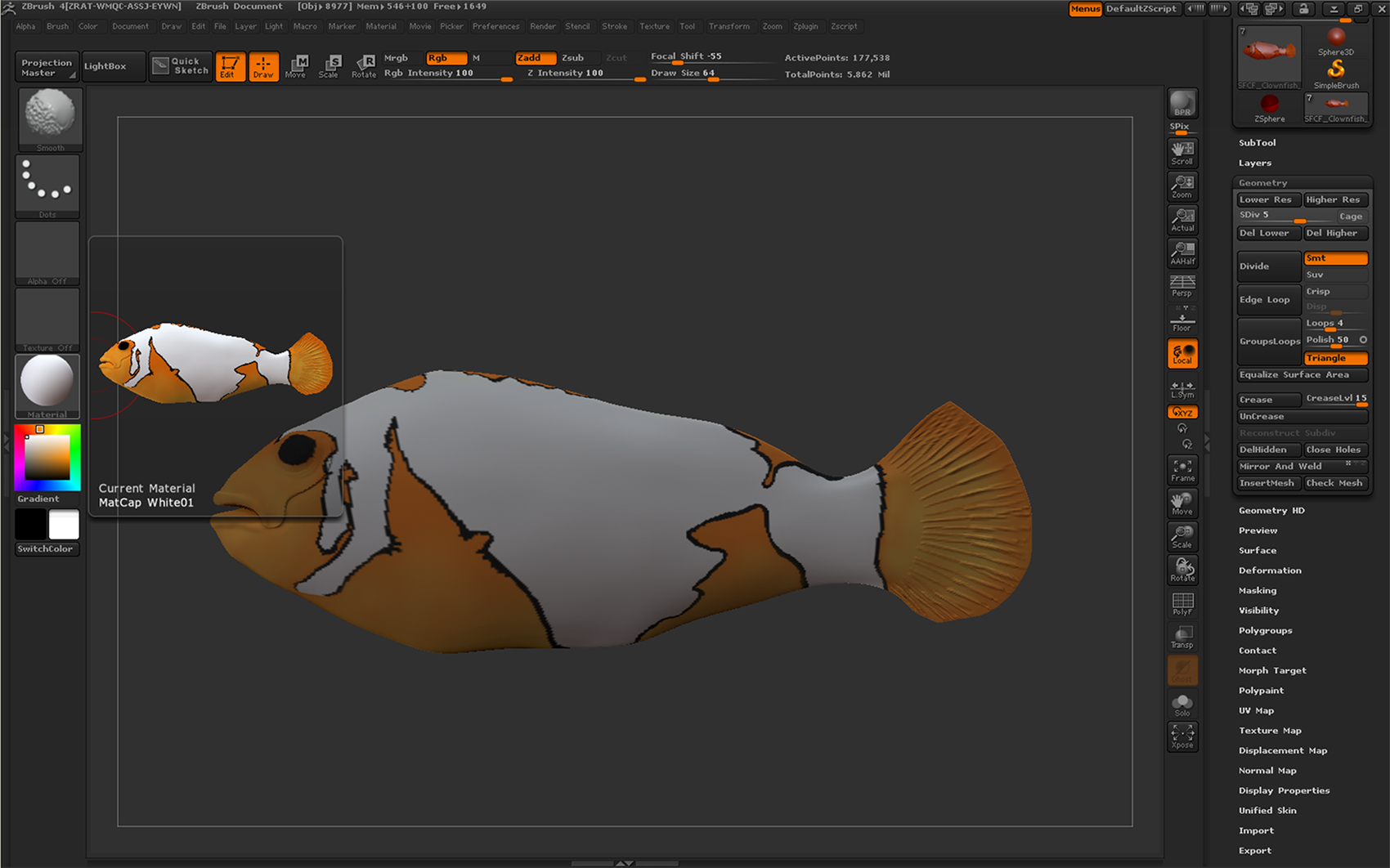
Toodark.jpg

I don’t know what happened, but I got my color back. I pressed a bunch of buttons on my keyboard and nothing worked, so I restarted ZBrush for a second time, drew a 3d cube on the canvas and changed the matcap to a white one that I use. It looked ok, but just in case I pressed ZSketch for no reason at all. Got out of that, then opened up my ZTL and it worked for some reason. Eh, whatever. As long as it works, right? :confused:

I figured out what my issue was. Hopefully this will help someone else.

I use Image Plan a lot as of late, and my subtool was a darker shade because I had the opacity on and it was less than 100%. When I was done using Image Plan, I forgot to turn the opacity back up, and that is why my sutool was darker than it should’ve been.

Again, hope this helps someone else.

1 Like