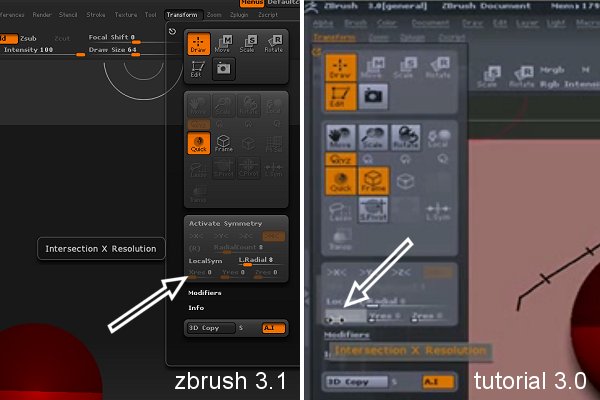
hey all. first post, i’m a fairly old hand with bryce and poser and i’ve been tinkering with zbrush since version2, nothing more than a glance though, mostly through fear. but now i think i’m going to get stuck in. upgraded from 3.0 to 3.1 and all the buttons have changed again.
i’ve been following the tutorials by jason welsh.
started on the zspheres lesson 4 (mid level) http://www.zbrushcentral.com/zbc/showthread.php?t=53087&highlight=poser
and i’m unable to change the 1:1 ratio (‘intersection x resolution’ (x res) under transform, as it’s greyed out. the tutorial is in 3.0 and he is able to set it to 1 (mine’s set to 0). this happens around 4 mins 15 seconds into the tutorial.
i’m thinking maybe it’s one of those new-version ‘hide and seek’ games of theirs, like the move tool. or i’m just completely over looking something?
thanks all
hope someone can help
Attachments