ZBrushCentral

zspheres, hand smoothing... help?

Ok, ive been following tutorials from Gnomon on zbrush basics, and as part of the learning process ive been using zspheres to make a whole human form… but every time i do, when i make individual fingers, i end up with a crease i just cant shift, whether i smooth, rake and smooth or just lower the subdivision and move the mesh around a bit… there should be a picture attachment to give the basic idea [ATT=]hand2.jpg[/ATT]… can anyone help?

Attachments
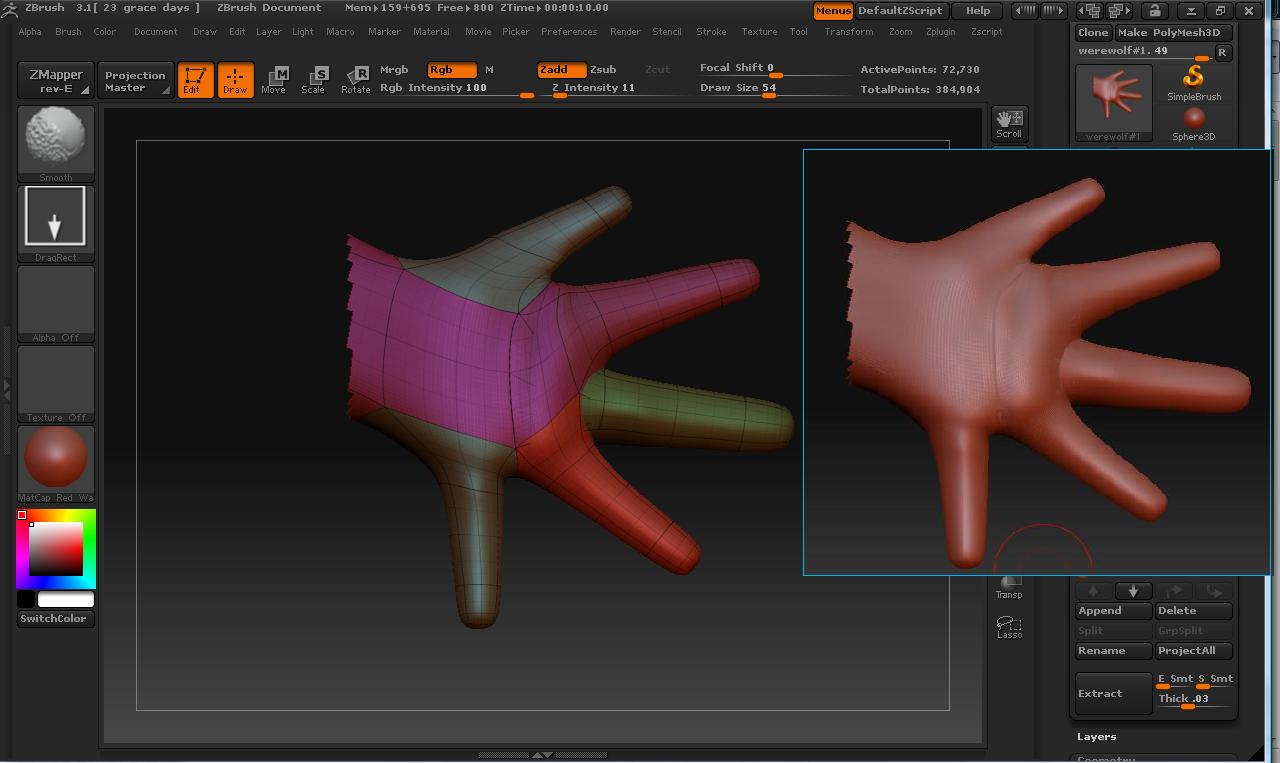
hand2.jpg

The problem is that your tutorial hasn’t covered one critical aspect of how ZSpheres work: At the default settings, ZSpheres skin as if they are six-sided cubes. Each side can only have one child.

When you created your hand, you attached three children to the same “side” of the ZSphere. They all then skinned to the same place, resulting in overlapping polygons and the crease.

There are two ways around this:


  1. Change the way you lay out your ZSpheres. A hand can be created like a fork, using multiple ZSpheres side by side for the palm and a finger coming off from each.
  2. Change the ZSpheres themselves via the resolution controls. There’s a tutorial for how to do that here: http://www.zbrushcentral.com/zbc/showthread.php?t=23136

thanks alot, i’ll give this a try, it makes a lot of sense :slight_smile: :+1: