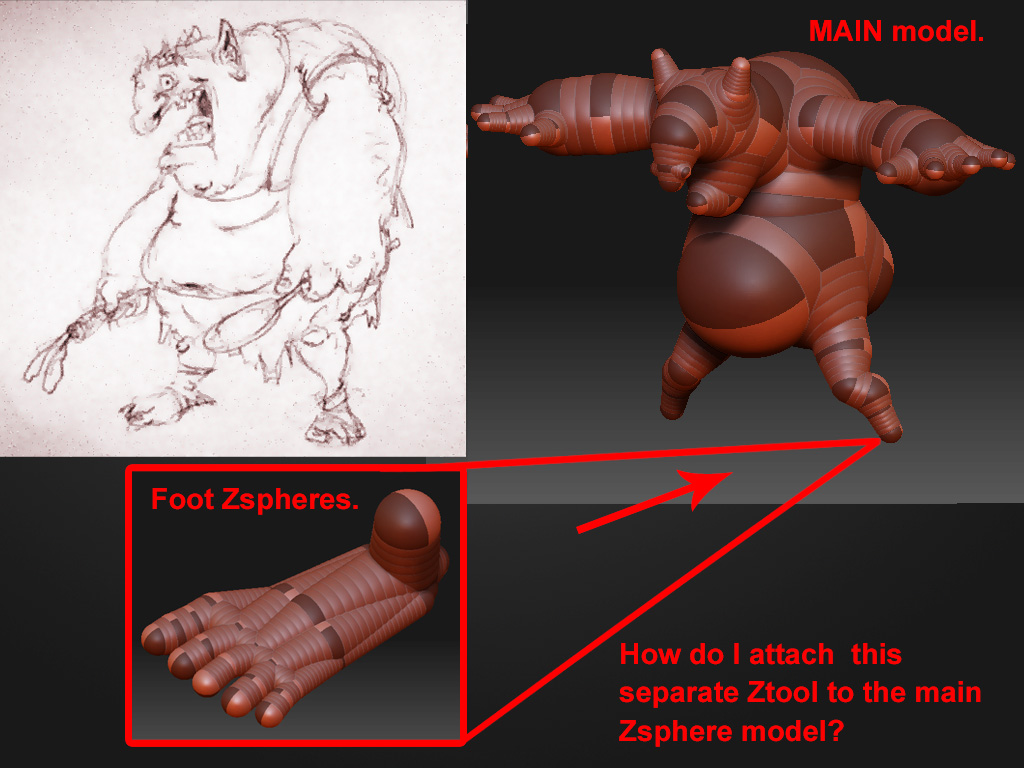
Hi! Started to model this character I drew recently. I have created the Zspheres for the base mesh and will use Unified skin ( and not Adaptive skin )to evenly distribute polygons all over the model( I will retopologize later ).I am finding it difficult to create Zspheres for the entire model by creating child Zspheres branching out all the way down to the fingers of the hands and the toes.
So I basically created the main body of the character , setting the proportions as close to the sketch as possible,and then made a separate chain of zspheres for the feet. I like the control I have in creating separate limbs and parts as it makes it a lot more easier to move the zspheres around . I want to avoid using things like Local transformations while creating small Zsphere sections as I feel it makes things a tad bit more difficult for me.Blame my clumsy fingers for that.
Now how do I attach this separate chain of Zspheres to the main Zsphere structure such that I have one contiguous Zsphere model which I can edit and later skin using unified skinning. It will help me tremendously if it is possible to do it. Please help :-).
Attachments