ZBrushCentral

zSphere help

Hello everyone.

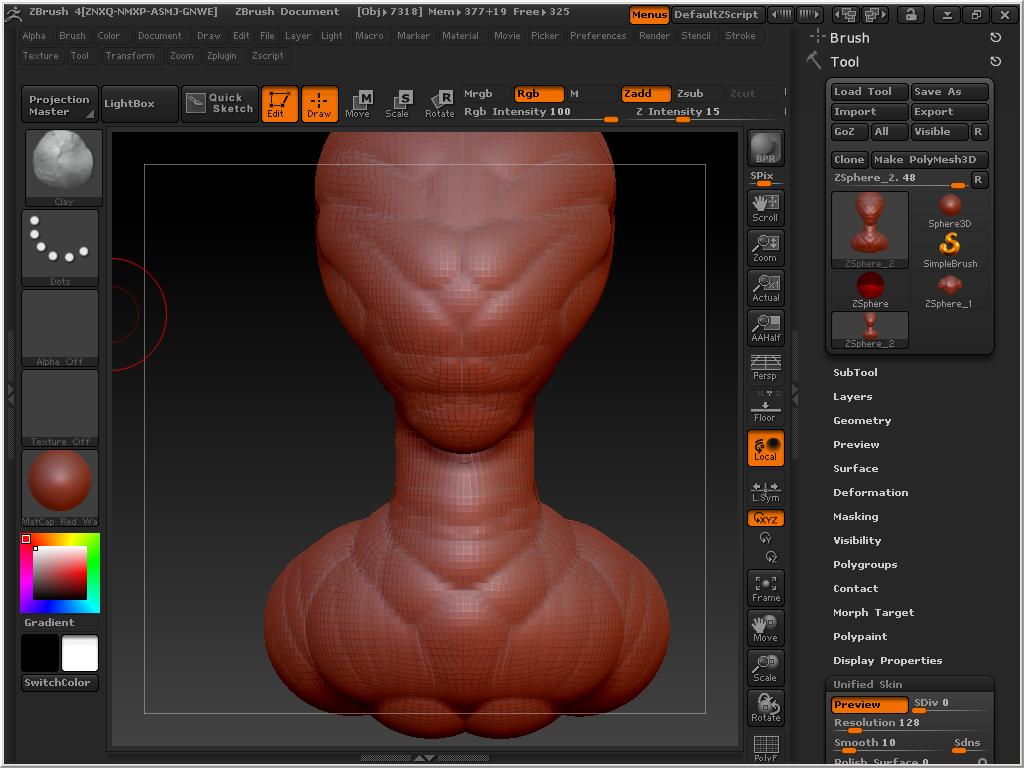
I’m a beginner on ZBrush so i just want to know if i can somehow make more polymeshes to this model to make its skin more smoothier.

is it possible?
i made this model with zSpheres.

thank you for answers and have a nice time!

and btw sorry for my bad english [attach=235846]alien.JPG[/attach]

Attachments
alien.JPG

hi black0star0

looks like you created this with ZSketching.

If so you you can go to the side palette under unified skin and press “Make unified skin”.

Otherwise if it is done with ZSpheres only the way to go is with make adaptive skin.

Then the new created mesh should appear in the toolbox and from there you can go to Geometry and add some subdivision levels with the divide button.

Cu Ollie

yap. i created model with help of zSpheres and then put on the surface some zSketches. well im quite noob so adaptive skin is locked and so is geometry. how do i unlock the mode?? i know i’d have to watch tutorials but i dont have time right now. alien?ek.JPG

click “Make polymesh”…then make some time for watching tutorials

Could a Moderator please move this thread to the proper Forum so we can help this guy without using up bottom row thumbnails. Thanks!:slight_smile:

adaptive-unified.jpg

guys i found out how to give model more poly’s thanks to cosmic.ollie
i am using zBrush for about 1month but i never got any interest to make something really good (for me). so today i made my first alien and I’m proud on myself. i didnt import any spheres for eyes. and i still dont know how to paint/color in zBrush :stuck_out_tongue:

i use mouse.

thanks to everyone who helped!!
Alienbyme.jpg

just one question… how can i “paste” a picture on my model like on this sample so i can give my alien some other color/skin texture :stuck_out_tongue: …?
untitled.JPG

Good start black0star0! Keep working on it.

Just a reminder, if you have questions or want help with something, then post your thread in Other Questions and Troubleshooting Forum.

If you want to show off your artwork then you can post in the Main Forum.

oh okay. thank you! :slight_smile:

About your painting question, I would advise you to watch the Spotlight Tutorials in ZClassroomto learn how to use Spotlight.

thank you i will watch. so the spotlight is used for painting models etc.?

Originally posted by black0star0,

so the spotlight is used for painting models etc.?
It’s one of the ways. There are other ways like polypainting with just Rgb on. Using a background image with ZProject Brush. Using ZApplink plugin or Image Plane 4 plugin.