during creating zsketch balls they are too big in compare to the red cursor circle … Any ideas ?
Attachments
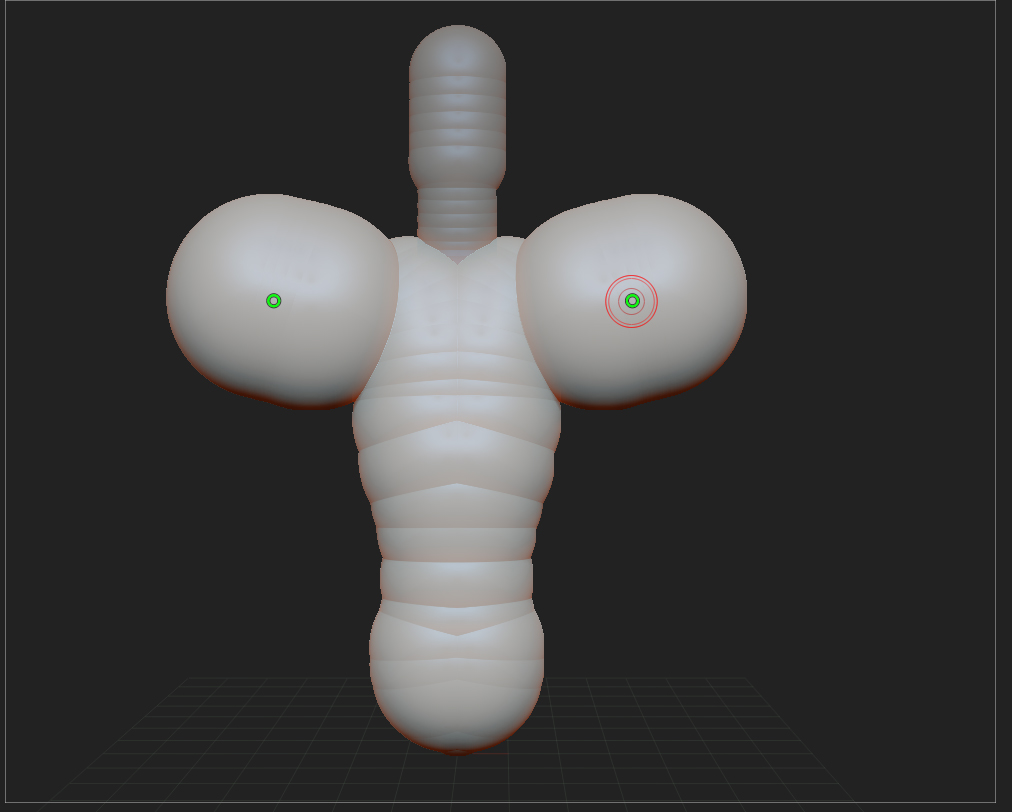
during creating zsketch balls they are too big in compare to the red cursor circle … Any ideas ?
There is a tiny button in the worst place possible, its called Dynamic, its right where you adjust your brush size (Draw Size at the top of your ZBrush window just above the Canvas) and it needs to be off before you start using ZSpheres.
I bet that fixes it!
but … it is ur naked words ?orr. u maybe can explain what dynamic button does regarding to zspheres and then zsketch … thank u 
Naked?
Um ok, I will try to dress them up a bit!
The dynamic button maintains your brush size (under normal circumstances such as while sculpting) regardless of how you are zoomed in or ot, or more precisely how you have scaled stuff on the canvas (I think of it as zooming but its actually scaling).
Normally WITHOUT this on you can zoom in and out and its sort of like changing your brush size, with it on your brush size automatically changes with it.
This doesn’t work with ZSpheres, mainly I think ZSketch because its a rather different tool, its not like the normal sculpting tools (I don’t know how, its just different).
If you turn Dynamic on and off while using ZSketch you won’t see any difference, you need to have it off BEFORE you start working, I could be wrong but I think its a known bug.
Does that help?
It helped … thanks small_orange_diamondsmall_orange_diamond
Yay!!!