ZBrushCentral

Zrbsuh 3.5 R3 - How to Export Details from BumpViewerMaterial

Hi, I am having problems extracting a bump map. It gives me a white blank image and even after adjusting the levels back in PS, the pores are not showing.

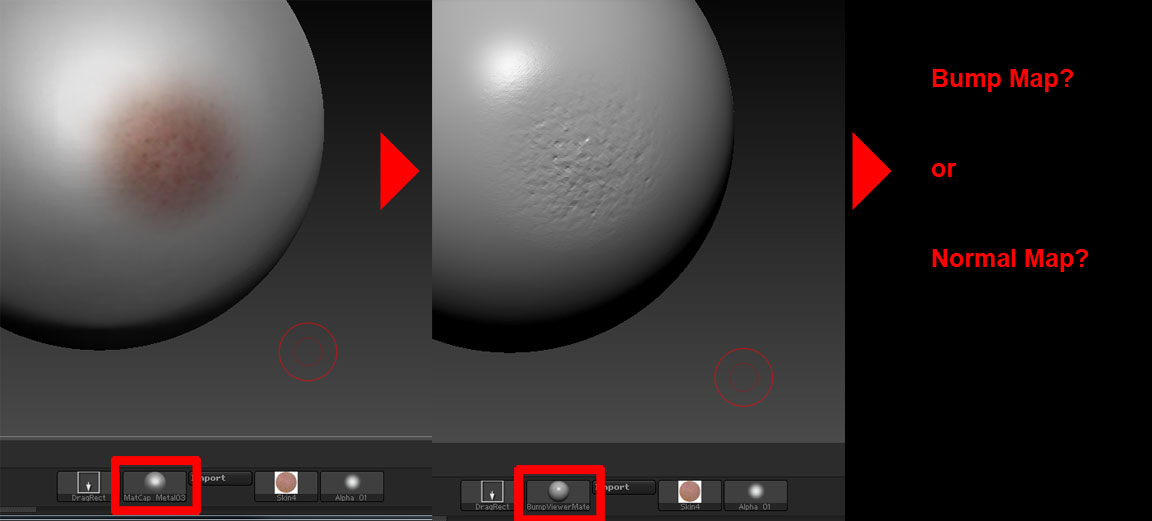
The pores details are from the color map, after I switch to BumpViewerMaterial.

How can I export the pores details as Bump Map or Normal Map as shown from the BumpViewerMaterial?

Any help/hints is appreciated.

bumptest1.jpg

Hi, I use 3.5 r3 and all is well.

I first create an object, a sphere.

Then I draw depth information on it, anything, some scribbles.

I go to my Normal Map palette and click “Create Normal Map”.
Zbrush tells me to go to my lowest SubDivision level. I realize I have no Subd on my sphere so I subdivide it one time, creating one level of Subd, I then switch to my lowest level.

Now I hit “Creat NormalMap” in my Normal Map palette.

And Zbrush creates a very nice Normal Map.

How can I tell? I go to my Texture menu and click it and there I see my Normal map, with all of the depth detail that I described, drawn in, automatically. From there I can export it as a .psd if I need it.

Working fine with those steps. Please follow directly and report the part where you stumble, so far I’m able to create normal maps just fine in r3 using the bumpviewer material without a hitch.

Ahhh, put it simply did you “create NormalMap” after painting all your pores and such?

Hi Extra,

Thank you for the reply. Those are the steps I do to create the Dis/Normal Maps. However, I think that you miss understood my problem. I haven't sculpt the pores. They are from the color map, after painting the color map. I switch to BumpViewerMaterial, where the details are shown as Bump. What I need now is to transfer/extract those details from the BumpViewerMaterial into a Bump or Normal Map. Is this even possible?

[bumpviewematerial1.jpg]

Hello. If your colour map has enougth details for bump details, then with the colour texture produced and sellected in the left UI texture sellection pallet, open the texture pallet and click on make alpha. This makes a grey scale version of the colour map which can then be exported for use as bump.

To make a normal map from this info, you must sellect this alpha in the right of the UI for displacements. When you have sellected this map, turn on Mode, increase the intensity and apply it. Its a good idear to have a layer on for this info. The details will be applied, then you can produce a normal map from your newly deformed object.