ZBrushCentral

ZProject brush problem 3.5R3

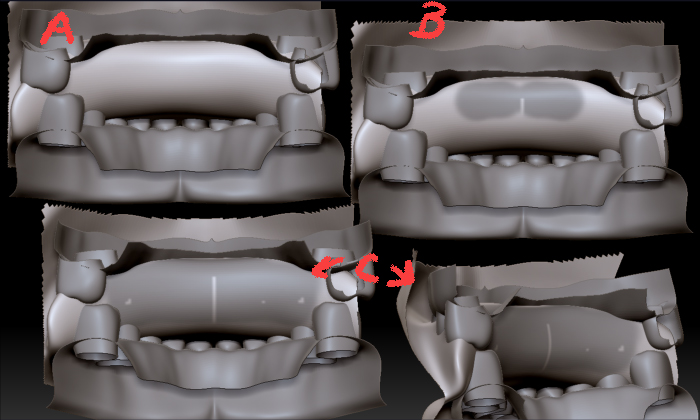
Here is the problem I am running into when I try to use the zproject brush in 3.5R3:
A. original mesh before projecting.When I want to project a mesh with the zproject brush, I hold down the alt key.
B.Instead of projecting, it is doing what looks like a light mask.
C. In this image, the seam and two spots appeared as I applied the brush, they have nothing to do with the back mesh detail that I am trying to transfer- it doesn’t look like that. As you can see, the mesh I am trying to project doesn’t even budge.
I am using windows xp.
Any suggestions?
zproject3.5problem.jpg

I am also getting weak results when using project all. If the zproject brush worked it wouldn’t be such a problem, but as it is I can’t work around this and will have to go back to 3.1 because these are functions I need for work.
Here are my results for project all:

  1. original mesh and skin to be projected
    2.both before projection
    3.project all
  2. resulting mesh- I can’t use zproject brush to fix what was missed with Project All.

Attachments

project all-3.5R3-notasgood.jpg

In case anyone else is having this problem, I have finally found the answer.
You have to make sure the zadd button is on so that it moves the mesh, otherwise it is just set up for RGB. I never hecked that before because it wasn’t set up that way in 3.1, I never had to switch that before.