ZBrushCentral

ZMapper Projection - 500.000 poly limit

Hi,

Him following the guide for projection a high-res mesh into a low poly one:
http://www.pixologic.com/docs/index.php/ZMapper_Projection

but I get the error about the 500k limit whed trying to:
Choose the original mesh (A), go into ZMapper, and click Capture Current Mesh in the panel above. This will remember model A as the mesh from which detail is being projected. Then leave ZMapper.

Any suggestions? Am I doing something wrong?

In ZBrush 3 you no longer need ZMapper to project details for creating normal maps. Do the following:


  1. Append the destination model as a subtool.
  2. Store a morph target.
  3. Divide the model enough to be able to support the details from the source model.
  4. Use Tool>SubTool>Project All to transfer the details.
  5. You can adjust the settings to fine tune results.
  6. You can also use the ZProject and other sculpting brushes to clean up any problems with the projection and get everything perfect.
  7. Go back to level 1
  8. Switch to the stored morph target.
  9. Create the normal map.
With ZMapper, you can’t adjust the projection at all. What it gives is what you get. That makes the method above much more powerful and versatile. And it even works with version 3.12.

Good use Subtool>Project All. Another nice FAQ tip! :slight_smile:

Thanks for the detailed reply, your explanations are always very precise and clear. :+1:

But still I feel that approach is not precise enough, I will get some problems with spikes on some edges and other little small imperfections.
Also some of the fine details, like a button on a shirt, would force me to subdivide the mesh too much just to get a good resolution to project those details.

So far, unless I dont change the original mesh the best workflow I’ve found is export the full high res model (sometimes in chunks depending on the hardware) into 3ds max or maya and use the render to texture in that software, allowing me to easily add new details outside the model (earings, or buttons in trousers, watches etc) without compromising the original model made in zbrush and withouth that process of projecting the details into the model.

Is there any other way in zbrush to just read several subtools and project their detail into a low poly final version without having to merge them or project their detail into a high res model?

Hi CastorPT, I found the same problem as you…

[Error.jpg](javascript:zb_insimg(‘111117’,‘Error.jpg’,1,0))
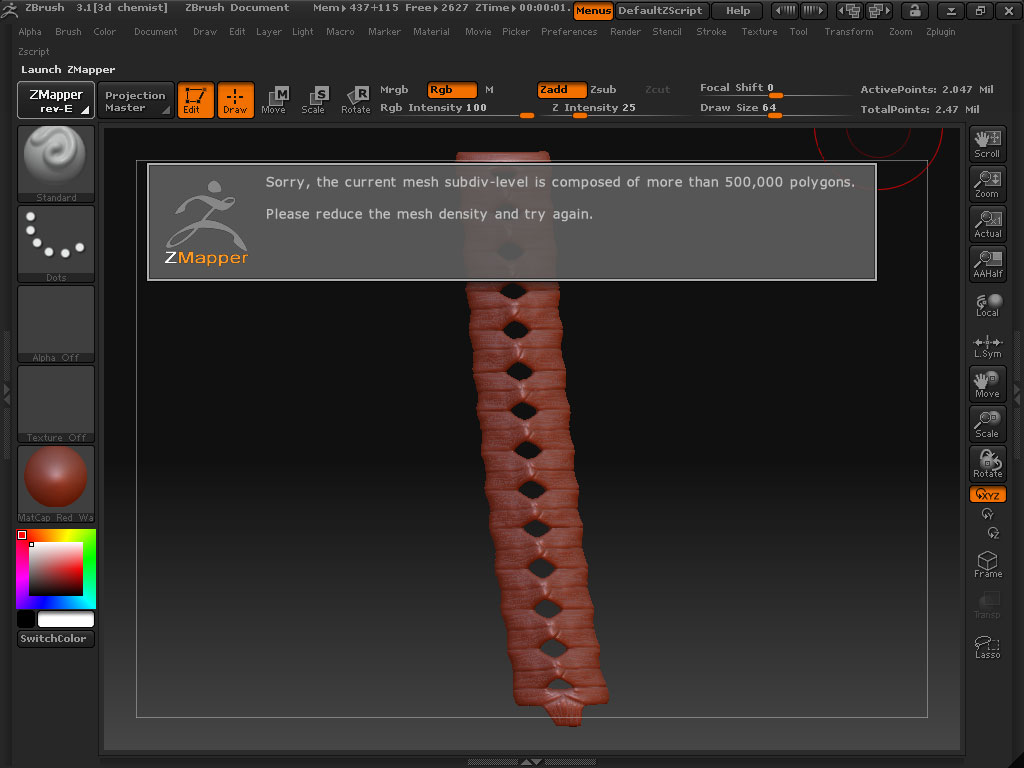
I did the high poly in ZBrush, low poly in maya, and using ZMapper I tried to do the normal map, but I found difficulties while doing it with ZMapper, it seems I cannot go bigger than 500k polys :frowning: .

So what have I done is I delete half of the mesh or at least not more than 500k polys, then I capture with ZMapper, import a complete low poly model with the uvs and start to do the normal map part by part. Finally, I stitch them in photoshop.

Well it’s kinda funny :smiley: , and I believe that’s not an exact method to do that.
Is that because of my PC is lack of memory or other problem???
I’m running 4gb memory with xeon quad core 2,4ghz.

I tried to do the project all before just like aurick said, but there’s spikes everywhere, if I divide more my PC’s getting slower and stop working

Need help also, thanks for the answer anyone :wink: .