ZBrushCentral

Zbrush4R6 Doesn't Know I'm Working on a Clone

Anybody else have this problem or know of a solution? I’m working on a clone of an object with subdivision levels, the clone itself of course is simply the model at it’s lowest level.

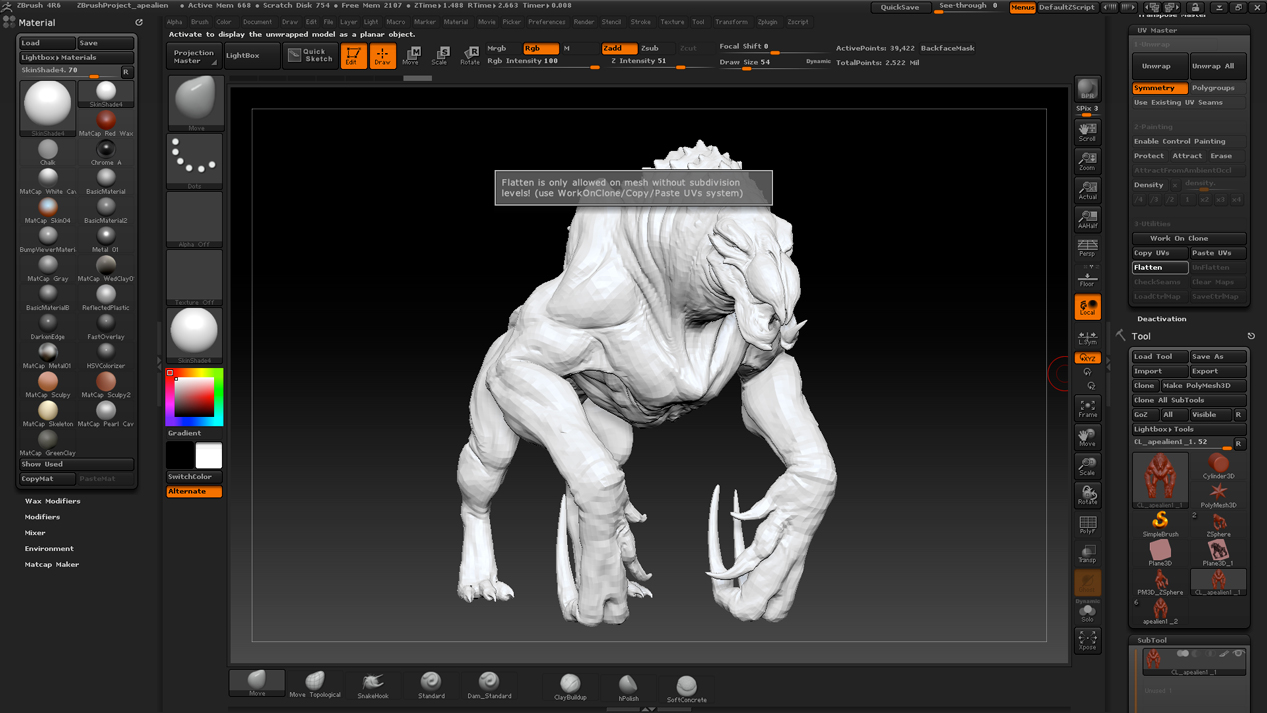
I can’t hit Enable Control Painting, it gives me an error message that implies I’m not working on a clone (saying “this function requires a model with no subdivision levels”).

I can hit Unwrap, letting zbrush just figure out the seams by itself, but I can’t hit Flatten to look at them, as it gives me the same error message again and acts like I never hit Unwrap in the first place.

Attachments
unwrap.jpg

Try renaming the original tool without a number at the end. Then try the clone button and working from there. I know sometimes Zbrush has issues with similar named subtools with numbers at the end, e.g., Dragon_Head1 and Dragon_Head2.

You did delete the higher subdivision levels on your clone? You should update to ZB4R6 P2…ZPlugins:AutoUpdate

The model you are using does have subdivision levels - Active Points are 39,000 whereas Total Points is 2.5 million. These numbers would be the same with no subdivision levels.

I guess you used the Clone button at the top of the Tool palette. This copies the model including subdivision levels. You can use that but you need to delete the higher levels. The UV Master>Work On Clone button copies the model without subdivision levels.