So I’ve made a talon and it’s not quite the shape I wanted, but the geometry is all twisted up and trying to build up over it with Clay is just creating a pinched look on lower subdivisions.
How do I untwist/uncrumple it?
Attachments
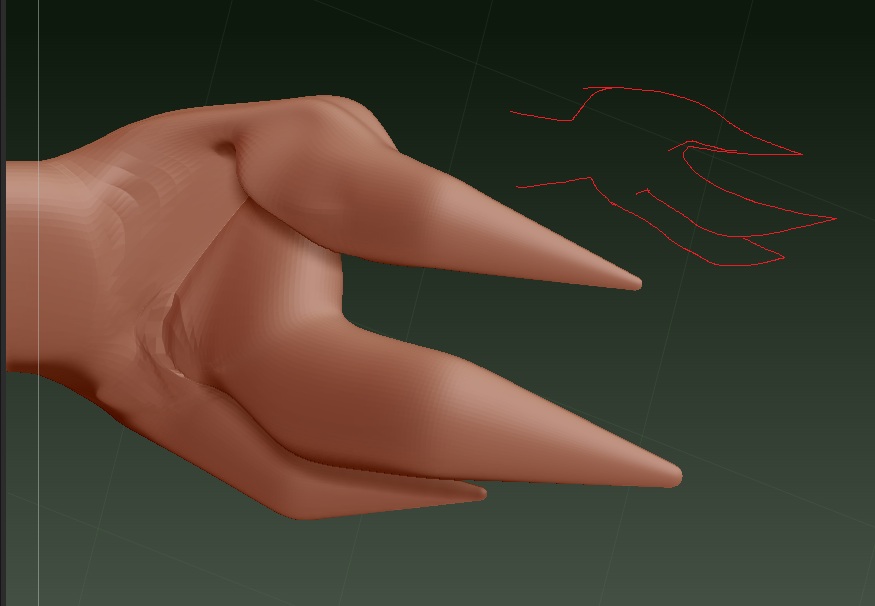
So I’ve made a talon and it’s not quite the shape I wanted, but the geometry is all twisted up and trying to build up over it with Clay is just creating a pinched look on lower subdivisions.
How do I untwist/uncrumple it?
I am assuming you made that with Zspheres?
Anyway, there is no, easy way to do what you need. I would either rebuild the geo that is messed up and insert it (videos in the zClassRoom on how to do this) or just dynamesh the thing and work from there.
Without knowing your end goal and workflow it is hard to give you a specific answer.
I don’t have ZBrush infront of me so I hope this makes sense…
But if you mask everything but your talon under the deformations pallet drop down there is a “relax” features that you can use that may be of help.
I would personally do what the other poster suggested and just dynamesh everything to get a nice sculpting mesh. You may have to do some extra work in bringing back some details but I think it would be worth it.
Thanks. Do Zphere/Zsketch armatures convert into Dynamesh? I’m afraid I’m quite new and I’m not familiar with all the many subtypes of geometry yet.
Yes they will convert.
Basically you use the “Make Adaptive Skin” feature once you have your ZSphere chain made and then you go to Geometry -> Dynamesh to turn it into a dynamesh.