ZBrushCentral

ZBrush U.I Question / Problem

I edited the u.i. into this:

And it is my first time creating a u.i. and i pretty much enjoyed very much the look of what i put together with the default items at my disposal.
Did no scripting whatsoever all i did was alt+ctrl move things around to way i like to work and that is without having to open side menu’s until i need them and utilize all of my drawing space, hence why the wide view port.

Now my shortcuts have been disabled, i don’t know why this is, could overlapping more than 1 item create this error?
This worked perfectly fine the way you see it here, except i had two rows at the top and then changed that to 1 row and sorted everyone on 1 row/line ViewMask to Export.

I don’t know if i may have hit a disable shortcut key, i tried looking around and found no answer so i came here to ask and hopefully get some help with this, for now i can just press S but i’d rather keep my flow with my shortcut keys as i got used to them.

Help please,
If you like my U.I. tell me how to share it and i will.
Also i used a default interface from the selections at the top, the one with the BrushMod and i can’t remove that brush mod button on top, with alt+ctrl, can someone help me remove that as well, i don’t think i need that.

Attachments
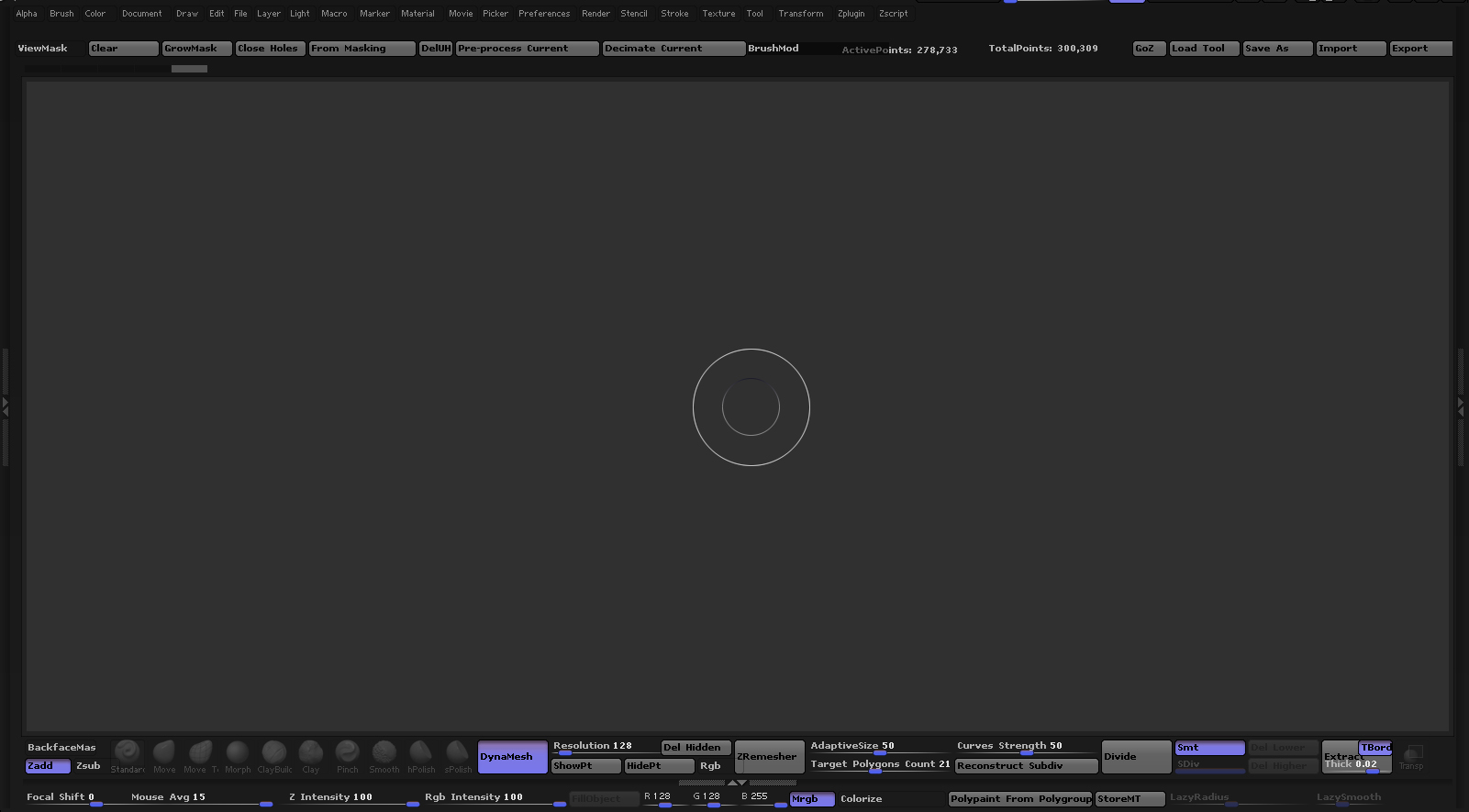
pimpui.jpg

Whatever works for you. Right click menu is quite handy and shouldn’t be readily dismissed. I posted one, needs the Axis plug to be really useful. Happy ZBrushing. ZRemesher has options to set, don’t see them there.

I use right click, somewhat, and you said you posted one? one what, menu?

This was done yesterday, when i find i need options i can add them at a later date though this is for sculpting out ideas/designs more than anything else right now.

Just need help with disabled draw size and pretty much any short cuts at the moment being disabled and removing the brushmod button at the top, this brushmod option is found in the default UI schemes at the top near menus.

My UI can be found in this thread>> http://www.zbrushcentral.com/showthread.php?182678-Custom-UI

Little bit confused how does loading your ui/cfg help mine?

Part of the problem you may be having is due to the menus being context sensitive, object not there or in Edit mode can lead to them not being present. I didn’t say you have to use mine. After using the software, I customized the UI to suit what I do on a regular basis. Options are good but when it takes a long time to get to them in the various menus, steps have been taken. Be sure to save yours before loading mine as it will replace what you have. Nothing wrong with your UI…if you do load mine, you’ll perhaps be able to tell why I made mine as you see. I access the brushes with the B hotkey and draw size with the S hotkey, most of the time. Depends on where my cursor is.

Thanks Doug i’ll give it a go and see what is going on with your u.i.
I take it that if your also using the S shortcut that your bracket keys also have been disabled from moving things around to setup your u.i.?

Haven’t tried it yet but will get to it soon and report back, i did things how i did them because the constant closing and open side menu panels just took time and all i wanted to do was click and sketch and continue moving along as quickly as possible.

I’ll probably tweak mine after viewing yours, and see what caused the “glitch” of disabling shortcut keys.
I find it odd though that at the very location of this applications creation i haven’t one 1 person to discuss this matter with, guess i’ll post elsewhere and see who else might have ran into this situation…

lso i used a default interface from the selections at the top, the one with the BrushMod and i can’t remove that brush mod button on top, with alt+ctrl, can someone help me remove that as well, i don’t think i need that.

That’s stuck there I’m afriad; it likely belonged to a default UI layout that was created in an older version of zbrush before Brushmod behavior was changed. If you want it gone now, you’ll have to rebuild your UI starting with a layout that lacks it.

Just like me to pick the impossible.
No way to edit it in script?
I mean it is not hard to just switch this over but damn… :frowning:

Also no help with the disabled shortcut keys?
No one has encountered this?

I have yet to test my other options.

Ty, cryid.

ZB is mostly awesome. However it can be confusing. Load mine. Unlike other software which displays all your options all the time, ZB does not. Look at mine and start there. Sliders may not show if there is no object selected. Don’t give up.

To doing things your self here is my answer for my problem, besides the mod brush i will just redo my u.i. though for future references this thread might help someone out in the future this answered my problems.
As i even tried to load the default and somehow my startuphotkeys.txt was deleted… oddness.

http://docs.pixologic.com/user-guide/keyboard-shortcuts/defaulthotkeys-file/

^ Location
StartupHotkeys.txt file – WindowsLocation: Users\Public\Documents\ZBrushData\ZStartup\Hotkeys\

//ZBrush Hotkeys
[BRUSH:MORE ITEMS,98] // B
[BRUSH:STANDARD,5447796] // Popup+T
[BRUSH:SMOOTH STRONGER,5447795] // Popup+S
[BRUSH:MOVE ELASTIC,5054565] // Popup+E
[BRUSH:MPOLISH,7151728] // Popup+P
[BRUSH:CLIPCURVE,4399203] // Popup+C
[BRUSH:CLAYLINE,4399212] // Popup+L
[ZPLUGIN:MISC UTILITIES :<<BRUSH,219] // [
[ZPLUGIN:MISC UTILITIES :BRUSH>>,221] // ]

I am happy now.