hello there,
im having some trouble with zbrush
and id be glad if anyone could help me solve em otherwise i would have spent a whole week of my life for nothing learning zbrush and redoing things again and again due to its crashes… which would be a pity 
why does it crash all the time? sometimes i even have to start it 10 times in a row until it even gets to the starting screen?
got 2gb ram, 2x2Ghz Cpu, and 256mb ati 850x gfx card
not great but it should do the job
what step does the video maker in the tutorials for the max export do between subdividing and sculpting the tool?
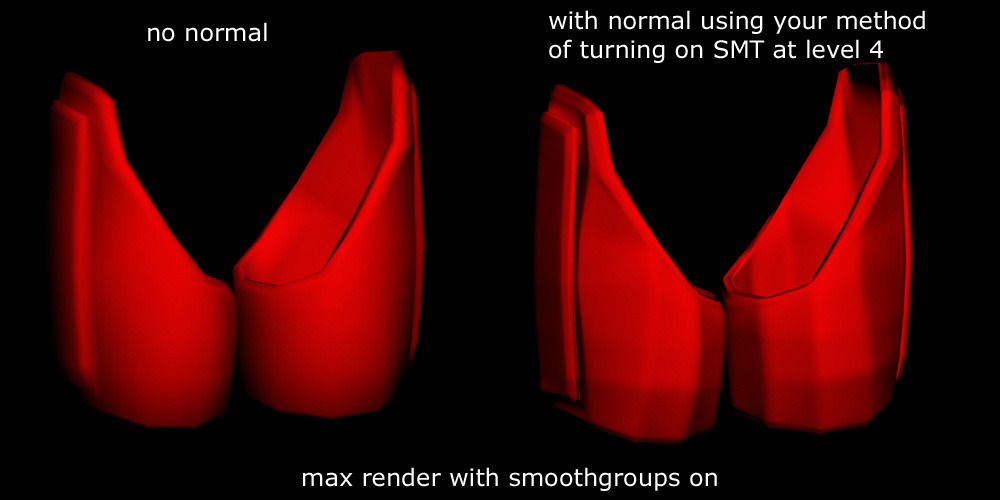
at the end of the subdividing video he has an edgy, faceted look, on the start of the sculpting video the club is eventually all smoothed out like a 3dmax smoothgroup would look. How can i achieve that? (might solve the following problem)
how can i project a polypainted colormap/texture on my SubD1 model the same way zbrush projects the normal and cavity maps?
my problem is that the cavity/normal map and color map just dont match up in the end. i realized this is due to the fact that the color map gets projected on the high poly and the normal map gets projected on the low poly.
http://img223.imageshack.us/img223/8345/distq.jpg
3.1
i tried other methods to circumvent that by using a morph target (didnt help much) and using a cage (didnt help either), i then tryied using the subdivion with SMT (smooth) turned off to reatain the basic shape of my model which worked just fine and gave me a much better ability to paint where my paint belongs apart from the detail work
the problem here was that the normal maps generated that way aswell as the cavity maps showed the polygon edges of my original low poly model!
they had a faceted look which obviously wasnt what i wanted. How do i prevent that?
http://img196.imageshack.us/img196/7983/norm.jpg
3.1.1
i tried using the “import smooth groups plugin” therefore just to see it do absolutely nothing at all except that it activates “frame” on import…
(i use max 8)
3.1.2
i toyed around with the normal maps even more
having SMT turned off during subdivison allows you to create useful (meaning smoothed) normal maps only if you have just 2 subD levels… once you have 3 the normal map become all faceted again and thus unusable
4
why does zmapper sometimes not show the bottom frame with all the settings? a restart of zbrush helps but nothing else.
5
why does my paint tool sometimes stop drawing and only start again if i turn it to Zsub, draw abit, undo and then go back to Zadd or RGB?
rhetoric questions  small_orange_diamond:
6
why does it crash so often?
7
why does it crash so often and without any sense? often on saving a tool (through the menu not the hotkey)
8
why does it not have a simple delete function that uses my DEL key instead of some awkward click and point adventure… thet mighty DEL button was an invention back in the middle of the last century which revolutionized the computer industry… just in case you missed it…
9
why cant i repickup somin when i leave edit mode? it makes using the canvas for somin else than drawing 2d pictures quite useless and gave birth to the annoying subtools thing… why not at least add objects that leave edit mode automaticly to the subtools list?
the greatest of thanx for anyone who can help me at least on the upper main questions…
these problems nearly made me cry…  (ya its utterly sad if you see that you spent hours on hours creating somin you love and adore just to realize it was all pointless… kinda hillariously funny too but much more sad than a good laugh by now)
 Anyway. Always save at the lowest subD with all subtools. make sure no masks are active. Always save through subtool master (it does a check for hidden geometry and has a better save function). Also…don’t rush the saving. I can crash max everytime if I wait for the “autosave” to be running and then do something crazy like a boolean or a meshsmooth…yeah…real crazy. sigh.