ZBrushCentral

Zbrush polypaint pixalation on highest subdivsions

Hi all 1st post in these forums so iam really hoping some one can help me out in here (praying!)

Ok here is my problem, I have a model that I want to export the texture map from, I textured it all within Zbrush (using polypaint). My sub division lvls go up to 6 and I have used HD mode to polypaint and texture certain parts of the model also. However, when I now click “New From Polypaint” get these strange artifacts in my model as u can see in the screenshot below.

I have noticed though these strange artifacts mainly only appear on the areas whereby I applied the “Geometry HD”, oh I should probably mention that I divded my Geometry HD twice which got me around 38 million polys. I did while polypainting switch between HD sub 1 and 2 at times, because sometimes full hd was not needed, and it also gave me a larger area to texture with when only HD sub lvl 1

So if anyone can please let me know what these artifacts are and how I can get rid of them would be a great help to me, and I don’t want to go into Photoshop or what have you and manually have to paint all these artifacts out…

After a bit of experimenting I am able to paint over the strange looking artifacts, however they dont really go away, because as soon as I hit “New From Polypaint” it all appears once again :’(

Btw just to let you know I’am usng Zbrush 3.5R3 if that should makes any
difference…
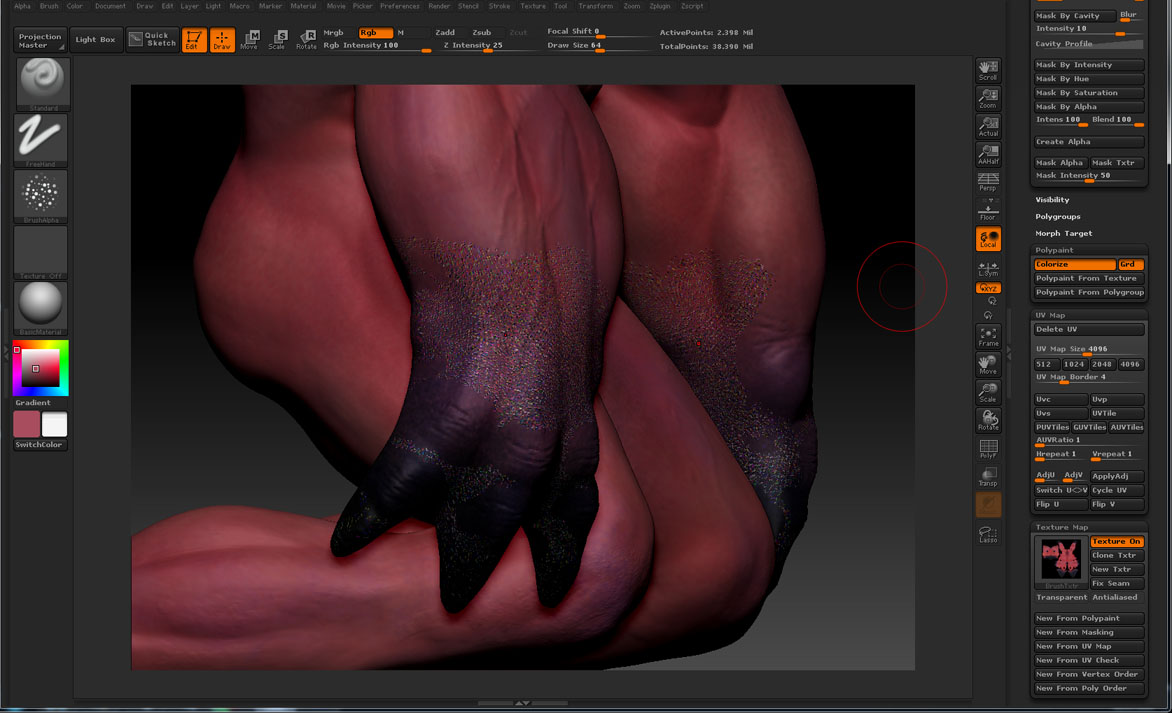
ZBRUSH PIXALATION ERROR2.jpg

Part of the problem may be due to the fact that your polypaint drastically exceeds the amount of detail that your texture can hold. A 4K map holds a maximum of 16 million data points. Your particular UV mapping is actually closer to 8-9 million usable pixels. So in order to transfer your polypaint to the texture ZBrush is having to discard about 75% of what you’ve painted. That may be what is creating the artifacts.

Hi Aurick, thanks for your reply sounds like a plausible answer to me :stuck_out_tongue:

However sadly I was a little too impatient and went back a few steps in my saved files. Resulting in having to re-sculpt and texturing it all again before, all them strange anomalies appeared.

As a test though for future reference, I did try changing the map sizes from 6k to even 8k and was still facing the same issues. The strange thing is though if I only work at the highest HD sub division iam not getting any errors. Sadly though personally for my situation it’s a lot slower working this way as the area I can work on is a lot smaller and slows my pc down a fair bit :stuck_out_tongue:

so I think in future in “geometry HD” I wont be using them sliders in between lvl 1 and 2 no more to prevent be developing similar sorts of issues further down the line

Anyway thankyou Aurick for you quick response, your input is valued highly as always! :slight_smile: