ZBrushCentral

Zbrush mask/inflat

Hi all,

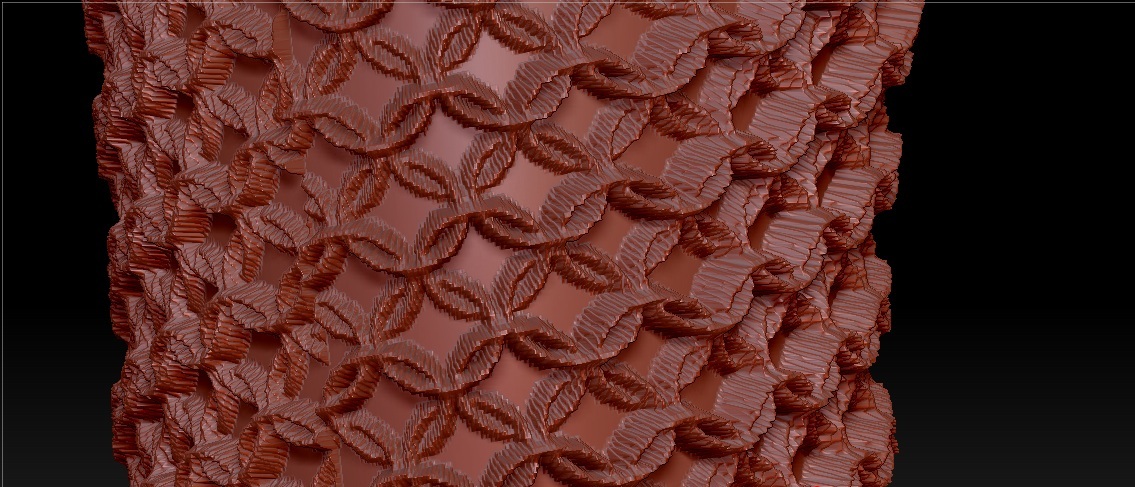
This is the step that i have done.

  • Created Texture with multiple chain rings 3d
  • Exported mesh UV in photoshop
  • Import UV in brush painted
  • use mask by intensity
    all ok, then
  • use Deformation->inflat to 5 value for make the chain

this is the result

As you can see, is different than normal smoothed ring 3d.

Any help will be greatly!

Attachments
chain.jpg

Can you post a picture of the texture that you converted to a mask?

It may be that your mesh simply needs more subdivision to allow for this detail. Other tips:

  1. Make sure your texture map is high enough resolution to not cause pixellation in itself when applied.

2)Try blurring the mask using “blur mask” in the masking palette, one you have applied the patterned mask to soften the transition. If you want to finer tune that transition blur, apply a very slight slight Gaussian blur to the mask in photoshop, or import in as an alpha and use the blur slider in the alpha palette (that last has performance implications when the alpha is being actively used somewhere, so if possible I recommend simply applying the blur in photoshop until you get the results you want.)

  1. Enter in the inflate value numerically in the deformation palette with the keyboard, not with the slider, and start with very small increments, 1, 2 etc. Even the lowest default values you get with the slider can be too much for what you are trying to do.

The texture is 2048x2048 the same resolution that i exported from brush.

i have tried to increase 2 more sudvid, but nothing changed.

The best result is decrease the number of inflating and use the “Blur Mask” but it smoothed too much.

i think i need to set the right blur value in photoshop, right?

Thanks.