Hi guys,
Im a newbie so be nice 
Version: ZBrush 3.5, Maya 8.5
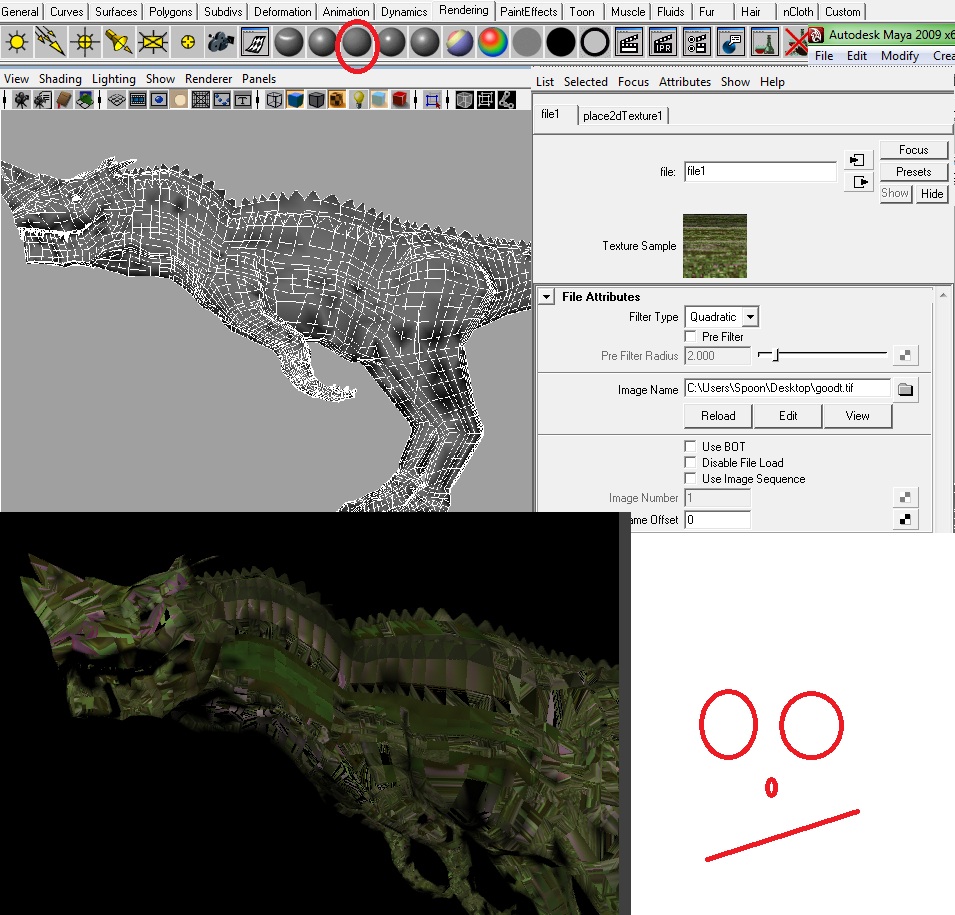
Okay i have attached 2 pictures that will hopefully help anyone understand what is happening.
I have saved a model that i made, has been built in Maya > exported to Zbrush > Textured and painted (Pic 1 number 1) I have it saved as a tool an can open it anytime for changes.
I then want to export so i Delete whatever UV it may have (part 2 in pic) and create a new PUVTile UV size 4096 - scaling down to 1st subD of course.
I increase my subs back and create a new texture from Polypaint (part 3) and it gives me what is shown in the pic.
I then head over to Maya (Picture 2) > select my initial model > assign Lambert > choose File and locate the exported texture. However as you can see by the pic, its buggered.
Now this is where im lost. I have spent the past 4 hours going through tutorials etc but i get lost as there are a lot that deal with 3.1 and zmapper but this is no use to me.
I also tried to export my ZBrush base model into Maya except i get the error “Cannot read file” when importing :S
If anyone could provide me with some steps i would GREATLY appreciate it as im disheartened by my work getting stuck at a pivitol point 
Attachments