ZBrushCentral

Zbrush breaking up mesh randomly

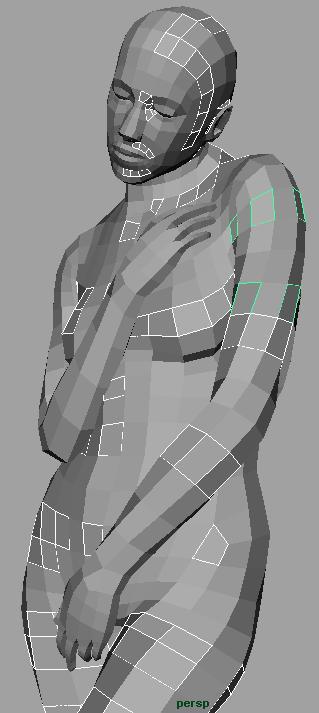
i’m not sure what is happening/ happened, and it has happened with 3 of my recent models. i noticed it when i exported an obj for a test and when i opened it in maya it was no longer one mesh but broken up into strange groups of faces. i’ve checked to see if it was something before i brought it into zbrush and the evidence seems to show that it has happened in zbrush. on one of my models it happened with the main mesh but the subtool is fine, although i hadn’t sculpted on the subtool in awhile. any ideas?

[attach=136855]Meshbreak.JPG[/attach]

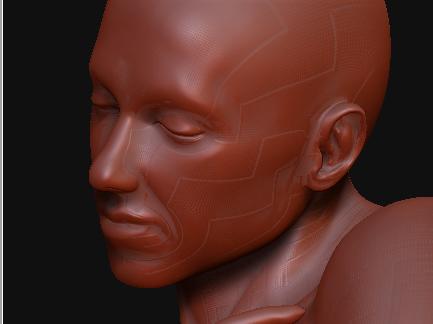
Also, recently some strange artifacts have appeared on my mesh, but that happened after i had already noticed the breakup issue.

[attach=136854]zMeshbreak.JPG[/attach]

Attachments
zMeshbreak.JPG

Meshbreak.JPG

check the polyframe (ctrl+f)

also, turn off grp in tool>export

i’m not sure what i’m supposed to do with the check poly frame. although i turned of grp in export options and it seems to be fine now. thank you very much, i was confused and didn’t find anything about it online. is this generally what happens when you use poly groups with grp turned on in export? after i read your post i realized all the models i was having problems with where ones where i used poly groups. i feel kinda stupid now that it was something so simple, thanks for helping

not a problem at all.

and yes, the grp button is to export out polygroups as different elements in the obj.

and the polyframe button was to see if the breaks in your model were where the different polygroups came together.