ZBrushCentral

ZBrush annoying oroblem.

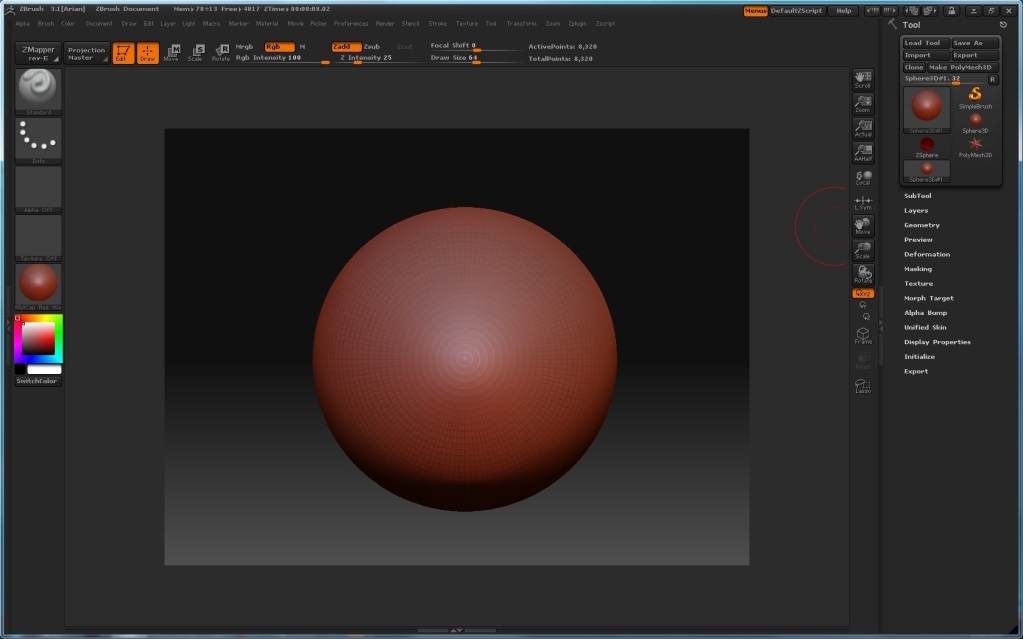
hey everyone. I have this very annoying problem with Zbrush. It doesn’t show the window of it’s interferance in the appropiate size. also when I try and zoom in looks OK, but after I try to zoom out the object it goes back to it’s original size.
Here’s image to see of what I’m talking cuz my english isn’t very good and I suck at explaining things.

[attach=145014]zbrushproblem.jpg[/attach]

Well hope you understood my problem and have idea on how to fix it.
Thank you.

Attachments
zbrushproblem.jpg

I think you could use the zoom document, or actual size buttons top right edge of the image view to solve your problem

resize your document - go to Document tab and enter the proportions you want and then click resize. Then you should be fine by pressing “F” or like agent said press the actual size button.

Try thinking about the working space as a Photoshop doc. there is a fixed size and it is NOT 3d space. When you zoom in and out, you are not navigating in space, but rather zooming in and out of the doc.

To “zoom in and out” on a 3d object in zbrush, you use the scale button, which is 6 buttons below the zoom button in your image. Though you use this to “zoom” on the object, it will not change the scale of your object should you want to reimport it into a 3d program.

Agent Enigma thanks for the tip but if I zoom on the document than scale out the object in edit mode the size of the document get back to it’s previous size (the one on the pic)…

JeremyD thanks for youre suggestio, but my document is one the “normal” size. It’s 960-720. If I make it 2000 or bigger it looks good, but it slows me very much.
Tsailen thenks for trying to help me, but that wasn’t what I was asking. Sorry if I have confused you.

If you’re working on a large monitor (I use a 30in) Change the default size up to double. As you said, you can’t get the thing to stay “sticky” Or when you zoom out, you loose whatever size relation the image. As far as I know there is no way to stop that from happening…other than changing the actual size of the document. You can change the default document size as well, you just have to save over the file that loads at start up. I don’t remember which one, or the path, but do a search, you’ll find it.

Some one made a plugin here, recently, I believe that will zoom out for you, and remember the state you were at so you can zoom back in to the same spot you were before, that might help you a bit. I don’t remember the name of the plugin though

I don’t know if this helps but since peoples monitor size differs, I took a (print screen) shot of Zbrush, pasted it into ms paint, cropped out only the image viewing size that my monitor alows, then saved it. Imported it into photoshop and looked at the image size.

This gave me the correct document size I can work with using my monitor.

AgentEnigma - I did that for awhile as well. But some things inside of Zbrush don’t work very well without the 4:3 aspect ration that Zbrush uses natively. I could be wrong on this but I remember Aurick saying something about the res and a bug…I don’t remember which one though.