ZBrushCentral

Zbrush 4r6 Slice Curve Issue

Hi i’m having an issue with the slice curve in zbrush. I’m currently taking furio’s sculpting mech’s class and he’s using it alot in his demo’s. Instead of just creating 2 separate polygroups when i slice a cylinder in half it seems to create other groups in between the cut. So when I dynamesh with groups on, i’m still not able to move those two separate pieces apart because of the polygroups created in between the cut.

Its much easier to explain in through an image, so below is a picture of what is currently happening on my side, and what is supposed to happen when using the slice curve brush.

Attachments
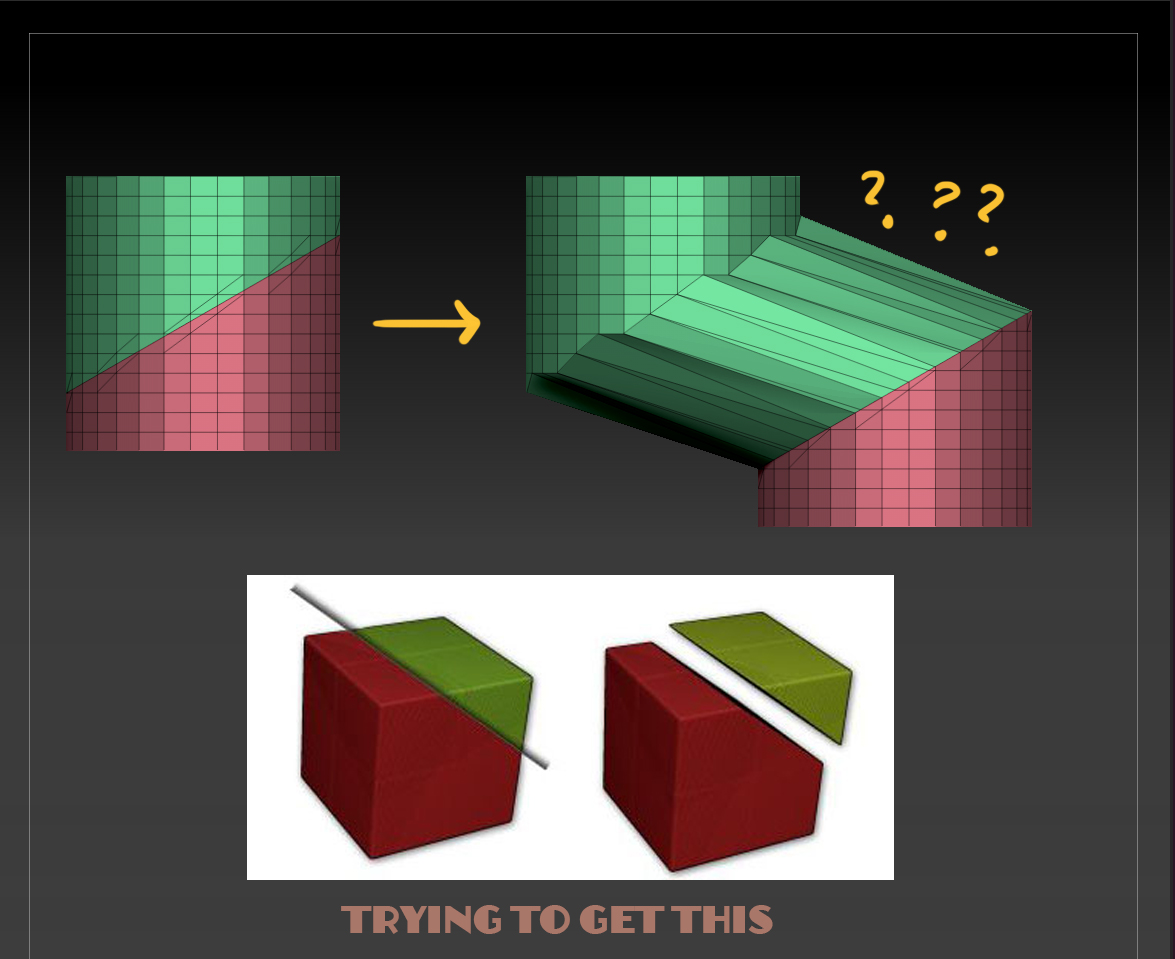
why.jpg

  1. The “Groups” button in the dynamesh menu must be pressed while dynameshing to achieve this.

  2. For some reason Zr6 now creates overlapping geometry composed of multiple polygroups when performing this operation. Ctrl-shift click on the visible portion of the mesh you want to move to hide everything but that polygroup, press Ctrl-Shift-A to un-hide all connected geometry, then Polygroups> group visible, or mask and unhide everything, then invert the mask to isolate it and move it away.

Or simply hit “auto groups” in the polygroup menu.

Hazard explains the situation in this post, and how to avoid it happening:

http://www.zbrushcentral.com/showthread.php?181309-how-to-use-slice-tool-and-dynamesh-to-create-separate-pieces-of-geometry

Thanks a lot Scott for the credits

Best Regards

Fran

Thank you very much guys :slight_smile: Truly appreciated :slight_smile: