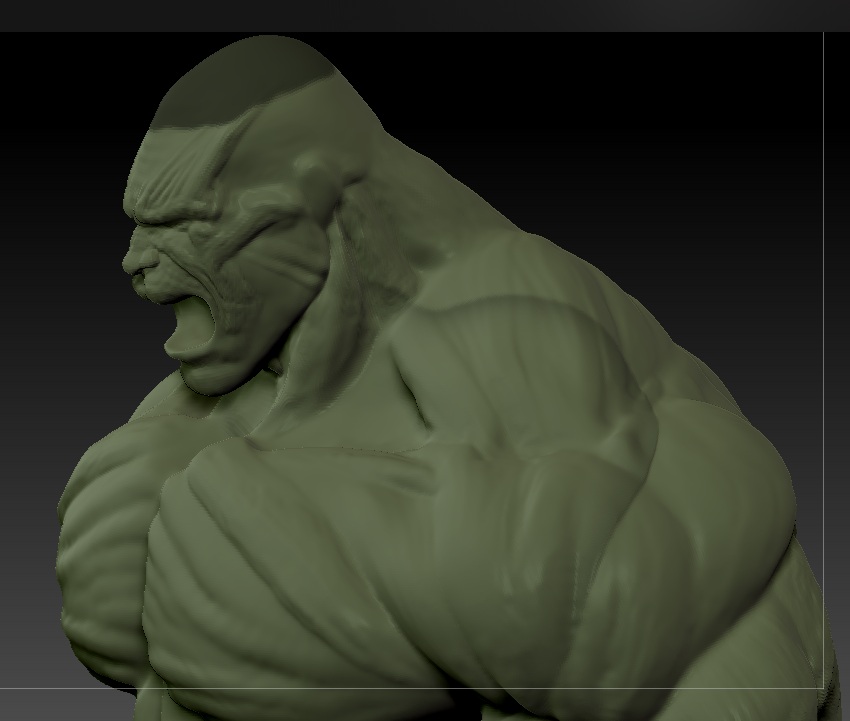
[QUOTE=MaxPower81;954734]I’m guessing you’re working with layers? I’ve had this plenty of times in the past. You have to be very careful to clear your mask before you make a layer. Otherwise, when you switch back to it, it will reload every time. You could try merging layers if you have some. Or clear your mask and start a new one. Frankly layers being able to store poly paint or masking info is a “feature” that has never been useful for me. It has only ever caused problems or happened accidentally. I wish they had different palettes for it because it has never worked as advertised for me.
Hey thank you for replying, i haven’t used layers on my model at all yet, but i’ll definitely keep that in mind for future reference. and my model had triangles in it and it had an extremely high poly count for my computer so it was slow, so i was wanting to reconstruct the subdivision levels, but with triangles zbrush won’t let you do that. So what I had to do was duplicate my existing higher res subtool, dynamesh the new one at the highest poly count allowed, then go to project all and it got a lot of the detail back. Luckely I wasn’t down to the small details with my model or I would’ve lost it all. But I was able to subdivide my dynameshed model twice and so I now have three subdivision levels to work with. But I’ll keep that in mind as well about the freezing other subdivision levels because I can already forsee me running into a problem like that, thank you again for your comment, I really don’t know what’s going on with this thing though, it’s almost like there’s a circle that goes from the neck, to the shoulders, to the armpit, to the check, and back around on the oposite side of the body that makes kind of an oval shape there, and it seems like the head and that cirlce share common verticies or something, but idk how that could be. Whatever the case for some reason it’s not doing it at the moment lol I’ll keep you informed if it persists.