ZBrushCentral

zbrush 4r2; importing 16bit alphas and textures

Hi – have a slight problem that seem to have come up and just wondering if anyone on the devteam side might be able to replicate.

In ZBrush 4r2, as soon as I try to import a 16bit alpha it firstly, takes a long time for the software to regain interactivity (i.e. takes like 30sec or so for import to complete) and when it does come back, the 16bit alpha is not showing properly. Usually its just blank. (The alpha in question is from photoshop, psd format. grey mode, no alpha channel)

When importing RGB textures, they do come in but the same sluggish (takes 30sec or more) import procedure is noticeable.

In ZBrush 3.5 and ZBrush 4.0 r1 the same alpha works without any problems nor sluggish import performance.

I couldn’t seem to attach the alpha in question to this post but let me know and I could email it or so.

Is this a bug or is there a setting somewhere that might help me get back the previous performance with this? Any workarounds?

Thanks
Johan
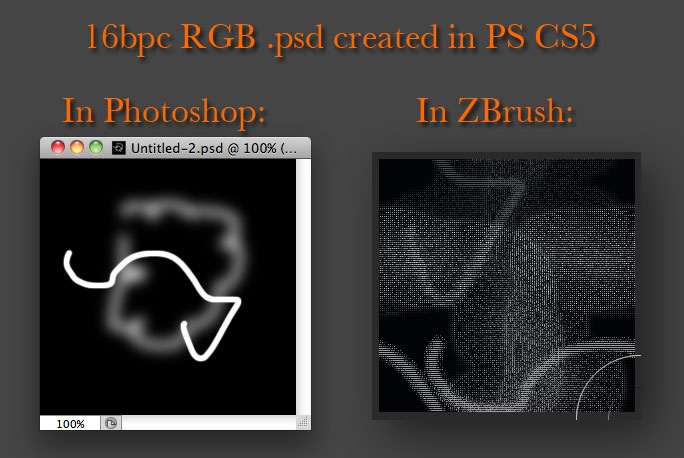
I don’t experience any delays when importing Alphas created in Photoshop (using CS5).
What I do see is that 16bpc RGB images saved as a .psd come in corrupt.

AlphaError.jpg

Alphas created in greyscale mode make it through fine however.

I’m affected by this also. It appears to only happen with greyscale 16bit PSDs larger than 512 x 512.

I’d appreciate it if anyone else can replicate this with the larger alphas on their installations. I think this is why some people notice it, and others do not.

This is a huge bug. I’m shocked nobody else is mentioning it. As it stands I’ve reverted to using ZB4 because of this. :frowning:

I too am experiencing this issue. It has become quite a problem for my workflow, and for several other artists at the studio where I work.

I can confirm that 16bit greyscale PSD alpha’s over 512x512 do not successfully import.
I cannot currently produce images detailing my problem due to NDA, I’ll try to put something comprehensive together using generic or personal art, as we’d really appreciate a solution to this problem.

Marcus Civis posted a fix for this.

“Try setting Preferences>Performance>Preload File Size to its highest value and try again. Note that I don’t think the new setting will store with the config.”