ZBrushCentral

Zbrush > 3dsmax without lower subdivs

Hi there,

I recently created a new model, which I was planning to afterwards animate in 3ds max. However while creating it I’ve used the Subtool Master and Decimation Master plugins, resulting in me losing lower subdivs.

I know that the usual way to work is to export a lower subdiv into 3ds max, along with normal/displacement maps… but no longer having any lower subdivs, am I screwed here?
After decimation I’m left with a model with about 5.5mil. totalpoints. Would I be able to use this in 3ds max, and finally animate it properly?

I’ve tried reconstructing lower subdivs, but get the ‘triangle error’, apparently because I used masks along the way.

So… should I go back three MAJOR steps to an earlier version of the model with subdivs, and do all the work all over? Or can I still salvage this?

I’d really appreciate any tips here :slight_smile:

Regards, you’ll be saving this critters’ life!
[todo.jpg]
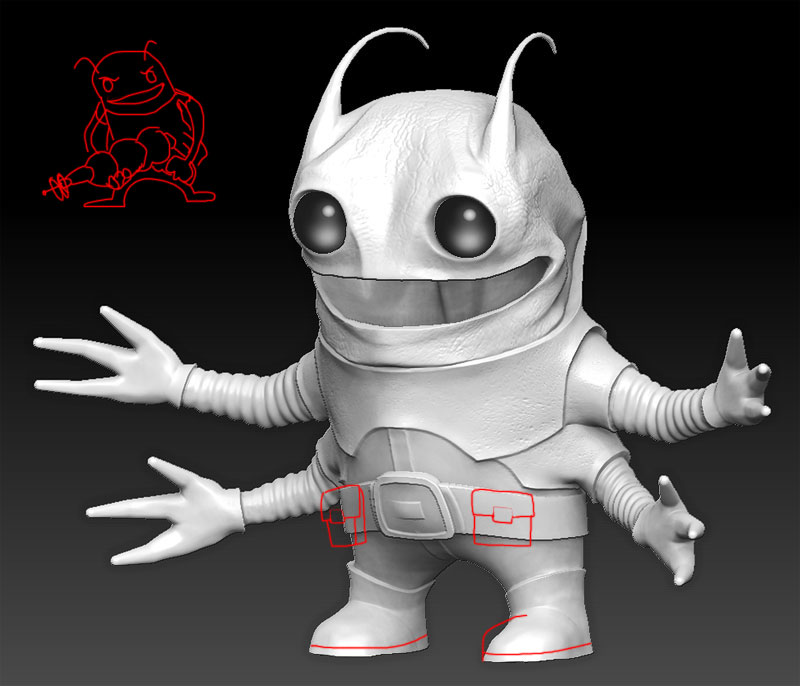
Decimation is not intended for what you are attempting. Decimation is intended for really only two or three purposes:

  1. 3d Printing
  2. Static items in a scene that no longer need their levels of subdivision
  3. Casting normals maps in another application

Basically any time you would not ever need the subdivisions ever again - but of course you should keep a copy of your file with all the levels for future reference.

If you have a copy of your file with subdivisions you are golden, as it sounds you do not have one there are basically two ways you can regain your lower poly base mesh:

  1. You can bring in your base mesh that is still all or mostly quads and (using the move and other brushes) sculpt it to a basic shape slightly smaller and in the same subtool as your detail mesh then use Tool>SubTool>ProjectAll process to restore details - there are a number of tutorials on this process so I will not go into that now
  2. If you still have the highest level of detail (not decimated) you can normally use the Tool>Geometry>Reconstruct Subdiv down one level at a time until you are at your original level (please note that if you have multiple objects you will need to Tool>Polygroups>Auto Groups and then Tool>SubTool>Group Split them first)

Think I got all the steps right - Hope this helps:).

As to attempting to animate 5.5 m tris … don’t … if you don’t want to go insane (decimated objects are largely a mixture of tris and such - nasty stuff if not static).

Oh, I figured Decimation Master was a nice & easy way to optimize a mesh :slight_smile:

Thanks for the remarks, I’ll be sure to check it out.