ZBrushCentral

Zbrush 3.5 to 3DS Max 2010?

All right. I don’t seem to have any luck getting an answer to anything here. Now, is it possible for anyone to let me (and others) know if there’s a set way of importing Zbrush 3.5 models into 3DS Max 2010? I’ve looked around the forums, and it seems to be more or less a coin toss getting anything to work. Is that really so, and what, if anything, works?

Do I have to flip the texture, for instance? I can’t tell, considering a lot of other settings and procedures have to be just right. I know I’m supposed to flip the UV’s, so I do that, but I can still not get it to look right. A lot of details get lost. I’ve messed around with it for a long time, and I’m about to scream. I cannot believe two common and expensive programs are that incompatible.
Anyway, do anyone know of a tutorial specific for this problem or any ideas for what works?

Thanks,

HL

Which bit are you struggling with.

Yes you can import models into 2010.
Obj is the way to go.
Yes you do have to flip the textures. You can do this is Zbrush before the textures are exported or flip the texture coords in Max later if you’ve forgotten to in ZB.

A lot of details get lost

Where are you losing detail…in the texture or the mesh. If in the texture export out a higher resolution image.
If in the mesh - export out a higher subdivision model.

Thanks for the reply.

Well, the model I made was from Zspheres and from there on subdivided several times. I read that you’re supposed to create displacement maps from the lowest subdivision, which I then did, but the details are really not there. As far as I remember, the model has about 5 subdivisions, and a PolyPaint texture map.
The texture comes across alright, but as said, the displacement does not. Maybe there’s something I’m fundamentally doing wrong.
I put the displacement map into the displacement map slot in 3DS Max. Is that the right way? The model explodes, as it is automatically set to 100%, so I tone it down.
I also read that some people put the displacement map into a displace modifier.
Would you know if that really is the way to go.
If not either, where and how can I find out?

Thanks again,

HL

Sounds like you’re using Scanline renderer which is a bad idea.
Switch to Mental Ray.

To start with I’d choose a standard material. (You can also use the Arch & Design mat but start with standard.)
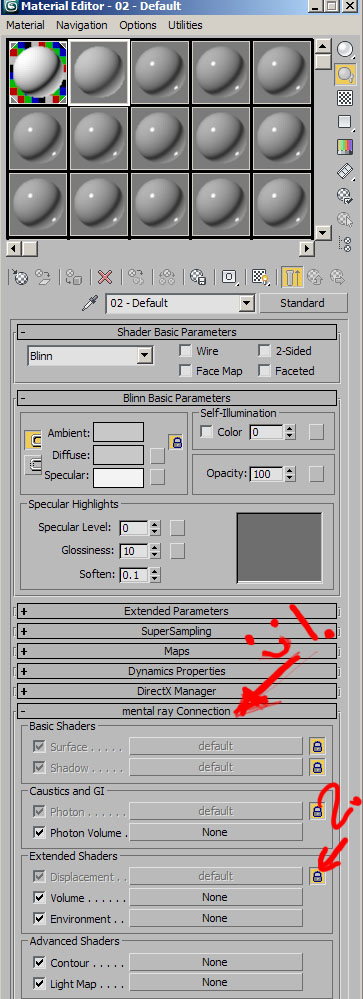
At the very bottom of the Material editor is a mental ray connection drop down.
Open this up unlock the Displacement slot.
Add a 3D displacement and add your map in the Extrusion slot.

Don’t forget you may need to Flip it.
Set filtering to none.
Set Blur to 0.01

If you’ve created a 16 bit Displacement set the RGB offset to -.5 in the output slot of the bitmap.

The other way to do it, is yes to use a displacement modifier, but place a Turbosmooth under the the displacement with as high a sub’d level as your computer can manage. Use Luminance center or as before set rgb offset to -.5

Check this out also it’s for Mudbox but a lot of it is very relevant for ZB.
http://www.neilblevins.com/cg_education/mudbox_2010_to_max/mudbox_2010_to_max.htm

Thanks for that. I’ll try it. The last few days I’ve messed around with Decimation Master, trying to avoid the displacement problem, and it seems to do and look all right, but I’ll give what you suggested a go. The figures don’t have to be animated, or at least I hope not :slight_smile:

Thanks,

HL

@hotknife
Is this method still can be use in Max 2010?..because I cant seems to find the Mental Ray section at the very bottom of my Standard material option…or is it move somewhere else?..am I missing something here?..

I did change to Mental Ray renderer.

Edit:
I also saw Dustin Brown doing this technique in his video tutorial, but he was using Max 2009, and I thought in 2010 they change/simplified this process by moving it into other section, but I notice this threads title is the 2010, so clearly I missed something here…anyone can point me to where I can find this mental ray section in the material editor?

Thanks
_Revel

Yes this can still be used for Max 2010. You need to have Mental Ray set as the renderer, by default it’s at the bottom of the Standard material.

C attached. :slight_smile:

Attachments

mentalray.jpg

Perhaps look up the GoMax tool/script in this forum as well, as this is a script to allow one button press to get your models to and from Max with displacement/normal and diffuse maps…It’s great considering you just press a button and the rest is taken care of.

Well my mental ray connection still not showed up, but then I do a quick google about it and found out that we actually need to check the “Enable Mental Ray Extentions” under the preferences menu, then only it showed up :smiley:

I’m kinda new to Max, so…yea… :o

Btw, I’m checking out the GoMax thread quite often but haven’t try it out yet. Looks a powerful tools but because I’m still at the very base level of understanding Max, I’m considering the “hard” way of learning so that I can more understand how the things will work.

Thanks for the help hotknife! :slight_smile:

_Revel