ZBrushCentral

ZBrush 3.5 R3 ZSketch not working...

hello all,

i’m fairly new to zbrush.

i just got ZBrush 3.5 R3 yesterday and was really looking forward to trying out the ZSketch option i saw in some of the videos from ZClassroom, but it’s not working.

i made a ZSphere and pressed Shift+A, like the video said to, but nothing happens. i thought maybe it just didn’t change color, like in the video, but when i tried drawing on it it just made more spheres like the one i first placed.

is ZSketch a plug-in that i need to add? if not, does anyone have any idea of what might be wrong?

Yep, first you have to make the zsphere an active tool, before you can enter zsketch. After drawing the zsphere on the canvas hit “t” on the keyboard and then afterward shift+a.

Hope that helps.

Hmmmmmmm, even this is not working for me.

How do i make “zsketch” appear on the interface ?

Could you show us a screenshot of your ZBrush interface (the whole interface)? Please have a ZSphere selected and the Tool palette open as well.

Thanks!

Well cut to the chase, I was in 3.1 not 3.5 so I had to buy the upgraded version and I installed it…

NOW…

I am able to zsketch when using a pre made creature tool but, how do I

Make a new document from scratch and zsketch creating my OWN characters and creatures???

Thanks, I am SOO SSTOKED TO FIND OUT About this!!!

I bought scott spencers book too, This is gonna be so badass, I love this ****

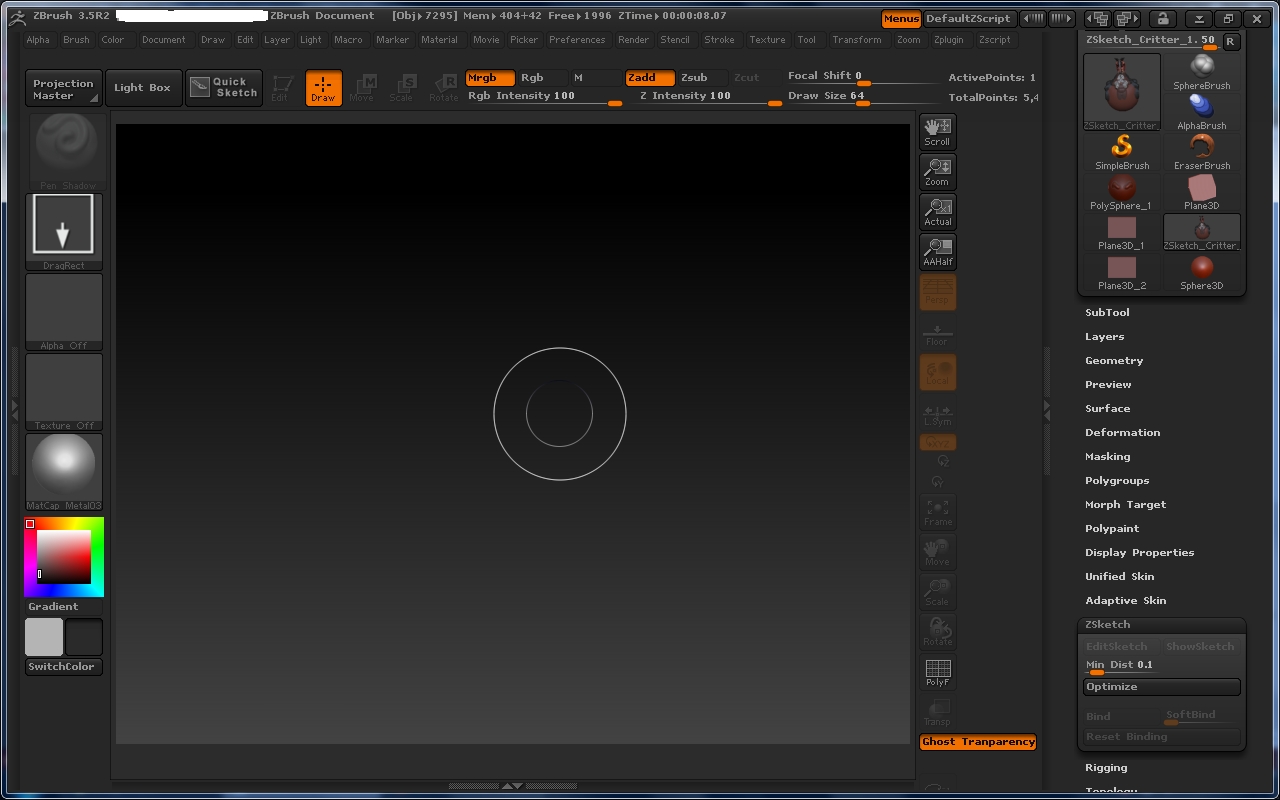
here is a screenshot. BTw

I am not sure if my reply just posted but I bought the new version and can sketch BUT its only when I use a pre made zsketch creature.

i want to make my OWN fresh stuff from scratch how do I do that?

I bought scott spencers books too :slight_smile:

I am SOOOOOOOOO excited right now omg lol

Attachments

zbrush screenshot.jpg

Now I dont see any Zsphere option thouhg…???

Hey there,

you know that you are using 3.5 R2 right? As i haven’t been using R2 a lot i can’t really help you. Update to R3 and your problem should be solved instantly.

In case you can’t wait: draw a ZSphere on the canvas, Hit T to enter edit mode. Hit shift + a (or go to Tool/ZSketch and hit Edit Sketch) now you should be able to draw your ZSketch starting from the existing ZSphere.

Hope that helps

Yea basicallly I wanna lay out my concepts with zspheres then refine them with zsketch then sculpt…