ZBrushCentral

zbrush 3.5 bugs

Ok i have a bad issue in 3.5 and i can’t find a way around it, i have a character that looks correct in zbrush, subtools are head, horns, body, eyes, some deco elements, no i want to import a new subtool, press any tool in the toolspallete and import, when i append the new tools is scaled, totally off
i modelled the basemesh and all other parts in max, so the scaling in max is the scaling i want.
I thought maybe its max, and started testing around, exporting the head from my initial tool (which looks correct in zbrush) does work it comes into max like it should, test with the horns, work too, eyes are too small, decodetails seem to be the same scaling but again too small. When i import the body into max its approx. 34k times too small, i scaled it so it fit somehow…
Ok maybe its still max i though, so i created a new tool inside zbrush, appended all subtools from my initial tool and tadaaaa, the same effect, head and horns are correct, eyes and decostuff too small and body so small it can’t be seen by zbrush

Now i open up 3.1 import the head from 3.5 and import the new subtools i wanted to add, everything is scaled correctly, ok i thought lets just save it as a tool and open it up in 3.5
opened and appended, same effect everything is scaled… but i just exported the head from 3.5 if i reimport it, it gets scaled, if i make a polymesh out of it, it gets rescaled, everthing is wrong and i cannot work on my model anymore and its driving me nuts :frowning:

ok investigated a bit more, i just opened up my first save, when the body was just one piece (i later detached the head, to be able to get a higher polycount, didn’t want to have the body at 20mio quads, just to have 5 in the head…), everything but the body can be appended from my latest file, but the body is really off, so i guess something happened when i made two tools out of my initial basemesh - 8 revisions later, last version befor the scaling appeared, yep its definitely the step when i split head and body

also focus is off, it focusses anywhere somtimes the upper body, sometimes the foot, dependent on how my viewingdirection is, thats a minor issue but still an issue

Submit a ticket on support. I did it also. But it occurs only if your Ztool was created in previous version (at least in my case) of ZBrush

I just sent files to the support,
from what i saw while setting up the files for support (removing the subdivision to change the filesize) it appears that the export scaling and offset parameters have changed from one revision of the file to the other, so it seems that somehow it got changed and the exportvalue seems to be the size in zbrush too, so when i changed the values to be like before i detached the head, all is fine again. phew

As a colleague of mine had the same issues, here is the fix if you ever head into wrong scaling.
You just have to check the scaling and offset parameters PER SUBTOOL, if something is off compared to your initially imported basemeshes, just copy the scale and offsetparameters from the basemesh to your subtool and everything is just fine. So somehow internally zbrush seems to mix up those parameters, i don’t exactly know how but it does.
Hope it helps :slight_smile:

“just copy the scale and offsetparameters from the basemesh to your subtool and everything is just fine.”

Where do i find these scale/offset parameters for my basemesh and/or subtool. I mean i see those sliders in the deformation panel but everything basically has 0 as the value, both my original obj and the subtool. I have a semi-largish presentation due monday and Zbrush 3.5 is totally screwing the scaling of my subtools when I append them. A “mini tutorial” walking through this fix would be GREATLY appreciated! Right now I am just guesstimating and trying to scale/offset until it matches but if there is some way to auto-magically get these numbers exactly that would be fantastic.

on the right side in your tools pallette is a export fioeld, there are your parameters :slight_smile:

Ok getting closer to the source of evil and its getting creepy…

so if i open up any tool in zbrush and import my basemesh ( example: www.polyphobia.de/nonpublic/staff.obj) i get these values:
Scale: 480.361267
X Offset: -0.0122
Y Offset: -0.930996
Z Offset: 0
and other funky values with any other mesh exported from max with the zbrush export settings, where are these values coming from? the tool is placed on the scene center, the file is simply in cm as a scaling, it doesn’t matter if i use inches or whatever, so what funky scaling is zbrush using internally?

So others and me searched for ways to get past that scaling issue and found a solution with loading a polysphere which has the scale and offset settings like they should be scale 1 offset 0-0-0, now if you append you freshly imported model, which gets a funky scale and offset value it also gets transformed to 1-0-0-0 as it should be and as it is exported with 1 as the base scale and placed on 0-0-0.
Now if you do the same with any 3d Mesh from zbrush like Sphere3d, Cube3d or whatever Form3d Tool it gets the funky scaling only with the Polysphere i get clean results and if the export values somehow change during the work i can easily change it back to 1-0-0-0.

On a side note, when converting a Form3d tool into a polymesh, the scaling changes from 1 to 0, not so on a polysphere.

So i hope this will help tracking the scaling bug inside the zbrush System a bit more. Didn’t try R3 yet so maybe its already fixed, i can’t say.

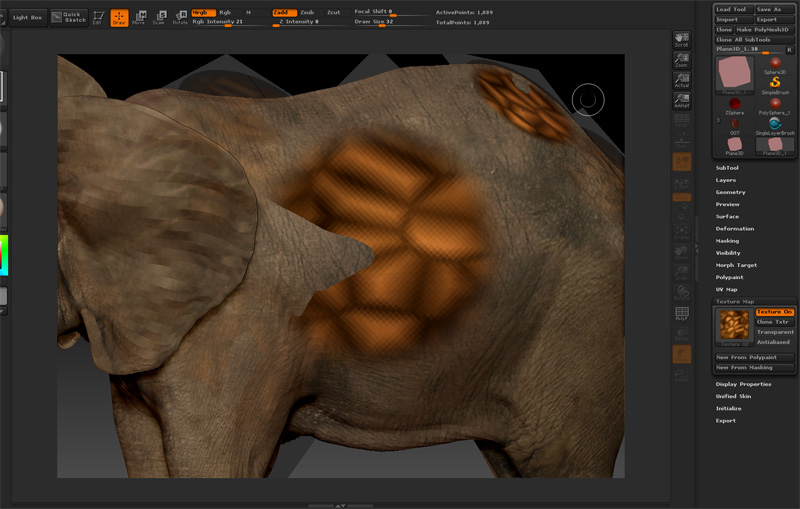
I noticed Projection master using plane3D no longer works great like the previous version. wonder anyone came across something like this.

[bug.jpg]
here it is, newly project texture seems no longer interacting with the 3d mesh.

with the scaling thing. I find what you need to do is make sure your export optins are scale 1 and offsets to 0 this actually seems to effect the import options. If I setup my import options without also setting up my export options my scale is always messed up.
How does this work for others?

Had scale issues myself, this is a 3.5.r3 bug. Every clone, or new produced mesh scales way off. To fix this I go into Zplugins, open Subtool master, and press scale offset before apending or use a duplicate mesh.

and this bug is going on and on and is touching other parts of my workflow…

so i created a new character for a client, its huge, however i thought it has something to do with it, but it’s only a part of it.

I have issues with the Move Brush and other brushes that just won’t work as they should on that mesh. The movebrush has like a built in endpoint, so instead of moving around the mesh like i want i can move it only for a few pixels.

So here is the mesh imported into a polysphere at real scale - so i clicked the polysphere, said Make Polymesh3d, to have a copy of it, import the mesh at real scale, so it has export Values of 1-0-0-0

so i use the Movebrush, its configured to 100% of the z intensity, i grab and move, to the absolute maximum of the move, it just stops there no matter where my cursor actually is

move_01.jpg](http://www.zbrushcentral.com/zbc/faq.php?faq=vb_read_and_post#faq_zbc_display_images)
what happens is how it should be, it moves like i do till the end of my screen but i have awesome export values again and i know they are going to kick me in the ass at one point unless i write them down and type them in manually once they change when whatever zbrush feature i used and switch to 0-0-0-0 or something different

so just for my records and so that i don’t have to sae them on my machine in a text file
405,129578
0
1,546549
0,103433

Attachments

move_02.jpg

move_03.jpg

When scaling or certain actions seem restricted, the mesh is too ‘big’ for zbrush to handle in terms of scale. Under Deformation modifiers, try “Unify Mesh”, then try editing again.

Hello folks!

Neox, I almost had a heart-attack when I first experienced the bug, thanks for posting your ingenious work-around! I too was surprised to find that my mesh was importing with weird default values (22.75… for scale). I was able to export from zbrush normally with these settings, but my problems happened when I started saving my files:

Apparently, zbrush 3.5 rescales the mesh if you have part of the mesh hidden when you save the file! I did so and my 22.75… ‘magic’ number reverted to 0 after I saved for some unholy reason. Fortunately, with your work-around I can use zbrush again as if it were 3.1! Thanks again!

Scratch that, the hidden mesh glitch is still present even with Neox’s work-around! Fortunately, the work-around means you don’t have to remember some absurd floating point number for the scale to change it back. . .

All Zbrushers be warned, if you save your file with your mesh partially hidden, zbrush 3.5 R3 will rescale your mesh to 0 for no reason at all!

hi Projection master using plane3D works in 3.5r3… after projecting we use to drag plane 3d but we forget to turn off ZADD button. jst turn off n it works fine…