ZBrushCentral

Zbrush 3.1 - 3ds max 2008 Creasing normal maps

Alright so, I’m having some odd creases / artefacts in my normal maps when I export them from Zbrush to 3ds max 2008, I’m not exactly a pro at zbrush I have to admit that, so would highly appreciate that replies come as detailed as possible, as I won’t know 100% what you’re talking about :slight_smile:

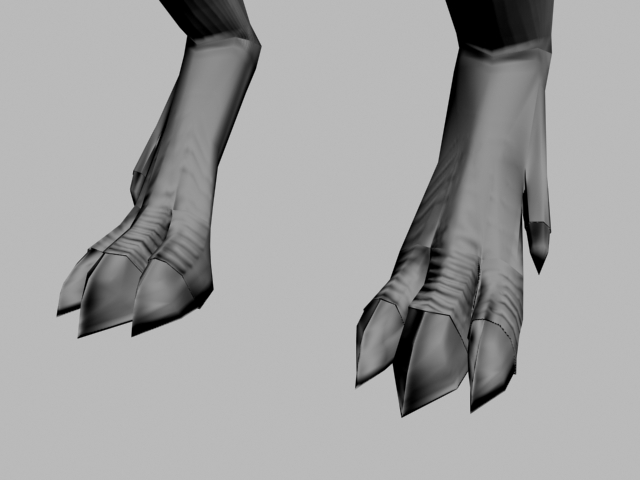
I’ve uploaded all of my images below to imageshack ( all of which I considered to be relevant to this question although if you need any other pictures or screenshots to go with it to get a better understanding of the issue I will post it asap :slight_smile: ) but as you can see on the lowest picture, on the tip of the toe claws there’s odd “dark creasings” it’s an issue I keep bumping into no matter what kind of object I’m working on, and browsing through these forums I only found 1 matter on the subject and it didn’t solve my issue.

For my normal map I used the 3dsmax7 tangentspace best quality preset file that comes with zbrush.

To shortly sum up my wall of text, I have “dark creasings” on the claws and other places ( most noteably sharp areas seem to get this annoying effect ) and I would love if anyone could give me a headsup as in how I avoid this, and how I create those smooth, sharp and sexy normal maps that I so adore :slight_smile:

Thanks in advance
Rene


do a search for “3dsmax8modifiedE”

it’s a config file for zmapper
you’re using default normal map settings from 4yrs ago.

If that doesn’t totally fix the problem then we will need to break your mesh at certain areas to get the best result in Zmapper.

Thanks for the reply, I will get a hold of the modified file asap and test it to see if it fixes the issues :slight_smile:

The result i got was somewhat similiar to the first one, so would love to hear what you mean by breaking it up to give better results ?

Rene

Attachments

zbrushcentral7.jpg

Anyone able to help me ? :slight_smile:

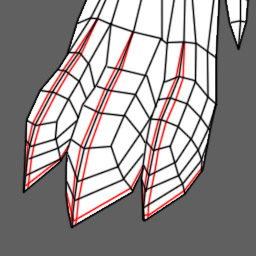
Add the red edges I have indicated in the picture. ZMapper does not cope well with acute angle changes, so in places like this you have to clamp the smoothing-around-the-corner effect to a narrow strip of polys.

Load the new geometry into ZB, subdivide to the same level as your old geometry’s highest, then project all the old shape onto the new mesh.

Cheers,

R
[attach=136010]AddTheRedEdges.jpg[/attach]

Attachments

AddTheRedEdges.jpg

then project all the old shape onto the new mesh.
And good luck with that :smiley:

I’ll get around to trying it tomorrow, but basically, whenever I get these dark creasings it’s due to Zmapper not having enough polys / edges to work with in the area mentioned ?

Thanks for the responses :slight_smile: