Hello,
I have customized my UI with loading my old UI from 4r8 (because it was a lot work).
There are 2 new buttons from zBrush 2018 now missing. In the description they should be found under DRAW.
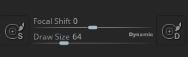
(left and right on screenshot)
But I can’t find them.
I would like to put them again in my UI.
thanks for help
