Thanks for the response guys.
Nope, not a material issue, like I said, this is only happening when I open a .ZBR file.
Otherwise the everything works fine.
For example, I am working on the model and reach a point where I’ve finalized it.
I drag and drop it onto the canvas to render out. Then I save it to .ZBR format as back-up just in case Zbrush crashes while rendering. At this point there are no artifacts.
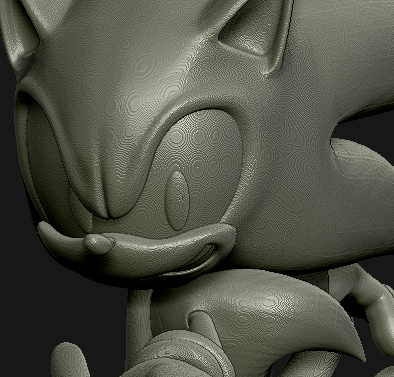
HOWEVER, when I open that .ZBR file, the artifacts are there. It’s quite weird. Doesn’t change, even if I change materials or colors etc etc. This never happened to me in Zbrush4.
The image you see below is the problem i’m talking about, and it is happening with every .ZBR file that I am opening.Again, this is only happening with .ZBR files.