ZBrushCentral

ZB4R2 retopology and projection issues (solved)

Hey guys,

I’ve been having trouble projecting my high res details to my new topology. I keep thinking that I may have some stray points somewhere, but I’ve checked and haven’t found any. Also, when building new topology in ZB4R2, the lines look very faint, and its very hard to distinguish where you have laid down a point. In previous versions you could distinctly see where you had laid down a point, even when you clicked onto the work space, it was clear where the origin of previously laid point was. Is there a setting that controls the visibility of the points? Any ideas or suggestions would be greatly appreciated. Thanks.

Attachments
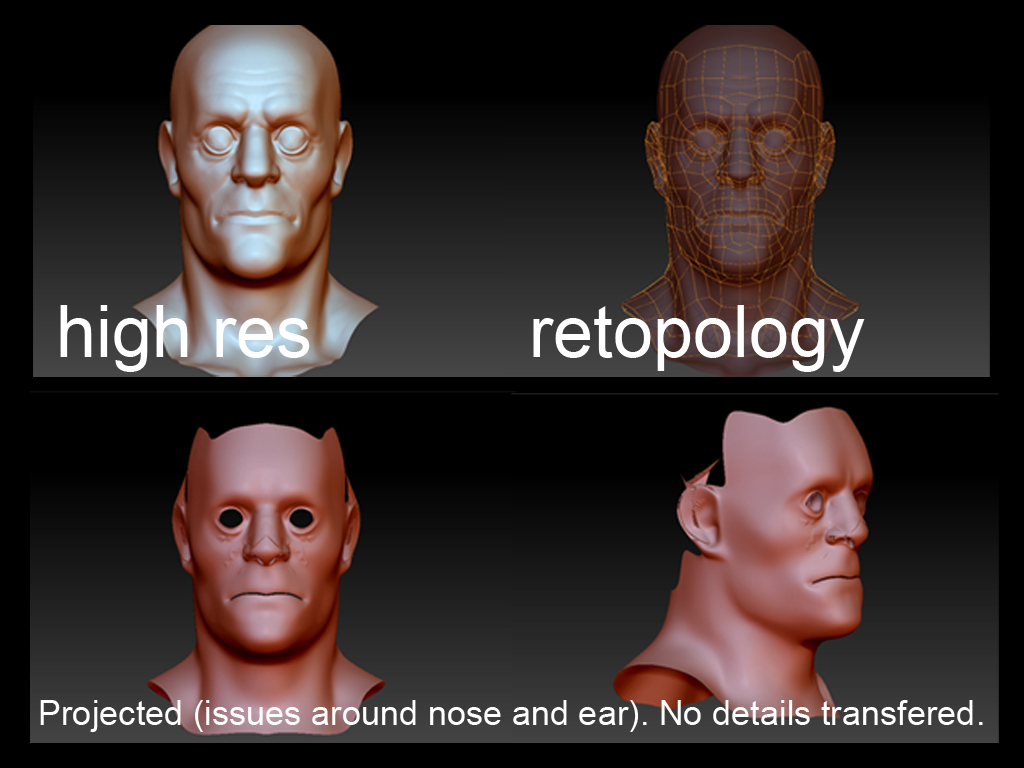
retop_issue.jpg

You might try assigning a bright material like Matcap White to the reference mesh which the yellow topo lines will stand out better against than the red wax. They stand out great against the gorilla black, although that can make it hard to see surface detail in your mesh. Red Wax is too close in tone/color with the topo lines to make good contrast.

As for projection, they changed the default values in R2. I find I usually have to increase the Dist slider in small increments to get all my detail to project correctly.

Thanks for the quick reply Spyndel. When you refer to the “Dist slider”, do you mean the G Radial slider? All I see under the Adaptive Skin palette is G Radial Density, Max Twist Tolerance, and Proximity Tolerance.

I found the solution to my problem. Its under the Projection palette, I simply had to change the Projection Range to a value of -0.01 and my details came through just fine. There’s still a bit of distortion around the ear, but nothing I cant remedy. Thanks again for the suggestions Spyndel.

Glad you’re sorted. For the record, I was referring to the Dist slider in the Project all menu in the subtool palette.

Yea, I figured that. I should have mentioned I was attempting to project details directly onto an adaptive skin. I’ll keep that in mind if I ever need to project details onto some pre-made topology.:+1:

No worries. I use the manual projection methods in the Subtool palette on skins I generate, separate from the topology process, as I feel like I have more control this way. Topology creation has its own quirks that I prefer to deal with separately. I forgot that was even an option.