Hi,
Just followed the Zsketch tutorials and I can’t draw straight lines by holding Shift + Alt like it’s done in the video? I am using Mac. Are there other hotkeys for this?
Thanks in advance.
/ tennet
Hi,
Just followed the Zsketch tutorials and I can’t draw straight lines by holding Shift + Alt like it’s done in the video? I am using Mac. Are there other hotkeys for this?
Thanks in advance.
/ tennet
Just looked at the tutorial for the shift + alt keys to make straight lines and it does not work. I just get a brand new straight line but the old one does not change. I am on a mac as well. HELP!
Hello
I have found that you have to carefully decompose the following sequence to have it work :
1- press Shift
2- click on the Zsphere at the position you want to straight
3- then press Alt and drag
I’m on a Mac too.
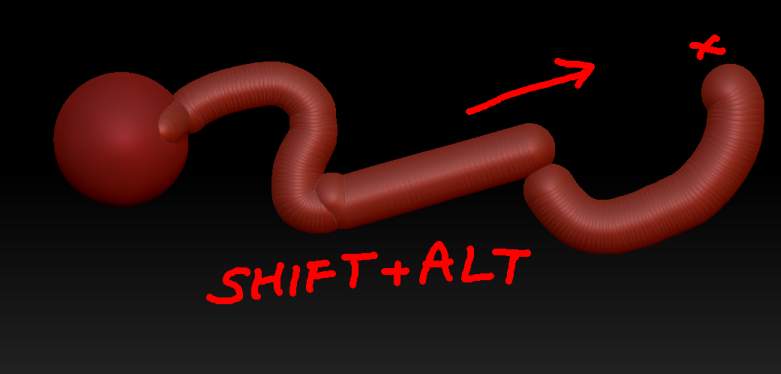
Steday is right. You need to click with just Shift held and then hold Alt. Basically this tells ZBrush first that you are smoothing and second that you want the line straight.
The straight line will go from the starting point to the end of the stroke:
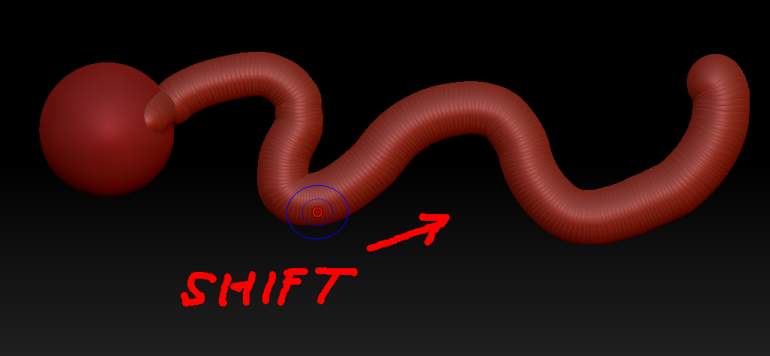
Sometimes, if the original line is wiggly, zspheres will get left out of the straight line but all you need to do is wave the cursor over them as you are smoothing and they’ll fall into line.
Yes, got it working. Thanks Steday and Marcus! 