ZBrushCentral

ZB 3.5r3 > Max 2008 - Normal map (Not Solved at all)

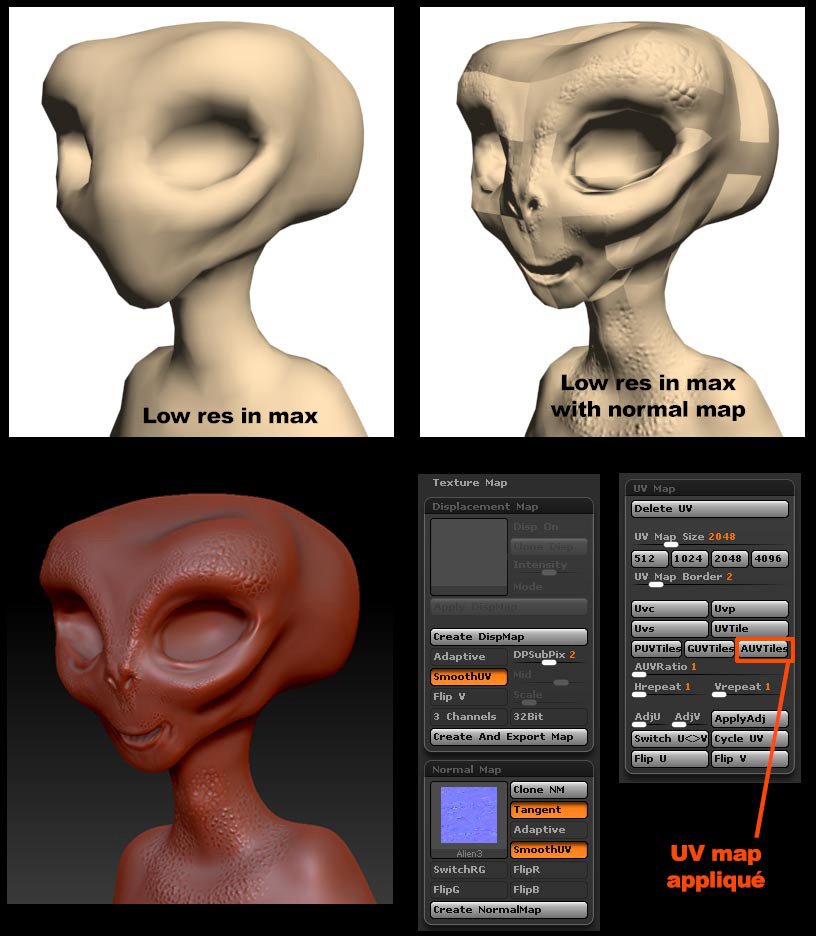
The same problem I read out there… I made a low res model in Max 2008 (I also tried to unwrap the map in max and same result) export .obj… hi-res in ZB, aplied the AUv tiles to the model (in low-res Sdiv_1) export the normal map… and this is the result (see image), somebody match this problem?. thanks.

Config: 3d Max 2008 / Z Brush 3.5r3

Attachments
alien-ZB.jpg

did you try turning off bitmap filtering on the normal map in Max? Did you flip the normal map vertically in ZB on export?

I doesnt try the turning off bitmap filtering on the normal map in Max, but I flip vertically the map… as you can see there is the information (bump effect) but don´t know what are those patches!!!.. I also tried the displacement map and work OK…

try turning off bitmap filtering then. I’ve had this problem before and it fixed it.

Try it (bitmap filtering)… and nothing…

Solved… I think its OK (see link), I believe its in ZB Export panel, must active Qud "quad poly, Txr “texture”, Mrg “merge UV cords”, and Grp “export sub groups”… well before this I export Max>ZB 2 times… hope that I fixed this bug. Cheers.

Attachments

normal-map.jpg

turn off “grp” and turn on “mrg” the rest at default , then export obj

after rendering others models I have the same problem… so I decide to do test with basic meshs… and same result: http://yfrog.com/j8tangentj … dont know what I miss…

The only solution I find is to import my low and hires model from zbrush to Max, and “render to texture” to generate my normal map… it work perfectly… the only way…

Have you tried Xnormal? It’s a free app and it’s really great. There’s a vid tut at eat3D showing the Zbrush/Xnormal workflow.

In 3ds max make sure you are inverting the G channel in the normal map if you haven’t exported in from Zb with flipped G channel.

Also it depends on the Gamma setting you are using in Max but if you are working in anything other than Gamma 1.0 on the import settings in Max, when you are bringing in the Normal Map try setting the Override Image Gamma setting to 1.0. Don’t use the default.