ZBrushCentral

ZappLink resolution

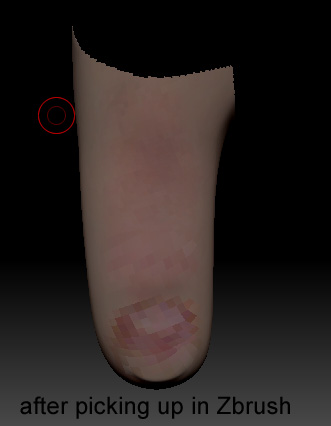
I am using Zapplink to apply a texture to my human model. All is well until I do the fingers and toes. I have subdivided my model to 25 million polys and I am using large high resolution (300dpi) images for textures. Everything works fine until I pickup the model after working in Photoshop. Once the tool is picked up in Zbrush it becomes very pixelated.

What can I do to get high res texture in Zbrush?

DtoeA.jpg

Attachments

toeB.jpg

retopo

your tool might be 25 million, but that does not mean that the fingernail has enough polys to pick up the texture.

each poly represents 1 pixel in zbrush, so you might have to retopo there…

take a look at the wireframe and how dense your fingernail is. if it is really dense, then there must be another problem.

Also i’m not positive this matters but have you already laid out the UV’s on your object?

Thanks for your help. I tried adding more geometry to the big toe. It didn’t work.

D

can you post a wireframe of your toe / finger?

how does it look like if you just poly paint it? smoother and captures all the details?

maybe you might have to stencel the image onto the toe and refine it with polypaint

When zapplink opens photoshop, the image is only 72 dpi. Can zapplink be set to use higher res images?

D

This is a totally different issue, but still has to do with zapplink. Sometimes when I go back into zbrush I get a flat uneditable image. when I redraw the tool it comes out flat dark gray. What’s up with that?

D

thats a good call, but honestly i don’t know.

i would check the poly oaint and maybe make the thumb a texture and then just drag it onto the thumb… won’t be 100% accurate but better then what you have and then you could always just clean it up afterwards…

Thanks

Yes, the uvs are laid out, but that doesn’t matter until I get back into Maya.

maybe screenshot would help. I don’t know if you have a texture map enable or not. and you can just resize the Document and use Zapplink to project a high quality texture into PS back to ZB.

I realized that the uv’s in the fingers and toes were too small. The larger the uvs the more resolution.

I had a similar problem. I just couldn’t work out how to get a higher resolution photoshop file exported via Zapplink.

In the end I found the Document Size is the key.

Go to menu Document and make sure that ‘wsize’ is not checked otherwise your document size will only be as big as your actual screen window.

Then in the same ‘Document’ menu set your ‘width’ and ‘height’. Its these values that will set the width and height (in pixels) of your Zapplink Photoshop file.

It is likely that the document won’t fit on your screen now, so you can zoom the document down by pressing the AAHalf button.

This will do it. Be warned thought that if you make your document too big Zapplink will run out of memory.