ZBrushCentral

ZApplink R3 - Depth Channel broken?

Hi,

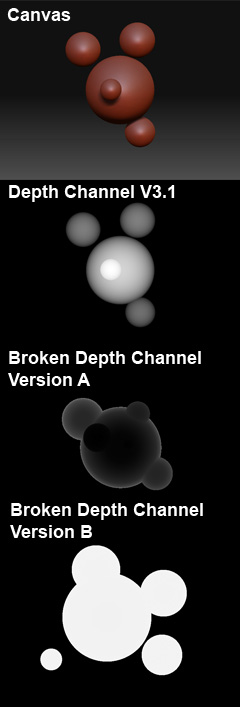
I’m using the Depth Channel that is created by ZApplink everytime and I encountered that the new Version does produce broken depth channels.

[ZAppling_Bug.jpg]

While ZAppling in Version 3.1 produces a clean Heightmap of the scene, in version 3.5 R3 the Heightmap is either inverted in front of a black background or the objects are masked out with pure white.

Does anyone have the same problem?

Have you resized your document? I am noticing some strangeness with shaders and zapplink after having resized the document.

and yes looking at the depth channel in my Zapplink document, it is more or less 50% grey, solid, even though there is sufficient depth in the tool to draw something more like what you have posted above.

Ok, that means I’m not the only one having this problem.

Well, this is very annoying. I’m using the Depth Channel for Fog/Haze and Depth of Field Postprocessing. Not being able to obtain a correct depth channel makes compositing a lot harder for me.

Right at the moment I have to use the MRGBZ Grabber Tool to create a Depth Alpha, export this and align it (it is automaticale cropped) to the document.

I don’t want to fall on anybodie’s nerves but would it be possible for one of the support staff to confirm this problem? I would like to know if it’s worth the effort to uninstall ZBrush and install it again without ZApplink and then maybe installing the plugin from a fresh download.

Or if perhaps anyone could give me a sign if he IS able to get a clean Depth Channel from the latest ZApplink version so that I could search for the problem on my side.

Some feedback would be greatly appreciated!

BTW: The Ctrl + Shift + S shortcut does not work for me. That shortcut is doing nothing although it is definitely still associated to ZApplink (it shows up in the menue tooltip)

Hello

We are aware of the ZApplink issue which will be fixed in an ZApplink Update very soon.

I guess I am a bit confused I had to install zapplink and now I am getting no depth information in the shader layers. The layers are just not there in the opened photoshop image. Is there a work around for this? I am getting pure white layers only. Much like broken depth channel version B image

Hello, having the same troubles with the missing zdepth channel in photoshop. I only get the pure white layer without the zdepth channel to guide on each view. Initially worked for me for a few weeks until now. (working on windows 7, 8gb ram, quad core machine). Any help would be greatly appreciated. :o

Have you tried deleting the files and redownload it from the Download Center at www.pixologic.com/downloadcenter ?

This happened to me as well but as soon as I restarted Photoshop all was fine.

Paul

Hello Paul, thanks! Just trying to find where the instructions are on how to delete plugins. When I installed Zbrush 3.5 R3, Zapplink was already in my Documents tab (All else fails, “drag Zapplink 3 folder to trash bin” sounds good!)

You delete the Zapplink files in the ZStartUp/Zplugs. There are two files that you have to delete.

ZAppLink3x.zsc and a folder ZAppLinkData35

When you download the new file you will have a folder and a zsc script put it in the same folder (Zstartup/Zplugs).

Paul

Hello, just reporting what i got with the instructions Paul posted. Managed to delete the plug ins and reinstalled Zapplink 3 via the Pixelogic downloadable files.

I tested it out with separate installs, using zapplink on 3 object meshes. initially worked for zspheres, simple shapes etc. I was relieved!

But then started getting wonky once I imported the mesh i was working on. It went back to photoshop with just the white layer without zdepth. and on some instances would just completely shut down.

My female body mesh is about 100k - 300k polys. Document size is about 1800pixels x 900 (some such).

The good thing is i was able to export out some polypainting and managed to fill out the other details with just compositing in photoshop and twiddling in Maya.

Thanks for the help guys!
^^
Could we get a copy of the file you are having issues with, because once I have the issue you are having all I need to do is just resend the ZBrush document back over to ZBrush and all is fine.

Paul

Same problem here. Various meshes. With and without resized documents, with or without perspective enabled. Re send, no change. ZBrush on different machines - no change. Change model out for spheres…different results, but still wrong.