ZBrushCentral

zapplink install problems

Hi
Im having trouble getting plugins to work.

I am using a trial copy of zbrush on a 64bit system. works fine, except I cant get any of the plugins to work, including zapplink which has an install system with it (I did check the link to make sure it installed in the right place) they dont even appear in the menu on the screen.

any idea whats going wrong?

cheers

What does your ZStartup>ZPlugs folder look like? Is each plugin within a subfolder? Or is each plugin in the folder itself, with the only subfolders being for data?

In other words, this won’t work:


  • ZStartup
  • [list]
  • ZPlugs
  • [list]
  • ZAppLink (folder)
  • [list]
  • ZAppLink.zsc
  • ZAppLink Data (folder)

[/list]
[/list]
[/list]This is what you want:


  • ZStartup
  • [list]
  • ZPlugs
  • [list]
  • ZAppLink.zsc
  • ZAppLink Data (folder)

[/list]
[/list]

i have it showing as it should then, but still no joy. :frowning:

anyone else got any ideas what causing the problem?

Ive tried reinstalling the software. I have also deleted the plugins and reinstalled them, (zapplink, transpose master, subtool master) none of them even show up in the interface.

Im guessing its a problem with 64 bit systems as I had them set up on a 32 bit system without any worries. till the pc died that is.

all help gratefully recieved

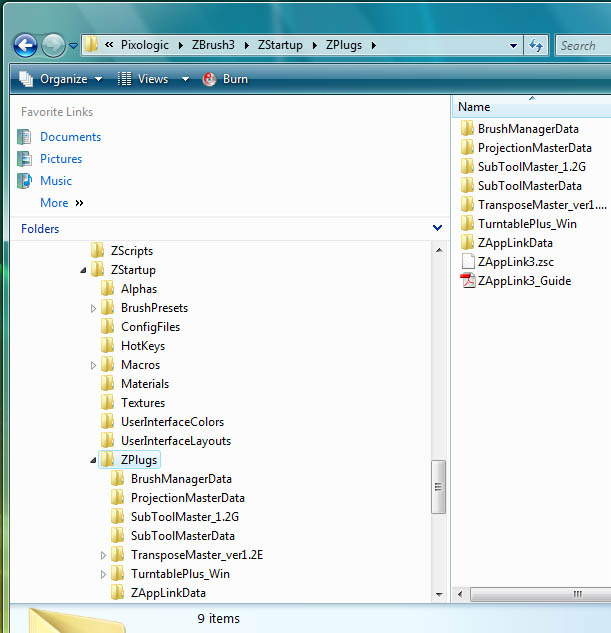
Could you show a screen shot of your ZStartup\Zplugs folder?

I run 64-bit Vista. I have no problems at all. The only way a plugin does not show up in the interface is typically if it’s not installed correctly.

hows this?
thanks for helping incidentally, IM feeling pretty frustrated thus far.
steve

Attachments

pixo_screen.jpg