I’ve been using ZApp. for a long time. No probs until now. For some reason on the top layer, when I bring it in from ZBrush, it has these artifacts from the previous ZApplink projection.
Some help as to why would be very helpful.
Thanks!
Attachments
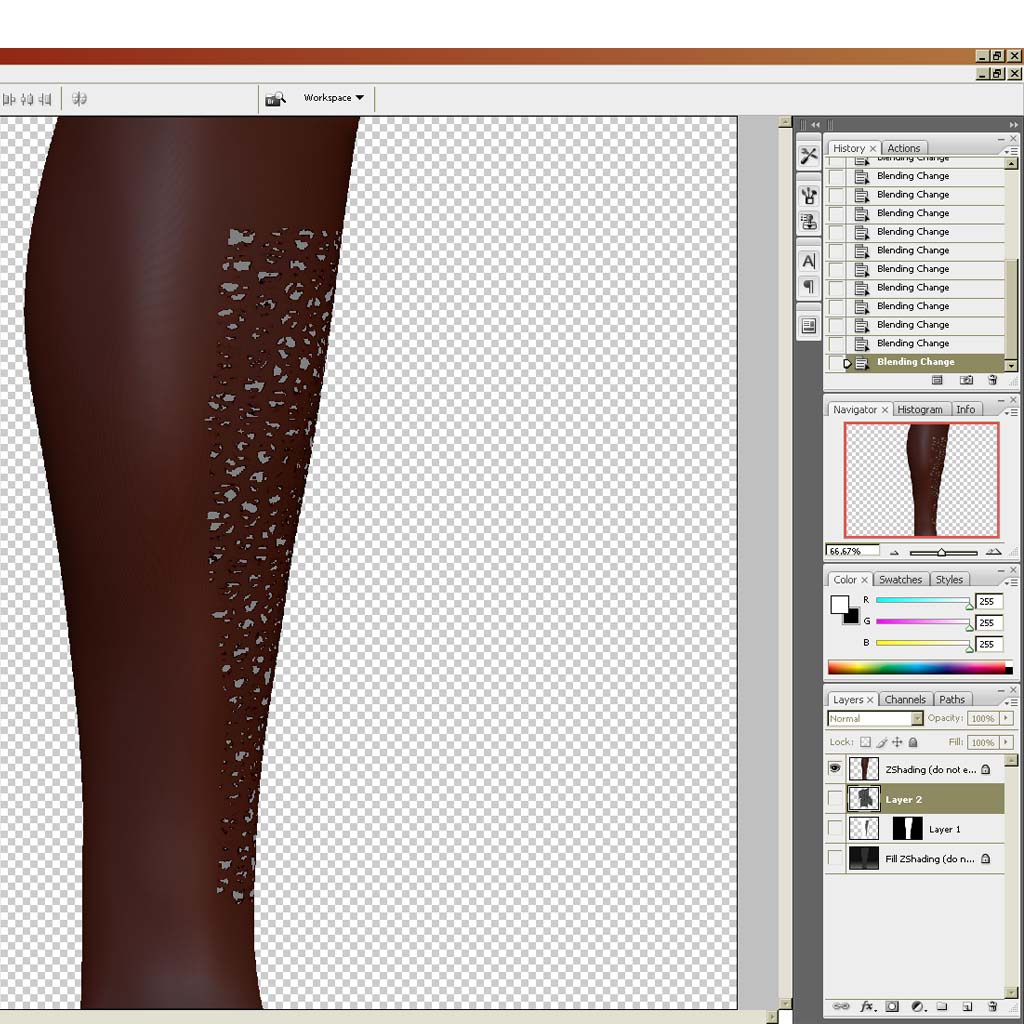
I’ve been using ZApp. for a long time. No probs until now. For some reason on the top layer, when I bring it in from ZBrush, it has these artifacts from the previous ZApplink projection.
Some help as to why would be very helpful.
Thanks!
Could you give more detail. What are the steps that can reproduce the error?
Hey aurick, save me. I did some more troubleshooting and here are the results. ZApp works fine if the texture does not have extreme black in it. Meaning if it has white to dark gray there are no artifacts, it’s only on the parts of the texture that are black.
What do you think?
Hey Aurick, It seems to be a problem only when it updates in photoshop with an existing texture with black in it. The good thing is that when I add to the texture and bring it back into ZBrush the artifacts go away. So I guess the solution for now is to just ignore the artifacts while in photoshop.
Thanks for your help and time as always!
zbrush looks at pure black as an alpha in relation to textures. There is never pure black in the world, so stop using it in your textures 
I think you are not understanding what I’m using it for. It’s good advice if I was using pure black for the diffuse map, but I’m not. I’m using ZApplink to create an alpha mask in order to create details, so using pure black is necessary in order to create the proper mask for extracting data.
Thanks for the suggestion though.