3GB Switch also worked in my computer.no more crashed,but computer seriously lags…
This may not a good way for me…
3GB Switch also worked in my computer.no more crashed,but computer seriously lags…
This may not a good way for me…
3gb switch will really only help you if you have dedicated video card… with on board it screws up shared resources and no amount of driver reinstalls helps so not worth it… time to rebuild xeon server
I have the exact same problem here. I have tried it on two computers both running windows xp service pack 3 and 2 gigs of ram. One computer is a single core and the other is a dual core.
I get the not enough memory and the same lines of error as you guys above. If support figures it out, please let me know.
Should I also submit a ticket? Maybe the more the merrier?
Sadly I’m finding more and more that insert functions and dynamesh in general (specifically remeshing) is really unstable on xp 32. Running out of memory on an insert operation or a remesh of a sub-million polygon model just seems odd to me, yet it happens constantly. I have no problems sculpting with traditional meshes of up to 4 million polies on the same machine.
Having the same problem here. I’m glad there is some awareness on the issue.
Inserting a negative mesh at any resolution causes ZBrush to crash, with the same line of error messages as what AmbientShade listed:
Maybe worth noting that when this crash happens my system seems totally fine, and page file usage is usually still very low.
My system information:
WinXP 32-bit, SP3
2gb system memory
896 MB nVidia gpu, 200 series
q9550 quad cpu
I originally thought that the crash may have just been due to my low RAM and old system, but I want to be sure before I commit to buying new hardware. As you can see… I’ve been holding out for a while. 
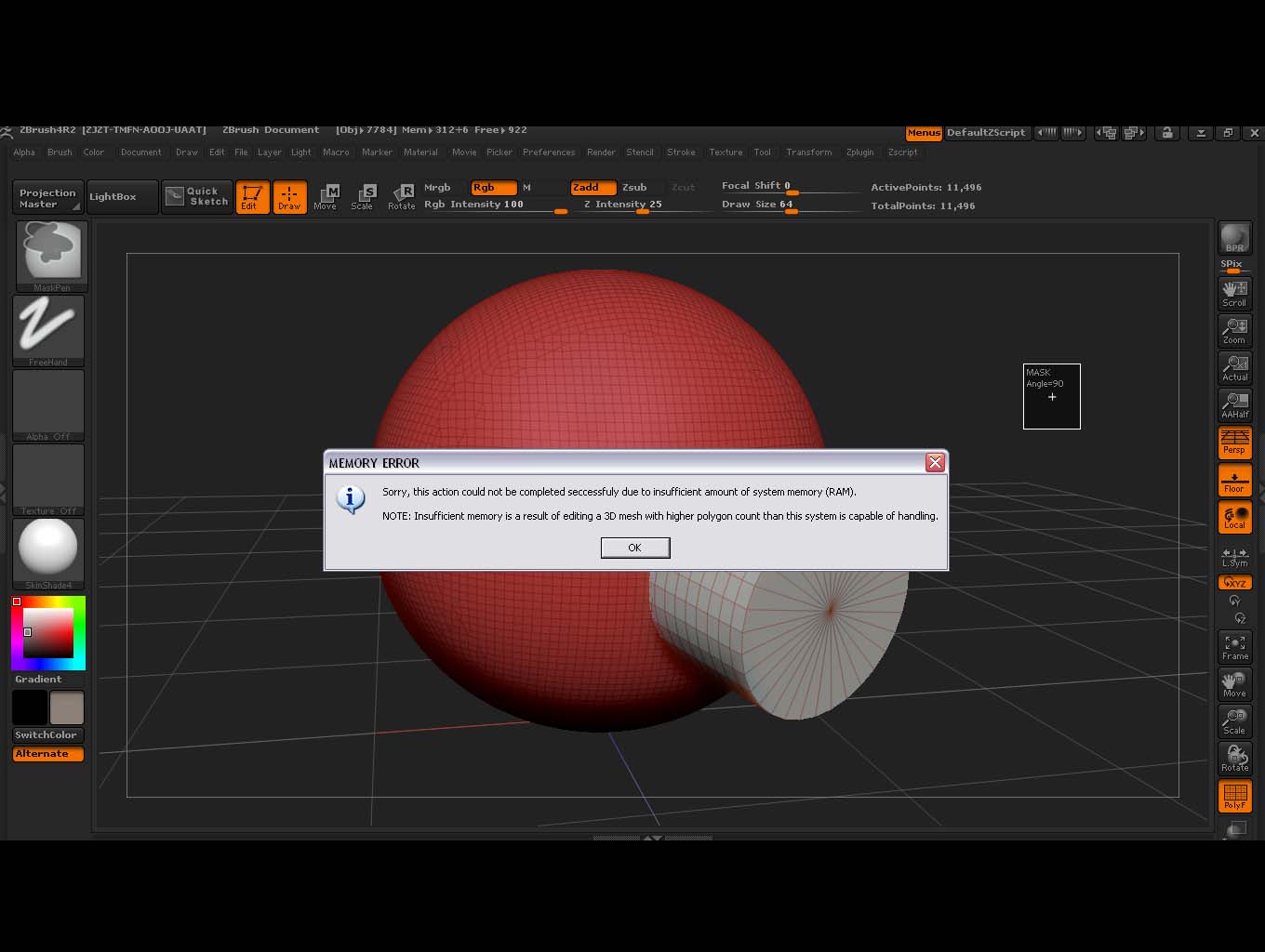
Also glad to see there is an awareness although, it was a while of digging before I found this thread. Same problem when trying to subtract in Dynamesh. Also same type system 4gb or 3.25 usable ram. Windows XP service pack 3. Happens no matter if using a Dynamesh Lightbox scene or a sphere turned 3d then Dynameshed. Resolution doesn’t matter either. Also tried Mem settings in Zbrush at 256 and set to 2700. No difference, same crash every time.
has anyone received an answer as to why yet? I hope they can come up with a fix for this.
Glad I am not the only one!
Originally Posted by jjens85
Inserting a negative mesh at any resolution causes ZBrush to crash
That is exactly what happens!
Hope there is a fix for this soon, I am dying to try it out.
Hi everyone;
I know it’s frustrating to not hear any news and agonizing to not be able to use some of this new and amazing functionality.
I just want to let you know, via my support ticket, that the folks at Pixologic are working hard to find and fix the cause of this.
It appears to be an issue in Windows XP; I can’t speculate on exactly what it is or when a fix will come.
Keep the faith!
Thanks for the update. At least we know it’s being looked into. We’ll be patient. 
i have this problem too.i am using winxp 32BIT,2GB-800 RAM(in ONE SLOT), but later,i change 2GB RAM to TWO 1GB RAM(667)(two slot with DUAL-CHANNEL),ALL PROBLEM GONE!!!
don’t know what’up:evil: May be you guy can try dual-channel…
HI, for some reason,i change my dual-channel-667-1GB-rams back to one 2GB-800-ram,and zbrush crash again when insertMESH (ZSUB),later ,i try to change the boot.ini file for enable 3GB mode,even i only have 2gb ram,and then restart winxp, i found that zbrush work fine with no problem!!i can insertMESH(zsub) many many time and don’t see any lagging or crash. zbrush run much more smooth then before
i don’t know why the 3gb switch will have such effect because i only have 2GB RAM…
Hi namdoyle,
It’s interesting you were able to get it working by switching RAM to dual channel 667 RAM. My system has4 - 1GB DDR2(667) Ram and it doesn’t work.
The 3GB switch with 2 GB RAM installed is curious; the 3GB switch doesn’t work for me as my system becomes unstable.
I have passed on your findings to support.
Just wondering, is there any update on the problem?
Nothing new to report; they are working hard to find a solution.
Has anyone heard anything, sorry don’t mean to be impatient.
Nothing yet.
hate to say but havent used zbrush in weeks now because i’ve gotten tired of the crashes. i really hope this gets fixed soon because i can’t believe theres just a few people with similar rigs and this problem. If this impacts everyone running xp 32 bit and limited videocard capability… thats a large chunk of people
please pixologic… any help would be much appreciated
Anything yet??
Pixolator just announced an update due out after mid-December which should address this and other issues identified since the Z4R2 release.
http://www.zbrushcentral.com/showthread.php?163463-ZBrush-4R2b-Announced